Key takeaway
- How to ingest, preprocess and manage large image datasets on Databricks with Auto Loader, Delta tables and parallel inference, and how AI agents help.
Processing a large-scale image dataset on Databricks means ingesting images from cloud storage into governed tables, preprocessing them in parallel on a Spark cluster, and feeding the result to model training or inference. The aim is a repeatable pipeline instead of a folder of files that only one engineer understands.
This guide is for data and ML engineers preparing images for AI and machine learning work, for example in imaging, inspection or retail. It covers the typical problems, ingestion, preprocessing, organisation, pipeline design, performance, and how AI agents fit in.
Why are large image datasets hard to work with?
Images are large, arrive continuously and carry little structure of their own. A team usually has to deal with several things at once: storage volume, mixed formats and sizes, metadata that lives somewhere else, uneven compute needs, and the cost of re-running work when something changes. In sectors such as health, the same pipeline must also respect privacy rules; our guide to data processing in the healthcare industry covers that side. Good pipelines treat automatic data processing as a design goal from day one.
How does Databricks help with image workloads?
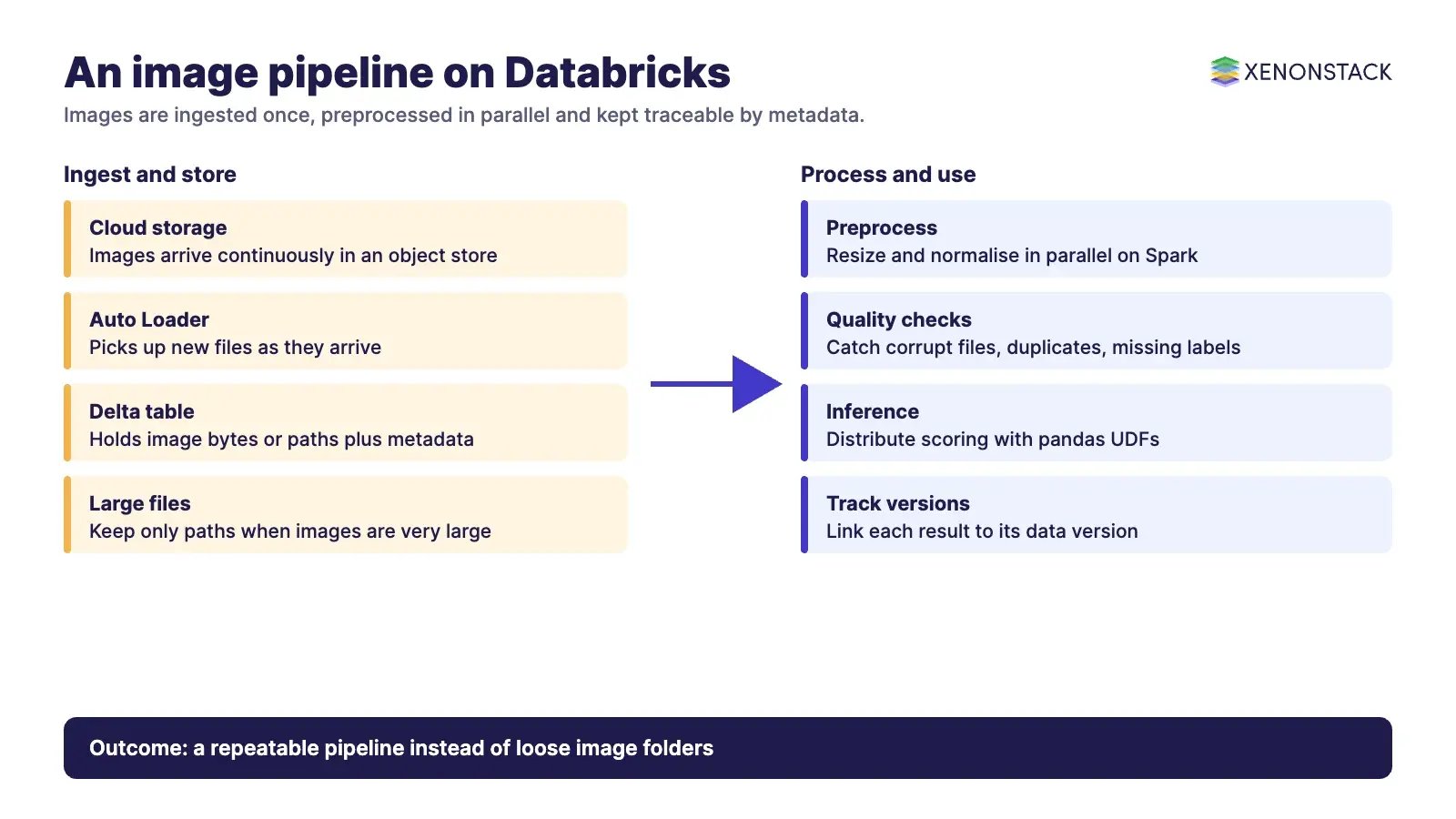
Databricks combines cloud object storage, Apache Spark for distributed work and Delta tables for managed storage. The Databricks reference solution for image applications describes the common setup: many images in an object store, with new images arriving over time. It recommends that you ETL images into a Delta table with Auto Loader for both training and inference. The platform runs on the major clouds, including AWS, Azure and GCP, and our Databricks page describes how XenonStack works with it.
How do you ingest images at scale?
The Auto Loader documentation says it "incrementally and efficiently processes new data files as they arrive in cloud storage". It supports file formats that include BINARYFILE, which is the practical route for image bytes. Auto Loader keeps track of discovered files in the checkpoint location, so a restarted job can resume rather than start again. The reference solution adds that Auto Loader automatically handles continuously arriving new images. For wider patterns, see our guide to data ingestion.
| Ingestion choice | When it fits | What to check |
|---|---|---|
| Auto Loader into a Delta table | Images keep arriving in cloud storage | Checkpoint location, file discovery mode and schema handling |
| One-off batch load | A fixed historical archive | Whether the archive will grow later |
| Metadata-only table with paths | Very large image files | The reference solution suggests this for average sizes above 100 MB |
How should you preprocess and organise image data?
Preprocessing, such as resizing, normalising and format conversion, is repetitive per image, so it parallelises well. The reference solution calls inference "embarrassingly parallel" and shows how to distribute it with pandas UDFs, with notebooks for PyTorch and Keras. Keep the original images untouched, write processed outputs to a separate table, and store metadata (source, capture date, labels, version of the preprocessing code) next to each image reference. If images exceed 100 MB on average, the same page suggests keeping only metadata such as file names in the Delta table and loading images from object storage by path when needed.
A table format with transactions is what makes this safe to change. Our guide to Delta Lake explains the storage layer, and our ETL pipelines page shows how pipelines are structured. Related engines are covered in our posts on Apache Spark Optimization, Apache Beam, Apache Flink for distributed data processing and Apache ZooKeeper.
How do you tune performance and manage quality?
- Match compute to the job: image decoding is I/O-heavy and model scoring is compute-heavy, so compare CPUs and GPUs for your model rather than assuming.
- Process only new files. Auto Loader's incremental design means you do not re-read the whole archive each run.
- Add checks before training: corrupt files, unexpected sizes, duplicate images and missing labels. See data quality and validation.
- Track experiments and model versions in the same workspace, so a result can be traced to the data version that produced it. Frameworks such as TensorFlow read from the prepared tables.
- Where data cannot leave a site, design for hybrid cloud from the start.
Where is this used?
Image pipelines appear wherever pictures carry the evidence: satellite and aerial imagery, medical scans, and product catalogues in e-commerce. The pipeline shape is the same in each case, while the governance differs. Medical images need stricter access control than product photos, and satellite imagery often needs location and capture-date metadata to be useful.
How do AI agents change image pipelines?
Agents can run the repeatable parts of the pipeline: watching for failed ingestion jobs, flagging a drop in image quality, opening a ticket, or starting a re-run for a bad batch. They need rules about what they may do on their own and what a person must approve. For vision workloads that end in inference, NexaStack is XenonStack's inference infrastructure. See also our reading on Robotics and AI, accelerated computing in robotics and intelligent automation with generative AI.
What should you do first?
- Measure your image volumes, average file size and daily arrival rate.
- Land one source folder into a Delta table with Auto Loader and keep original images unchanged.
- Add a metadata table and a first set of quality checks.
- Parallelise one preprocessing step and compare run time and cost with your current process.
- Write down who may change the pipeline, and talk to us through Contact Us or Talk To Specialist if you need support.
To map one decision your vision agents make, and the data and policy it depends on, book a Context Workshop. See what happens in the workshop.
Frequently asked questions
What is the best way to load images into Databricks?
Databricks recommends ETL of images into a Delta table with Auto Loader for both training and inference. Auto Loader supports the BINARYFILE format and processes new files as they arrive in cloud storage.
What should I do with very large image files?
The Databricks reference solution suggests keeping only metadata, such as file names, in the Delta table when average image size exceeds 100 MB, and loading images from object storage by path when needed.
Can image inference run in parallel?
Yes. The Databricks reference solution describes inference as embarrassingly parallel and shows how to distribute it with pandas UDFs, with notebooks for PyTorch and Keras.
Does Auto Loader reprocess old files?
Auto Loader stores metadata about discovered files in the checkpoint location, so after a failure it can resume from the checkpoint instead of starting again.
Where do AI agents fit?
Agents can monitor ingestion, flag quality problems and trigger re-runs, within rules that define what they may do without approval.
Follow XenonStack on LinkedIn: XenonStack on LinkedIn for new guides on agentic AI, data and platform engineering.
Ready to put AI agents to work? Explore ElixirClaw, the agentic OS platform to build, orchestrate and govern AI agents.
Explore the XenonStack platform family: ElixirData · ElixirClaw · ElixirHub · NexaStack · MetaSecure · Neural AI · AgentGRC · AgentSRE · AgentAnalyst · AgentInstruct · AgentRAI · AgentScrum · AgentSearch · AgentForce · AI Aviator · SAIF Aviator · CohortIQ · XenonStack AI · XenonStack UAE