Key takeaway
- How to analyse video and text together on Databricks: what the docs say about vision models, AI Functions and ai_query, plus a pipeline and agent design.
Multimodal video and text analysis on Databricks means turning video into frames, audio and text that models can read, then combining those findings in one governed pipeline. Databricks supplies the data platform and the model access; you supply the extraction steps and the rules for combining the results.
This page is for data and AI engineers who hold video archives, transcripts or captions and want to query them together. It covers what Databricks documents today, a practical pipeline, how the pieces compare, how agents change the design, and what to do first. Related reading: multimodal AI agents and image and video analytics with Databricks.
What is multimodal analysis of video and text?
Video is a sequence of images with an audio track, and text arrives as transcripts, captions, documents or notes. Multimodal analysis joins what is seen with what is said or written, so a question such as "which clips mention a delay while a queue is visible?" can be answered from one record. Natural language processing handles the text side, and computer vision handles the visual side. Our notes on edge computing for video analytics and real-time video streams cover capture and delivery.
What does Databricks document for vision models?
The Databricks vision models page says Model Serving provides a unified API to understand and analyse images. Requests can carry several images, and the page shows images sent as base64-encoded data URLs. It lists JPEG, PNG, WebP and non-animated GIF as the formats most models accept, with differences by model.
Limits differ by model. The page gives, for example, up to 100 images per request for Claude models and up to 5 for Llama 4 Maverick, so check the table for the model you choose. The SQL route uses the ai_query function, which the page labels as in Public Preview where the definition might change. Importantly, the page covers still images only and does not describe video input. A video workflow therefore starts with your own step that extracts frames.
What are Databricks AI Functions and ai_query?
The Databricks AI Functions page describes built-in functions for applying large language models to data stored on Databricks, callable from SQL, notebooks, Lakeflow pipelines and workflows. ai_query is the general-purpose function: you supply a prompt and choose a supported model. Task-specific functions include ai_parse_document, ai_extract, ai_classify, ai_analyze_sentiment and ai_summarize, and ai_transcribe for audio is marked Beta.
For large batches the page advises submitting the full dataset in a single query rather than splitting it by hand. It also states that AI Functions are not available on Classic SQL warehouses and need Databricks Runtime 15.4 LTS or above, so confirm your compute first.
How do the pieces fit together?
| Layer | What it handles | Databricks feature to check |
|---|---|---|
| Capture and storage | Video files, audio, transcripts in cloud storage | Unity Catalog volumes and tables |
| Frame and audio extraction | Sampling frames, separating audio | Your own code in a notebook or job |
| Image understanding | Describing frames, reading on-screen text | Model Serving vision API, ai_query with images |
| Speech to text | Transcribing the audio track | ai_transcribe (Beta) or another speech service |
| Text analysis | Entities, sentiment, classes, summaries | ai_extract, ai_classify, ai_analyze_sentiment, ai_summarize |
| Combination | One record per clip with time-aligned findings | Delta tables and SQL joins |
How do you build the pipeline?
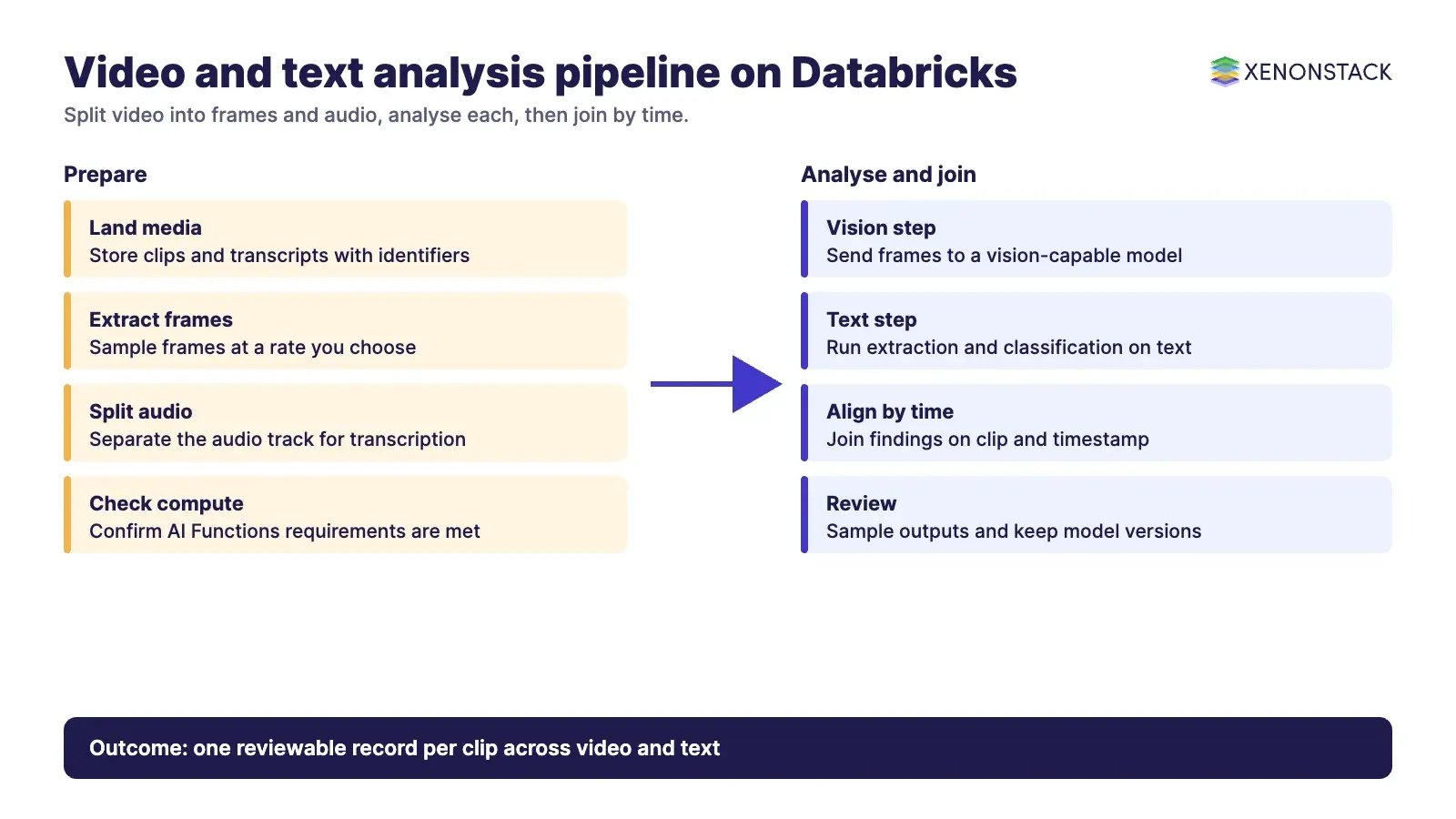
- Land the media. Store video and transcripts with an identifier and source for every clip.
- Split it. Extract frames at a sampling rate you choose and separate the audio. Sampling is a design choice: denser frames cost more to analyse.
- Analyse each modality. Send frames to a vision-capable model and run text functions on transcripts and captions.
- Align by time. Store findings with clip identifiers and timestamps so visual and spoken evidence can be joined.
- Review and monitor. Sample outputs by hand, track failures, and keep the model and prompt version with every result.
For related building blocks see data pipelines, cloud-native architecture, automatic speech recognition, sentiment analytics and multimodal image understanding.
What are the risks and limits?
- Model and feature status changes quickly: the vision route is in Public Preview and model lists move, so re-read the docs before each release.
- Per-model image counts, sizes and formats cap how much of a clip one request can carry.
- Video of people raises privacy and consent questions that need an owner and a retention rule. See our view on ethical AI standards.
- Model outputs can be wrong, so keep a human review path for decisions that matter.
How do AI agents change video and text analysis?
A batch pipeline answers fixed questions. An agent can pick which clips to inspect, request a denser frame sample when evidence is unclear, call a text function, and explain how it reached a conclusion. That needs clear limits on what it may read and do, and a trace of each step. NexaStack is XenonStack's inference infrastructure for vision and edge workloads. For hybrid processing and automation see hybrid AI processing for computer vision and AI-driven automation.
What should you do first?
- Choose one question that needs both video and text.
- Check your compute against the AI Functions requirements.
- Test a small set of frames with your chosen model and read every output.
- Decide the sampling rate, the review rule and the retention period.
- Speak to us if you want help: contact XenonStack or talk to a specialist.
To map one decision your video and text agents make, and the data and policy it depends on, book a Context Workshop. See what happens in the workshop.
Frequently asked questions
Does Databricks accept video directly in its vision API?
The vision models page covers still images only. For video, extract frames yourself and send them to a vision-capable model.
What is ai_query?
It is the general-purpose Databricks AI Function: you supply a prompt and choose a supported model, and it runs from SQL, notebooks or pipelines.
Can Databricks transcribe audio?
The AI Functions page lists ai_transcribe for audio and marks it Beta. Confirm its status before relying on it in production.
How many images can one request include?
It depends on the model. The vision page gives different limits, for example up to 100 images for Claude models and up to 5 for Llama 4 Maverick.
Where do AI agents fit?
Agents sit above the pipeline: they choose what to inspect, call the right function and record each step so decisions can be reviewed.
Follow XenonStack on LinkedIn: XenonStack on LinkedIn for new guides on agentic AI, data and platform engineering.
Ready to put AI agents to work? Explore ElixirClaw, the agentic OS platform to build, orchestrate and govern AI agents.
Explore the XenonStack platform family: ElixirData · ElixirClaw · ElixirHub · NexaStack · MetaSecure · Neural AI · AgentGRC · AgentSRE · AgentAnalyst · AgentInstruct · AgentRAI · AgentScrum · AgentSearch · AgentForce · AI Aviator · SAIF Aviator · CohortIQ · XenonStack AI · XenonStack UAE