Key takeaway
- Delta Lake adds ACID transactions, time travel and schema enforcement to data lakes. See how the log works, what is new in 4.x and when to use it.
Delta Lake is an open-source storage framework that adds a transaction log to files in a data lake, so tables get ACID transactions, versioning and schema checks. It describes itself as a storage framework for building a format-agnostic lakehouse, and it works with engines such as Spark, Trino, Flink and Python. Your data stays in Parquet files on object storage or HDFS; Delta adds the log that tells every reader which files make up the table.
For enterprise teams, the useful question is not whether Delta Lake has features, but where it removes risk: failed writes that leave half a table, two jobs overwriting each other, and pipelines that cannot be rolled back. This guide covers how the log works, what the current docs say about time travel, schema rules, liquid clustering, deletion vectors and UniForm, and when to choose something else. For the wider architecture, see our guide to the data lakehouse.
What problem does Delta Lake solve for a data lake?
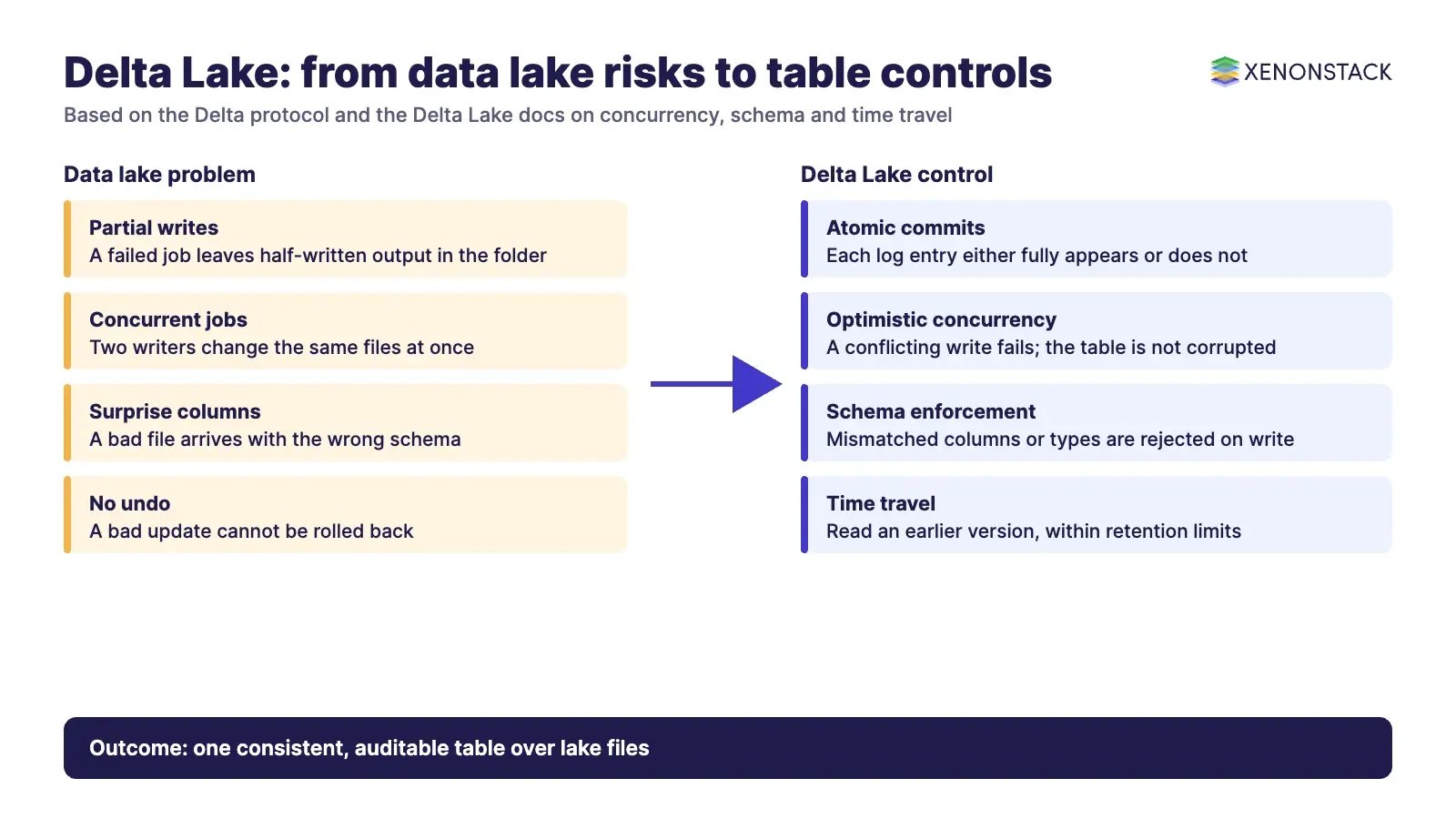
A plain data lake is cheap and open, but it is only a folder of files. Nothing stops a failed job leaving partial output, a bad file arriving with the wrong columns, or a reader seeing a table halfway through an update. Many teams therefore copy their important data into a warehouse, or run separate batch and streaming systems and merge the answers. Delta Lake targets these gaps by putting one table abstraction over the files. The Delta Lake docs list the headline features as ACID transactions with serializable isolation, scalable metadata, time travel, unified batch and streaming, schema enforcement and evolution, and merge, update and delete operations.
| Data lake problem | What Delta Lake adds | Where the docs cover it |
|---|---|---|
| Half-finished writes and concurrent jobs | Atomic commits through a transaction log, with serializable isolation | Delta protocol on GitHub |
| Bad or surprise columns arriving | Schema enforcement on write, with opt-in schema evolution | Table batch reads and writes docs |
| No way to undo a bad update | Time travel by version or timestamp, within retention limits | Table batch reads and writes docs |
| Separate batch and streaming copies | One table that is both a batch and a streaming source and sink | delta.io and Delta docs |
| Slow queries from poor file layout | Liquid clustering (Delta Lake 3.1 and later), compaction with OPTIMIZE | Clustering docs |
How does the Delta Lake transaction log work?
Every Delta table has a _delta_log folder. According to the Delta protocol on GitHub, each log entry is a newline-delimited JSON file named with a zero-padded version number, and each file is the unit of atomicity for the table: a commit either fully appears or does not. Writers first write data files, then commit by adding a new log entry. Readers get snapshot isolation, so a query sees one consistent version even while writers are active. To avoid replaying a long history, writers also create checkpoint files in Parquet that capture table state, and the protocol encourages checkpointing reasonably often.
How does Delta Lake handle two writers at once?
Delta uses optimistic concurrency control. A write reads the latest version, stages new data files, then validates and commits. If a concurrent commit conflicts, the write fails with an exception and the table is not corrupted. According to the concurrency control docs, two inserts cannot conflict, while an update, delete or merge can conflict with inserts and with each other, and compaction can conflict with those same operations. The docs also state that two streaming queries must never share a checkpoint location at the same time.
This matters for design. Retry logic, job scheduling and table layout all affect how often conflicts occur, so plan them before you put many writers on one table.
What do schema enforcement and schema evolution mean?
Schema enforcement is the gatekeeper. The Delta batch docs say a write fails if the incoming data has columns that are not in the table or data types that do not match, and column names cannot differ only by case. Columns that exist in the table but are missing from the incoming data are set to null. Schema evolution is the deliberate opt-in: set mergeSchema to true on a write, and new columns are added to the end of the struct they belong to. The docs advise against enabling automatic merging for a whole session because it makes schema changes harder to track. From Delta Lake 4.3 the docs also describe a WITH SCHEMA EVOLUTION clause in SQL and a matching DataFrame method.
How does time travel work, and how long can you go back?
You can read an earlier version of a table by version number or by timestamp, in SQL with VERSION AS OF or TIMESTAMP AS OF, or with the versionAsOf and timestampAsOf reader options. The docs give two retention defaults: delta.logRetentionDuration is 30 days and delta.deletedFileRetentionDuration is 7 days, the point after which deleted files become candidates for VACUUM. In practice, running VACUUM or shortening these settings limits how far back you can go. If audits or reproducible machine learning runs depend on history, set retention on purpose rather than relying on defaults. The docs also warn that time travel by timestamp can break if you copy a table directory to a new location, while time travel by version is unaffected.
What has changed in Delta Lake since the early versions?
The delta.io site lists Delta Lake 4.4.0 as built for Apache Spark 4.2.0, and the GitHub releases page lists 4.4.1 as the latest patch release, supporting Spark 4.2.0, 4.1.0 and 4.0.1. Check both pages before you pin a version, because releases move quickly. These are the changes most relevant to architecture decisions.
| Feature | What the docs say | Watch for |
|---|---|---|
| Liquid clustering | Replaces partitioning and ZORDER for layout decisions. Available from Delta Lake 3.1. You can change clustering columns later without rewriting existing data. | Up to 4 clustering columns. Not compatible with partitioning or ZORDER. Protocol versions cannot be downgraded. |
| Deletion vectors | Mark rows as removed instead of rewriting whole Parquet files. Introduced in 2.3.0; DELETE support from 2.4.0, UPDATE from 3.0.0, MERGE from 3.1.0. | Enabling upgrades the table protocol, so clients without support cannot read the table. |
| UniForm | Lets Iceberg clients read Delta tables, with Hudi support in preview. Metadata is generated after each Delta commit. | Iceberg and Hudi clients are read-only. Tables with deletion vectors are not supported. |
Treat each of these as a table-level decision, not a global switch. Test with the engines and catalogues you actually use before enabling them in production, because each one can change which clients can read the table.
Delta Lake, Iceberg and Hudi: how should you choose?
All three are open table formats over Parquet data files with a metadata layer. UniForm exists because many estates have more than one format, and the Delta docs describe it as one copy of data readable by Iceberg and Hudi clients. Our guide to Apache Hudi explains that format, and the comparison of a data warehouse, data lake and data mesh helps place any of them in your wider estate.
| Situation | Delta Lake fits when | Consider something else when |
|---|---|---|
| Spark or Databricks-centred platform | Your engineers already run Spark, or Databricks, which states that Delta Lake is the default format for all operations on its platform | Most of your workloads run on engines with stronger support for another format |
| Mixed engines and catalogues | Iceberg readers need read-only access through UniForm | You need external engines to write to the same table, which UniForm does not allow |
| Streaming plus batch | One table must serve both as source and sink | Sub-second serving of single records is the goal, which a lake table is not built for |
| Regulated data and audit | Versioned history and a log of every commit help investigation | Retention rules require deletion beyond what time travel retention allows |
How should an enterprise adopt Delta Lake?
A sequence that keeps risk low is below. It follows from the behaviours the docs describe.
- Pick one high-value table. Choose a table with real concurrency and audit needs, not a demo dataset.
- Set schema and retention rules. Decide who may use
mergeSchema, and set log and deleted file retention to match your audit period. - Design for concurrency. Separate writers that touch the same files, add retries, and give each streaming query its own checkpoint location.
- Add layout and maintenance. Use
OPTIMIZEand, where it suits, liquid clustering. ScheduleVACUUMwith retention you have agreed. - Enable advanced features deliberately. Turn on deletion vectors or UniForm only after you confirm every reader supports them.
- Govern the layer above. Add access policy, lineage and cost tracking, so agents and analysts use tables within agreed rules.
Moving from Hadoop is a common starting point; see our guide to Hadoop to Delta Lake migration for the challenges and target architecture.
What are the governance, security and cost trade-offs?
Delta Lake gives you an audit trail of table changes, but it does not decide who may read or change a table; that belongs to your catalogue and storage permissions. Time travel and retained files also cost storage, and VACUUM removes the files that older versions need. Protocol upgrades from features such as deletion vectors can lock out older clients. Decide the owner of each of these settings, write it down, and review it when you upgrade versions. Where AI agents query these tables, ElixirData Context OS keeps governed context, versioned policy and decision traces in one decision layer above AI agents, and AgentAnalyst lets teams ask questions of enterprise data in plain language and get real-time insights.
When not to use Delta Lake
Skip it for tiny datasets that a single database handles well, for workloads that need row-level transactions at very low latency, or where your platform standard is another table format and no engine needs Delta. In those cases the extra log and maintenance add effort without much return.
To map one data decision your agents should make, and the context and policy it depends on, book a Context Workshop. See what happens in the workshop.
Frequently asked questions
What is Delta Lake in simple terms?
Delta Lake is an open-source storage framework that adds a transaction log to Parquet files in a data lake. It gives tables ACID transactions, time travel, schema enforcement and merge, update and delete operations, and works with engines such as Spark, Trino, Flink and Python.
Is Delta Lake the same as Databricks?
No. Delta Lake is an open-source project that joined the Linux Foundation in 2019 and, according to delta.io, is not controlled by any single company. Databricks states that it originally developed the protocol and continues to contribute, and that Delta Lake is the default format on its platform.
How far back can Delta Lake time travel go?
By default the docs give 30 days of log retention and 7 days of deleted file retention. Running VACUUM or changing these properties limits how far back you can read. Set retention to match your audit needs.
What happens if two jobs write to the same Delta table?
Delta Lake uses optimistic concurrency control. If a concurrent commit conflicts with your write, the write fails with an exception and the table is not corrupted. Inserts do not conflict with each other, but updates, deletes and merges can conflict with other writes.
Does UniForm let other engines write to a Delta table?
No. According to the Delta docs, UniForm lets Iceberg clients read Delta tables, with Hudi support in preview. Those clients are read-only, and external writers can corrupt the Delta table.
Follow XenonStack on LinkedIn: XenonStack on LinkedIn for new guides on agentic AI, data and platform engineering.
Ready to put AI agents to work? Explore ElixirClaw, the agentic OS platform to build, orchestrate and govern AI agents.
Explore the XenonStack platform family: ElixirData · ElixirClaw · ElixirHub · NexaStack · MetaSecure · Neural AI · AgentGRC · AgentSRE · AgentAnalyst · AgentInstruct · AgentRAI · AgentScrum · AgentSearch · AgentForce · AI Aviator · SAIF Aviator · CohortIQ · XenonStack AI · XenonStack UAE