Key takeaway
- Snowflake multimodal AI for CTOs: Cortex functions for documents, images, audio and video, stage governance, documented limits, cost and an adoption path.
Multimodal AI on Snowflake means keeping documents, images, audio and video in governed stages and calling Snowflake Cortex AI functions on them from SQL, so the files never leave the platform your data team already controls. According to Snowflake's documentation, documents, images, audio and video each have their own supported functions, and most of them are generally available, while audio and video processing with AI_COMPLETE is in public preview. The decision for a CTO or CDO is less "can Snowflake do multimodal" and more "which modalities, which limits and which access rules do we accept".
Gartner predicted in September 2024 that 40% of generative AI solutions will be multimodal by 2027, up from 1% in 2023. This guide shows how the Snowflake pieces fit together, where the documented limits sit, how to govern access and cost, and when another route is the better choice. It builds on our guides to building multimodal AI models on Snowflake, Snowflake computer vision pipelines and AI data quality monitoring in Snowflake.
What does multimodal AI on Snowflake cover?
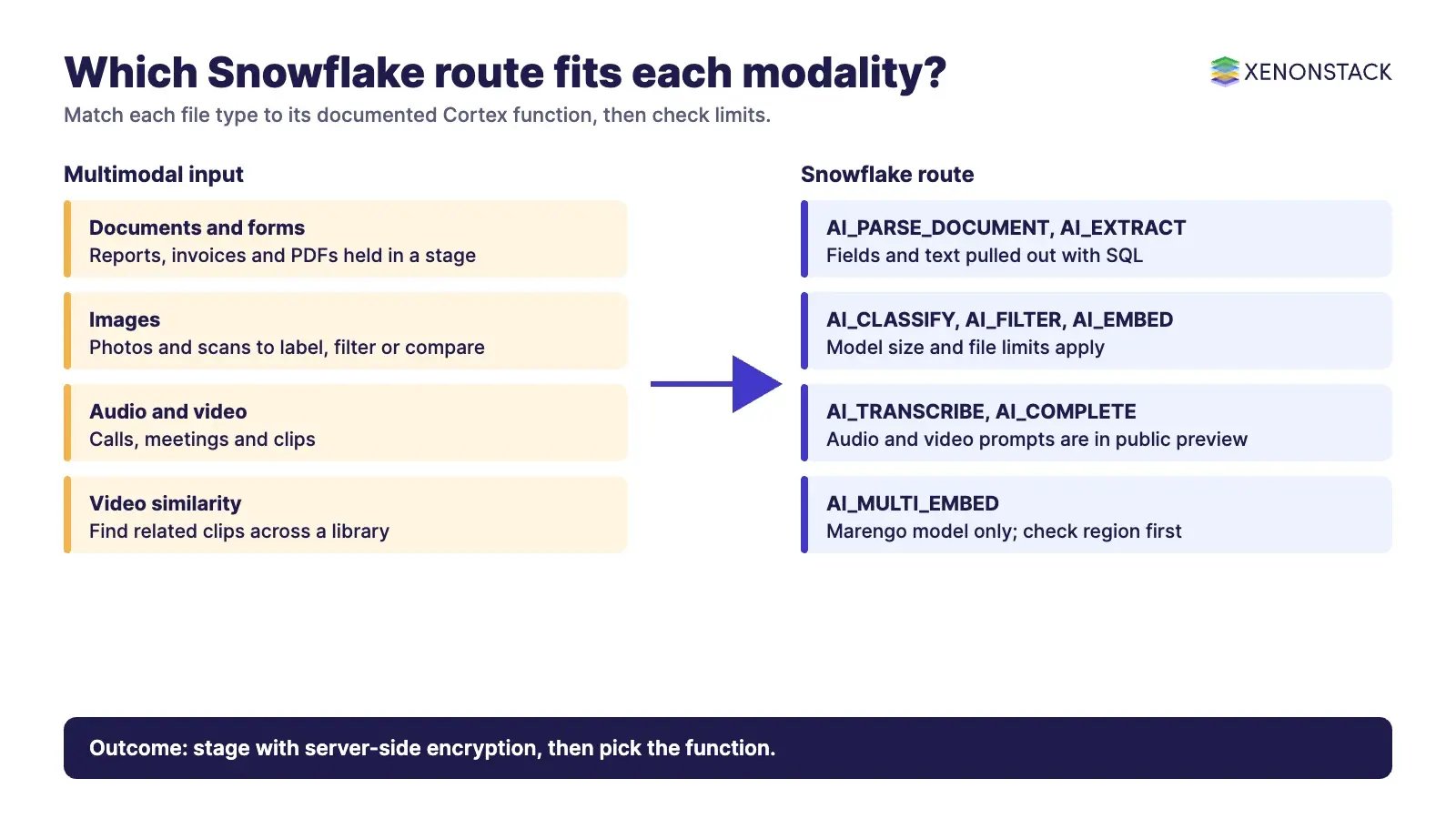
Snowflake's multimodal documentation groups the Cortex AI functions by the type of file they accept. Files are referenced with TO_FILE or the FILE data type, from internal or external stages, and a directory table lets you list them with DIRECTORY. The table below summarises what the documentation listed when we read it on 12 November 2026.
| Modality | Functions listed by Snowflake | Typical job | Status noted in the docs |
|---|---|---|---|
| Documents | AI_COMPLETE, AI_PARSE_DOCUMENT, AI_EXTRACT | Extract fields and text from files | Generally available |
| Images | AI_COMPLETE, AI_CLASSIFY, AI_EMBED, AI_EXTRACT, AI_SIMILARITY, AI_FILTER | Classify, describe, compare and filter images | Generally available |
| Audio | AI_COMPLETE, AI_TRANSCRIBE | Transcribe and analyse calls | AI_COMPLETE on audio is in public preview |
| Video | AI_COMPLETE, AI_TRANSCRIBE; AI_MULTI_EMBED for embeddings only | Describe or transcribe clips; embed video | AI_COMPLETE on video is in public preview |
Source: Snowflake documentation, multimodal AI functions. The same page notes that AI_MULTI_EMBED works only with the twelvelabs-marengo-embed-3-0 model.
How do multimodal files get into Snowflake and stay governed?
Snowflake handles data that does not fit a predefined schema, such as text, images, video and audio, through internal and external stages. External stages can point to Amazon S3, Google Cloud Storage or supported Azure storage. Directory tables catalogue the staged files, and roles with enough privileges can query them to get file URLs.
Three URL types matter for governance, according to Snowflake's unstructured data guide. A scoped URL gives temporary access without stage privileges and only the user who generated it can use it. A file URL is permanent and needs USAGE on an external stage or READ on an internal stage. A pre-signed URL opens without Snowflake authentication, so anyone holding it can read the file until it expires. Scoped and pre-signed URLs can reach consumers through secure views in shares, while file URLs cannot.
Encryption is a design choice, not a detail. Internal stages should use server-side encryption (SNOWFLAKE_SSE) for unstructured data access, otherwise files are client-side encrypted by default and cannot be read through those URLs. The encryption type cannot be changed after the stage is created, and Tri-Secret Secure needs SNOWFLAKE_FULL instead. Most multimodal AI functions also require server-side encryption on the stage.
For structured and semi-structured data that sits beside the files, Snowpipe loads files from a stage into standard and Apache Iceberg tables using serverless compute. Its documentation lists delimited files, JSON, Avro, ORC, Parquet and XML as load formats, so treat Snowpipe as the route for tabular feeds and stages as the route for the media files themselves. Snowflake can also query Iceberg tables managed in Snowflake Open Catalog through a catalog integration, which helps when data stays in storage you manage. Our guide to Snowflake data validation covers checking that data before models use it.
Which Snowflake capability fits which multimodal job?
| Job | Snowflake route | When it fits | What to check first |
|---|---|---|---|
| Pull fields from invoices, forms and reports | AI_PARSE_DOCUMENT or AI_EXTRACT on staged files | Documents already sit in cloud storage you can stage | Stage encryption and regional availability |
| Label or screen images | AI_CLASSIFY, AI_FILTER, AI_COMPLETE with an image-capable model | Labels and rules can be stated in plain language | File size and files-per-prompt limits of the chosen model |
| Find similar images or clips | AI_EMBED, AI_SIMILARITY, AI_MULTI_EMBED | You need similarity search across a media library | AI_MULTI_EMBED works only with the Marengo model |
| Turn calls and meetings into text | AI_TRANSCRIBE | Audio is held in stages and speech text feeds analytics | Supported formats and preview status of audio and video prompts |
| Search text and answer questions across data | Cortex Search for text, Cortex Agents for orchestration | You want retrieval and agents inside Snowflake's access model | The Cortex Search page describes text search; it does not describe multimodal search |
Snowflake describes Cortex Search as a hybrid vector and keyword engine over text data, and Cortex Agents as a managed platform in which agents plan, call tools such as Cortex Analyst and Cortex Search, and respond within Snowflake's governed environment. Our guide to agentic AI with Snowflake goes deeper on that layer. For cameras and edge devices, see Snowflake with edge AI for computer vision.
What limits should you plan for?
The limits below come from the same Snowflake page and were current when we read it. Model names and limits change, so confirm them before design sign-off.
| Area | Documented limit or rule | Design consequence |
|---|---|---|
| Image prompts, some models | openai-gpt-4.1: 10 MB per file, 5 files; llama4-maverick: 10 MB, 10 files | Resize or tile large images before staging |
| Gemini models | 100 MB combined; up to 20 images, 10 audio and 10 video files per prompt | Batch media by prompt, not by folder |
| Image dimensions | Under 8000 by 8000 pixels per image | Add a size check to ingestion |
| Video embeddings | Marengo: up to 6 GB, available in US East (N. Virginia) only, with cross-region inference supported | Check data residency before choosing it |
| Network policies | Media functions are incompatible with custom network policies, except AI_MULTI_EMBED | Review network controls with security early |
| Regions | AI functions are available in select regions; model availability varies | Confirm your account region first |
| Context window | Inputs over the context window return an error; outputs over it are truncated | Use AI_COUNT_TOKENS to test inputs |
How do you control access to multimodal AI in Snowflake?
Snowflake combines discretionary and role-based access control. Privileges go to roles, roles go to users, and each object has one owning role. Snowflake states that no super-role can bypass authorisation checks. For AI functions, calling one needs the account-level USE AI FUNCTIONS privilege plus the CORTEX_USER or AI_FUNCTIONS_USER database role. Calling a Cortex Agent needs the CORTEX_USER or CORTEX_AGENT_USER database role plus privileges on the agent and on the objects its tools use. According to Snowflake, the large language models it provides access to are deployed within the Snowflake Service perimeter.
Snowflake controls access to data and functions. It does not decide which business decisions an agent may take on top of that data. That layer needs its own policy and evidence: ElixirData Context OS keeps governed context, versioned policy and decision traces in one decision layer above AI agents, and AgentAnalyst lets teams ask questions of enterprise data in plain language and get real-time insights. For building and orchestrating agents with humans in control, ElixirClaw is an agentic OS platform to build, orchestrate and govern AI agents and automation workflows while keeping humans in control.
What does multimodal AI cost, and how do you keep it in check?
Snowflake's multimodal and AI function pages do not list prices; they point to separate cost and pricing pages. Two facts from the pages we read help with planning. Token counts for images and video depend on the model, and prompt text also counts towards the context window, so test representative files with AI_COUNT_TOKENS before a large run. Snowpipe uses serverless compute and charges a fixed number of credits per GB loaded, with no charge for warehouse time or file count. Put tags, budgets and resource monitors around AI workloads in the same way as any other consumption, as set out in our guide to FinOps for Snowflake.
What has changed in 2026 that matters for multimodal AI?
| Change | Why it matters | Source |
|---|---|---|
| Multimodal generative AI is moving into the mainstream | Gartner predicts 40% of generative AI solutions will be multimodal by 2027, from 1% in 2023 | Gartner, 9 September 2024 |
| Media handled by SQL functions | Documents, images, audio and video each have named AI functions, most generally available | Snowflake multimodal docs |
| Managed agents inside the platform | Cortex Agents bundle a model, tools and instructions as a reusable object | Snowflake Cortex Agents docs |
| Open table formats | Iceberg tables let Snowflake query data in storage you manage | Snowflake Iceberg docs |
What is a sensible adoption sequence?
- Pick one modality and one decision. For example, extract fields from documents that feed a finance review, not "all media".
- Confirm region, model and network rules. Check regional availability and the network policy limitation with your security team.
- Stage the files with server-side encryption. Choose the encryption type before creating the stage, because it cannot be changed afterwards.
- Grant least privilege. Give the AI function and agent roles only to the teams that need them, and prefer scoped URLs for sharing.
- Test on a labelled sample. Measure accuracy and token use on representative files before scaling.
- Add cost controls and review. Tag the workload, set budgets and review consumption monthly.
- Add agents last. Move to Cortex Agents or an agent platform only after the data and access model are stable.
When is Snowflake not the right place for multimodal AI?
- Time-bound decisions at the source. If a camera or sensor must trigger action in milliseconds, process at the edge and store results in Snowflake, as described in our computer vision pipeline guide.
- Media that cannot be staged or encrypted as required. Customer-side encryption or custom network policies can block most media functions.
- Regions or models that are not available. Residency rules may rule out a model such as Marengo.
- Files above documented limits. Very large images or long recordings need pre-processing or a different service.
- Decisions that need policy evidence. Data access control does not replace a decision layer for agent actions.
If you are weighing agent-led multimodal work beyond the data platform, see our guide to multimodal AI agents.
To map one multimodal decision your agents should make, and the context and policy it depends on, book a Context Workshop. See what happens in the workshop.
What should you plan for in 2027?
Snowflake is changing how access to Cortex models is controlled, and the last step lands in 2027.
- January 2027: Snowflake's release note on CORTEX_MODELS_ALLOWLIST says the 2026_07 behaviour change bundle becomes generally enabled and the allowlist parameter is fully retired. Model role based access control then becomes the only mechanism, including for embedding models. Snowflake says all dates are subject to change.
Review which roles hold model access now, including roles used by embedding and search workloads. Test your multimodal functions under model role based access control before the bundle is enabled, and check the release note again for the current timeline.
Frequently asked questions
Which file types can Snowflake process with multimodal AI functions?
Snowflake lists documents, images, audio and video. Supported image types depend on the model and include jpg, jpeg, png, webp and gif, and some models also accept bmp. Gemini models accept listed audio and video formats such as wav, mp3, mp4 and mov. Check the model table before design.
Do multimodal AI functions need server-side encryption?
Most of them do. The stage should use server-side encryption such as SNOWFLAKE_SSE. AI_MULTI_EMBED is the exception and supports all stage encryption types.
Can I use custom network policies with media AI functions?
According to Snowflake's documentation, media-processing functions are incompatible with custom network policies, except AI_MULTI_EMBED, which supports network-policy-protected stages.
What permissions do teams need to call AI functions and agents?
AI functions need the account-level USE AI FUNCTIONS privilege plus the CORTEX_USER or AI_FUNCTIONS_USER database role. Cortex Agents need the CORTEX_USER or CORTEX_AGENT_USER role plus privileges on the agent and its tools.
Is Cortex Search a multimodal search engine?
The Cortex Search page we read describes a hybrid vector and keyword engine over text data. It does not describe multimodal search, so use the image and video embedding functions for similarity across media.
Follow XenonStack on LinkedIn: XenonStack on LinkedIn for new guides on agentic AI, data and platform engineering.
Explore the XenonStack platform family: ElixirData · ElixirClaw · ElixirHub · NexaStack · MetaSecure · Neural AI · AgentGRC · AgentSRE · AgentAnalyst · AgentInstruct · AgentRAI · AgentScrum · AgentSearch · AgentForce · AI Aviator · SAIF Aviator · CohortIQ · XenonStack AI · XenonStack UAE