Key takeaway
- RPA vs APA vs computer-use models: how RPA differs from traditional automation, why it is now one layer under agentic workflows, and how to govern it.
RPA, agentic process automation (APA) and computer-use models are not three competing platforms. They are layers. RPA bots run fixed, rule-based steps through screens and APIs; agentic process automation puts AI agents in charge of the workflow, deciding the next step and handing exceptions to people; and computer-use models let an agent operate an application through its user interface when no API exists. The question for 2026 is which layer each step of a process belongs in.
This guide is for CIOs, CTOs, heads of automation and enterprise architects who own an RPA estate and are planning agentic workflows. It explains how robotic process automation differs from traditional automation, why RPA now sits as one layer under agentic process automation, what "computer model automation" means today, and the controls each layer needs. For the definition and research background of APA itself, see our introduction to agentic process automation; for the meaning layer that lets agents understand documents and data, see semantic automation tools for agentic workflows.
What is the difference between RPA, APA and computer-use models?
The three differ in who decides the next step. RPA follows a script written in advance. An agent in an APA workflow reads the case, plans, calls tools and asks for approval where policy requires it. A computer-use model is a way for an agent to act: it looks at screenshots and clicks, types and scrolls like a person. The table compares them as they are used in enterprise workflows in 2026.
| Approach | What it does | Where it fits | Main weakness | Status in 2026 |
|---|---|---|---|---|
| Robotic process automation (RPA) | Software bots replay recorded, rule-based steps across user interfaces and APIs | Stable, high-volume tasks with structured inputs, such as data transfer between legacy systems | Breaks when screens, fields or document layouts change; cannot handle judgement | Mature; now usually orchestrated as a tool inside agentic workflows |
| Agentic process automation (APA) | AI agents plan and run multi-step workflows, call tools, and route exceptions to people | Processes with varied inputs, frequent exceptions and decisions that need context | Needs clear decision scope, policy and audit trail; cost and behaviour must be governed | Growing quickly; buyers are told to watch for "agent washing" of older tools |
| Computer-use models | A model sees the screen through screenshots and acts through mouse and keyboard actions | Applications with no API or connector, where a person would otherwise click through screens | Slower and costlier than APIs; exposed to prompt injection from page content | Offered by major model providers with documented security precautions |
| Predictive and simulation models | Models forecast outcomes or test scenarios before a decision | Planning, risk scoring, demand and capacity decisions | Do not act on their own; output must feed a decision step | Used as tools that agents or analysts call |
How is robotic process automation different from traditional automation?
Traditional automation is built into or between systems: scripts, scheduled batch jobs, API integrations, database triggers and workflow or BPM engines. It is reliable and cheap to run, but every change needs developer work inside the systems involved. Robotic process automation works one level up, at the user interface. A bot drives existing applications the way a person would, without changing their source code, which is why RPA spread quickly across legacy estates where integration projects were too slow.
The trade-off is fragility. Because a bot depends on screen positions, field names and fixed document formats, a minor upgrade can stop it. Agentic workflows change this in two ways: agents can read varied inputs and decide what to do with them, and they can prefer an API or connector over the screen whenever one exists.
| Question | Traditional automation | RPA | Agentic workflow |
|---|---|---|---|
| How it connects | Code, APIs, scripts and integration platforms | User interface of existing applications, plus APIs where available | APIs and connectors first, RPA bots and computer use where needed |
| Who decides the next step | The developer, at build time | The recorded script | The agent, within a defined scope and policy |
| Handles unstructured inputs | Only with extra components | Only with add-ons such as document extraction | Yes, through language and document models |
| Change tolerance | High if interfaces are stable | Low; screen changes break bots | Higher, but behaviour must be tested and monitored |
| Typical owner | IT and integration teams | Automation centre of excellence | Process owner with platform, risk and security teams |
Our post on intelligent automation with agentic AI tools covers the tooling side of this shift in more detail.
Why is RPA now one layer under agentic process automation?
Most enterprises will not rip out working bots. A bot that moves invoices from a mailbox into an ERP screen every night still does that job well. What changes is who calls it. In an agentic workflow the agent owns the process: it reads the incoming case, checks context and policy, decides which tool to use, and escalates anything outside its scope. The RPA bot becomes one execution tool among several.
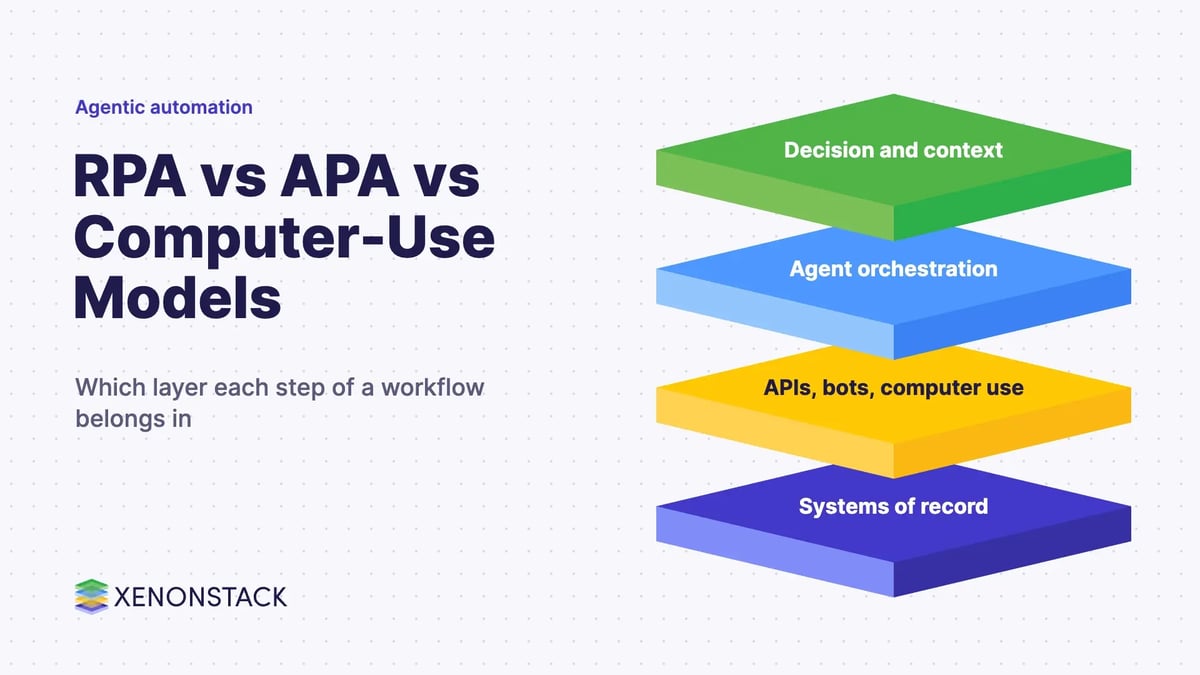
A practical way to picture the stack is four layers, from the outcome down to the systems of record:
- Decision and context layer. Policy, approval thresholds, business context and a trace of every decision. This is where humans stay in control.
- Agent orchestration (APA). Agents that plan the workflow, split it into steps, and route exceptions to the right person.
- Execution tools. APIs and Model Context Protocol connectors first, then RPA bots for stable screen tasks, then computer-use agents for applications that offer nothing else.
- Systems of record. ERP, CRM, core banking, policy administration and the legacy applications that hold the data.
The order inside the execution layer matters. The Model Context Protocol is described by its maintainers as "an open-source standard for connecting AI applications to external systems", and where a connector exists it is faster, cheaper and easier to audit than driving a screen. Our solution teams follow the same rule in client designs: use APIs or MCP connectors where the system supports them, and keep computer-use or RPA-style bots for legacy applications that only expose a user interface.
To run this stack you need somewhere to build and govern the agents and the workflows they call. ElixirClaw is an agentic OS platform to build, orchestrate and govern AI agents and automation workflows while keeping humans in control, and ElixirData Context OS keeps governed context, versioned policy and decision traces in one decision layer above AI agents.
What does "computer model automation" mean in 2026?
The phrase is used in two different ways, and it is worth separating them before any investment decision.
Computer-use models
The current meaning is AI models that operate a computer. Anthropic documents a computer use tool that gives Claude "screenshot capabilities and mouse/keyboard control for autonomous desktop interaction", with the application running each action in an environment the customer controls (Anthropic documentation). OpenAI documents a computer use tool that lets a model operate browser and desktop interfaces, such as filling out forms or testing user flows (OpenAI documentation). In effect, a computer-use agent can do what an RPA bot does without a recorded script, because it reads the screen each time.
That flexibility has a price. Both providers warn that content on the page can steer the model, so their guidance is to run computer use in an isolated virtual machine, container or fresh browser profile, restrict network access, keep credentials out of the model's view, and ask a person to approve changes with real consequences. Screenshots also add model input cost on every step. For these reasons computer use suits the long tail of UI-only applications, not high-volume steps that a bot or API already handles.
Predictive and simulation models
The older meaning, used in earlier versions of this article, was automation driven by predictive models and scenario simulations. Those models still matter, but they do not act on their own. In an agentic workflow they are tools: an agent calls a risk score, demand forecast or capacity simulation, then applies policy to decide what happens next, with a person approving anything above the agreed threshold.
Which approach fits which workflow?
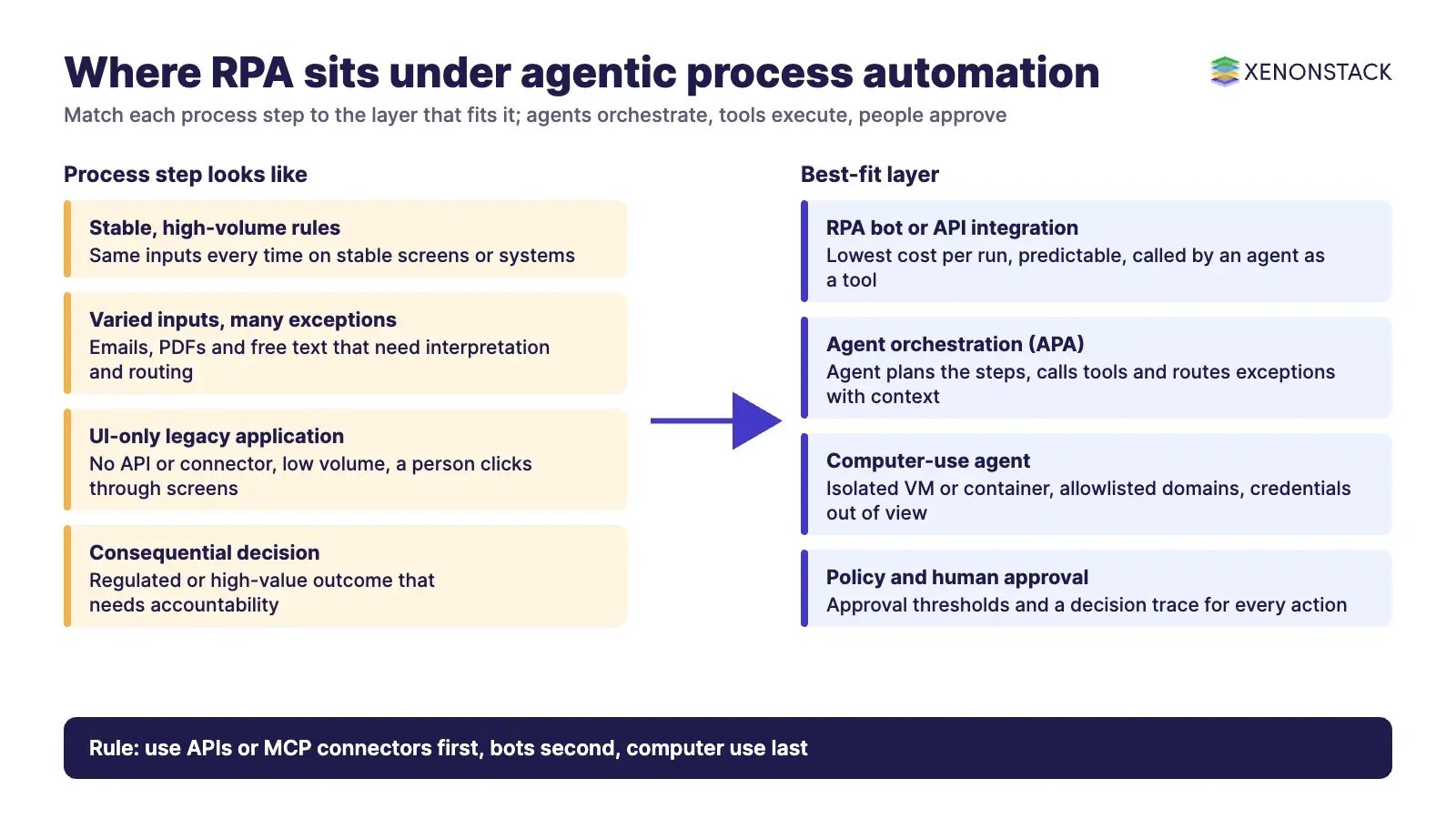
Use the characteristics of each step, not the name of the tool, to choose. One end-to-end process often needs all of these layers.
| If the step looks like this | Use | Why |
|---|---|---|
| Same inputs every time, stable screens, high volume | RPA bot or direct API integration | Lowest cost per run and fully predictable |
| System offers an API or MCP connector | API or connector called by an agent | Faster, cheaper and easier to audit than the screen |
| Inputs vary (emails, PDFs, free text) and need interpretation | Agent with document and language models | Reads meaning instead of fixed positions |
| Frequent exceptions that need a person | Agent with exception routing and approvals | Sends the case to the right person with context |
| Legacy application with only a user interface and low volume | Computer-use agent in an isolated environment | Avoids building a brittle bot for a rarely used screen |
| Decision depends on a forecast or risk estimate | Predictive model called as a tool by the agent | Keeps the model advisory and the decision governed |
| Regulated decision about a person | Agent prepares, person decides | Accountability and audit stay with named people |
Insurance is a good example of a sector that mixes all of these: claims intake with varied documents, underwriting decisions with regulatory scrutiny, and older policy administration systems. Our guide to agentic process automation in insurance walks through those use cases and the rules that apply.
What governance, security and cost controls do agentic workflows need?
Moving from bots to agents moves risk from "the script failed" to "the agent made a choice". Gartner, as reported by New Electronics, predicts that over 40% of agentic AI projects could be cancelled by the end of 2027 because of escalating costs, unclear business value or inadequate risk controls, and warns about "agent washing", the rebranding of existing products such as chatbots and RPA without real agentic capability. The controls below address those causes.
| Risk | Control |
|---|---|
| Agent acts outside its remit | Written decision scope per agent; policy checks before every action; approval thresholds |
| Prompt injection through screens or documents | Isolated VM or container with minimal privileges; domain allowlists; human confirmation for consequential actions (per Anthropic and OpenAI guidance) |
| Credential exposure | Keep logins and secrets out of screenshots and page text; use service identities with least privilege |
| No audit trail | Record a decision trace for each step: inputs, policy applied, tool called, who approved |
| Runaway cost | Prefer APIs over screens; cap steps and session time; monitor model and screenshot input usage |
| Bot and agent sprawl | One inventory of bots, agents and connectors, each with a named business owner |
Two decision agents map directly onto these controls. The Approval Agent approves requests within policy boundaries and escalates exceptions with full context, and the Exception Handling Agent routes every edge case to the right person with full context and evidence.
Video: an agentic approval workflow in ElixirClaw, where agents assemble the case and a person signs off the decision.
In what order should enterprises move from RPA to agentic process automation?
Our maturity work with enterprise clients places "scripts and RPA in silos" at an early stage, with orchestrated, governed agents as the target. The sequence below gets there without breaking what already runs.
- Inventory the estate. List every bot, script and integration, its owner, volume, failure rate and the systems it touches.
- Classify each process step. Mark steps as stable rules, interpretation, exception handling or decision, using the table above.
- Pick one process with frequent exceptions. Exceptions are where bots fail and people spend time, so they show value fastest.
- Put an agent in front, keep the bots behind. Let the agent orchestrate and call the existing bots and APIs; add computer use only for UI-only steps.
- Define policy and approvals before go-live. Set the decision scope, thresholds, escalation paths and the decision trace.
- Measure and retire. Track straight-through rate, exception handling time and cost per case; retire bots whose steps now run through APIs.
For the wider design patterns behind step 4, see our explainer on agentic workflows.
When should you keep RPA and not use agents?
- The process is stable, rule-based and high volume, and the bot rarely fails. An agent adds cost without adding value.
- Every step must be deterministic and reproducible for audit, and there is no judgement involved.
- An API integration can replace the bot outright. In that case retire the bot rather than wrapping it in an agent.
- Nobody can own the decision scope, approvals and monitoring an agent needs. Fix ownership first.
- The data the agent would need is poor or unavailable. An agent will make confident mistakes on bad context.
To map one process step your agents should own, and the context, policy and approvals it depends on, book a Context Workshop. See what happens in the workshop.
Frequently asked questions about RPA, APA and computer-use models
What is the difference between RPA and APA?
RPA runs fixed, recorded steps through screens and APIs and stops when an input falls outside its rules. Agentic process automation (APA) uses AI agents that read the case, plan the next step, call tools and hand exceptions to people. In 2026 most enterprises run RPA bots as one of the tools that agents call, not as a rival platform.
How is robotic process automation different from traditional automation?
Traditional automation is built into or between systems through code, scripts, API integrations, batch jobs and workflow engines, so it usually needs developer work in the systems themselves. RPA works at the user interface and drives existing applications the way a person would, without changing their source code. That makes RPA quick to deploy on legacy systems but fragile when screens change.
What is computer model automation?
The term is used in two ways. Today it most often means computer-use models: AI models that see the screen through screenshots and operate it with mouse and keyboard actions, as documented by Anthropic and OpenAI. Older usage meant predictive and simulation models that forecast outcomes; in an agentic workflow these become tools an agent calls before it decides.
Will AI agents replace RPA?
Not for every task. Stable, high-volume, rule-based steps are still cheaper and more predictable as RPA bots or API integrations. Agents add value where inputs vary, judgement is needed or exceptions are frequent. The practical pattern is an agent that orchestrates the process and calls bots, APIs and, only where no API exists, a computer-use agent.
When should I use a computer-use agent instead of an API?
Use an API or a Model Context Protocol (MCP) connector whenever the system offers one, because it is faster, cheaper and easier to audit. Keep computer-use agents for applications that only have a user interface, run them in an isolated virtual machine or container with minimal privileges, and ask a person to confirm any action with real-world consequences.
What controls do agentic workflows need before production?
At minimum: a defined decision scope for each agent, policy checks and approval thresholds, isolated environments and allowlisted domains for computer use, credentials kept out of the model's view, a decision trace for every action, and cost limits. Gartner, as reported by New Electronics, warns that over 40% of agentic AI projects could be cancelled by the end of 2027 because of costs, unclear value or weak risk controls.
Follow XenonStack on LinkedIn: XenonStack on LinkedIn for new guides on agentic AI, data and platform engineering.
Explore the XenonStack platform family: ElixirData · ElixirClaw · ElixirHub · NexaStack · MetaSecure · Neural AI · AgentGRC · AgentSRE · AgentAnalyst · AgentInstruct · AgentRAI · AgentScrum · AgentSearch · AgentForce · AI Aviator · SAIF Aviator · CohortIQ · XenonStack AI · XenonStack UAE