
Key takeaway
- Remove data silos in Databricks with Delta Lake, Unity Catalog, Lakeflow Connect, federation and sharing, then add AI on governed data. Enterprise guide.
Databricks removes data silos by putting data from many systems under one governed layer, so that analytics and AI read the same data instead of private copies. According to its documentation, the pieces are Delta Lake for table storage, Unity Catalog for access control, lineage and audit, Lakeflow Connect for managed ingestion, Lakehouse Federation for querying data you leave in place, and sharing for data that crosses organisational boundaries. AI helps once those foundations exist; it does not replace them.
For a CDO, CTO or data architect, the practical question is which silos to ingest, which to federate and which to share, and who owns the policy that applies to each. This guide sets out that decision, what each Databricks capability does, and what governance you need before AI agents are allowed to act on the combined data. For the platform background, see our Databricks Data Intelligence Platform page and the data lakehouse architecture overview.
What is a data silo, and why does it block AI?
A data silo is a store that one team or system controls and other teams cannot reach, query or trust. Three effects follow: the same metric is calculated differently in different places, teams rebuild pipelines that already exist elsewhere, and AI projects stall because no one can say which copy of the data is correct or who may use it.
Copying everything into one place does not fix this on its own. Without shared access rules, lineage and ownership, a central store becomes another silo with more data in it. That is why the governance layer matters as much as the storage layer.
Which Databricks capability removes which kind of silo?
Each capability below is described as stated in Databricks documentation, read on 13 November 2026. Release status differs by feature, so confirm the current state on the linked page before you commit to a design.
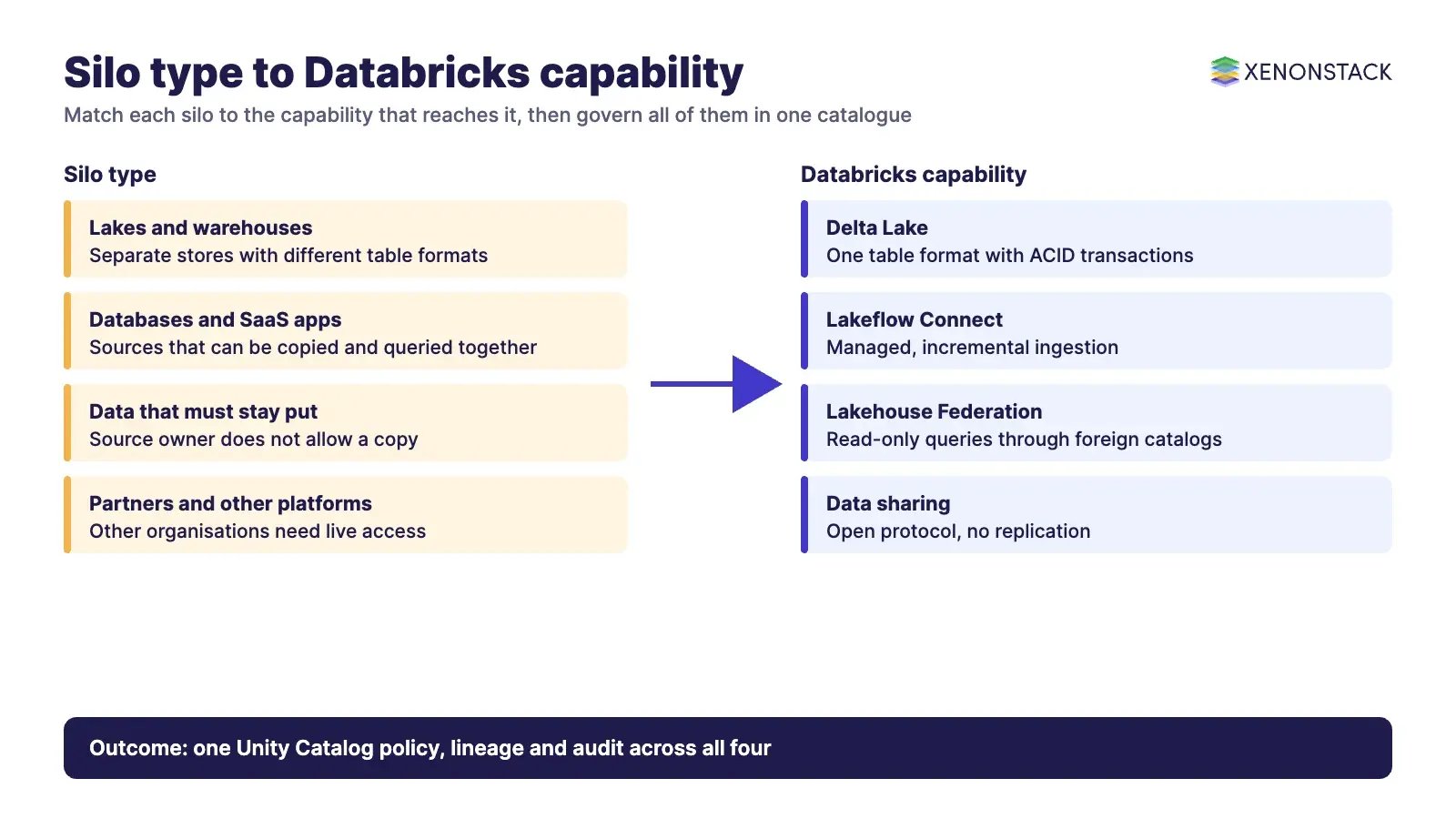
| Silo type | Databricks capability | What the documentation says | When it fits |
|---|---|---|---|
| Raw files and tables in separate lakes and warehouses | Delta Lake | The storage layer for lakehouse tables. It adds a file-based transaction log to Parquet files for ACID transactions, and unless specified otherwise all tables on Databricks are Delta tables. | You want one reliable table format for batch and streaming data. |
| Operational databases and SaaS applications | Lakeflow Connect | Managed connectors grouped by source type (database, SaaS, file, streaming). Credentials sit in Unity Catalog connections and ingestion is incremental after the first run. Connectors are in various release states. | The data must be analysed together and the source can be copied. |
| Data that must stay in its source system | Lakehouse Federation | Governed, read-only access to external data through Unity Catalog foreign catalogs, with table-level access controls. Listed sources include PostgreSQL, MySQL, Oracle, SQL Server, Snowflake and Google BigQuery. | Copying is not allowed or not worth it, and read-only queries are enough. |
| Partners and other business units on other platforms | Data sharing | An open protocol that does not require data replication. Recipients can be users without Databricks. The page notes that cross-cloud or cross-region transfers may still incur egress fees. | Another organisation or platform needs live access to a governed set. |
| Access rules that differ per tool | Unity Catalog | The unified governance layer for data and AI built into Databricks: privileges, attribute-based policies, row and column filters, lineage, discovery and an audit log system table. | Always. It is the layer every other row depends on. |
Databricks documentation now calls the sharing protocol OpenSharing, and the open-source project is still hosted under the Delta Sharing name. Use whichever name your own Databricks account shows. Delta Lake is the open-source table format underneath; its transaction log has an open, published protocol that other systems can read.
How do you decide between ingesting, federating and sharing?
Start from the data, not the tool. Ask four questions of each silo: may the data be copied, how fresh must it be, how often is it queried, and who owns the policy for it. The answers point to one of three patterns.
| Pattern | Choose it when | Trade-off to plan for |
|---|---|---|
| Ingest into Delta tables | Data is queried often, joined with other sources, or used for model training. | You now own a second copy, its refresh schedule and its storage cost. |
| Federate and query in place | Data must stay with its owner, or you need a quick view before deciding to ingest. | Access is read-only and query performance depends on the source system. |
| Share across boundaries | Another team or organisation needs governed access without a copy. | Recipient setup, token or identity handling, and possible egress charges. |
Most estates use all three. A common sequence is to federate first to learn what is worth moving, ingest the high-use sources, and share what other parties need. Cost controls matter at each step, and we cover them in FinOps for Databricks.
Where does AI actually help in removing silos?
The documentation describes AI as a consumer of the unified data rather than as the mechanism that merges it. Genie, for example, lets users ask data questions in natural language, with answers grounded in the organisation's data and governed through Unity Catalog. Data teams configure trusted data, metrics and business rules for it. Product names and billing for Genie features are changing, so check the Genie page for current names and pricing before planning a rollout.
This is the useful way to think about AI here: it widens who can reach the data, so the access rules must already be right. For a view of how analysts can ask questions of enterprise data in plain language, see AgentAnalyst, which lets teams ask questions of enterprise data in plain language and get real-time insights.
How do you govern the combined data?
Unity Catalog treats every governed asset as a securable object in a three-level namespace of catalog, schema and object. Permissions are granted on those objects, and the catalog records lineage from source tables to models and dashboards. The audit log system table keeps a record of data access and system activity. According to its site, Unity Catalog is enabled automatically in workspaces created after 8 November 2023.
| Governance question | Where the answer lives |
|---|---|
| Who may read this table or column? | Unity Catalog privileges, attribute-based policies, row filters and column masks |
| Where did this number come from? | Lineage from source tables through to models, services and dashboards |
| Who touched it and when? | The audit log system table |
| How do users find it? | Catalog Explorer |
| Which decisions did an AI agent take on it? | Outside the platform: a decision layer that records the agent's action, the policy applied and the approval |
The last row is the gap many teams find late. Platform audit logs show data access, but a board or regulator also asks why an agent acted as it did. ElixirData Context OS keeps governed context, versioned policy and decision traces in one decision layer above AI agents, and AgentGRC keeps autonomous agent actions inside policy, with the audit trail risk teams need. For the governance and SAP-specific side, read SAP Databricks governance and security, data governance for business-ready data and the open and unified metadata platform guide.
What does a sensible adoption sequence look like?
- Inventory the silos. List each store, its owner, its sensitivity and who needs it. Rank by business value, not by size.
- Set the governance baseline. Define catalogs, ownership, privileges and the audit approach in Unity Catalog before moving data.
- Federate to learn. Use read-only foreign catalogs to see which sources are actually queried together.
- Ingest the high-use sources. Move them into Delta tables with managed connectors and confirm each connector's release status.
- Share what others need. Provide governed shares for partners and other platforms instead of exports.
- Open the data to AI last. Add natural-language access and agents only when policies, lineage and a decision record are in place.
For domain models built on the combined data, see building domain-specific AI models with SAP Databricks. For agents that work across text, images, audio and video, see Databricks multimodal agents, and for a vision use case, Databricks for smart city computer vision. Delta Lake itself is covered in our Delta Lake guide.
When is Databricks not the right answer?
- The silo is a small, stable system with a single consumer. A direct integration is cheaper than a platform change.
- The source cannot be read by a listed connector or federation source. Check the documentation list before planning.
- Ownership is unresolved. No tool fixes two teams that disagree on who defines a metric.
- Feature status is unclear. Where a connector or capability is in preview, treat it as a plan to confirm, not a commitment.
To map one data decision your agents should make, and the context and policy it depends on, book a Context Workshop. See what happens in the workshop.
FAQ
How does Databricks eliminate data silos?
It combines Delta Lake storage, managed ingestion with Lakeflow Connect, read-only federation to external systems, sharing without replication, and Unity Catalog for one set of access rules, lineage and audit across them.
Should we ingest data or federate it?
Ingest sources that are queried often or used for model training. Federate sources that must stay with their owner or that you want to assess first. Federation in Databricks is read-only.
What does Unity Catalog control?
According to Databricks, it manages privileges, attribute-based policies, row and column filters, lineage, discovery and the audit log for data and AI assets in an enabled workspace.
Can we share data with parties that do not use Databricks?
Yes. The Databricks documentation says open sharing works for any user, whether or not they have access to Databricks, and does not require data replication. Egress fees may still apply across clouds or regions.
Does AI remove silos by itself?
No. The documentation presents AI features such as Genie as consumers of governed data. The silos are removed by ingestion, federation, sharing and governance, and AI then widens access to the result.
Follow XenonStack on LinkedIn: XenonStack on LinkedIn for new guides on agentic AI, data and platform engineering.
Ready to put AI agents to work? Explore ElixirClaw, the agentic OS platform to build, orchestrate and govern AI agents.
Explore the XenonStack platform family: ElixirData · ElixirClaw · ElixirHub · NexaStack · MetaSecure · Neural AI · AgentGRC · AgentSRE · AgentAnalyst · AgentInstruct · AgentRAI · AgentScrum · AgentSearch · AgentForce · AI Aviator · SAIF Aviator · CohortIQ · XenonStack AI · XenonStack UAE


