Key takeaway
- Plan SOC automation for remote workforces: which controls to automate, where analysts approve, and an adoption sequence grounded in NIST and MITRE.
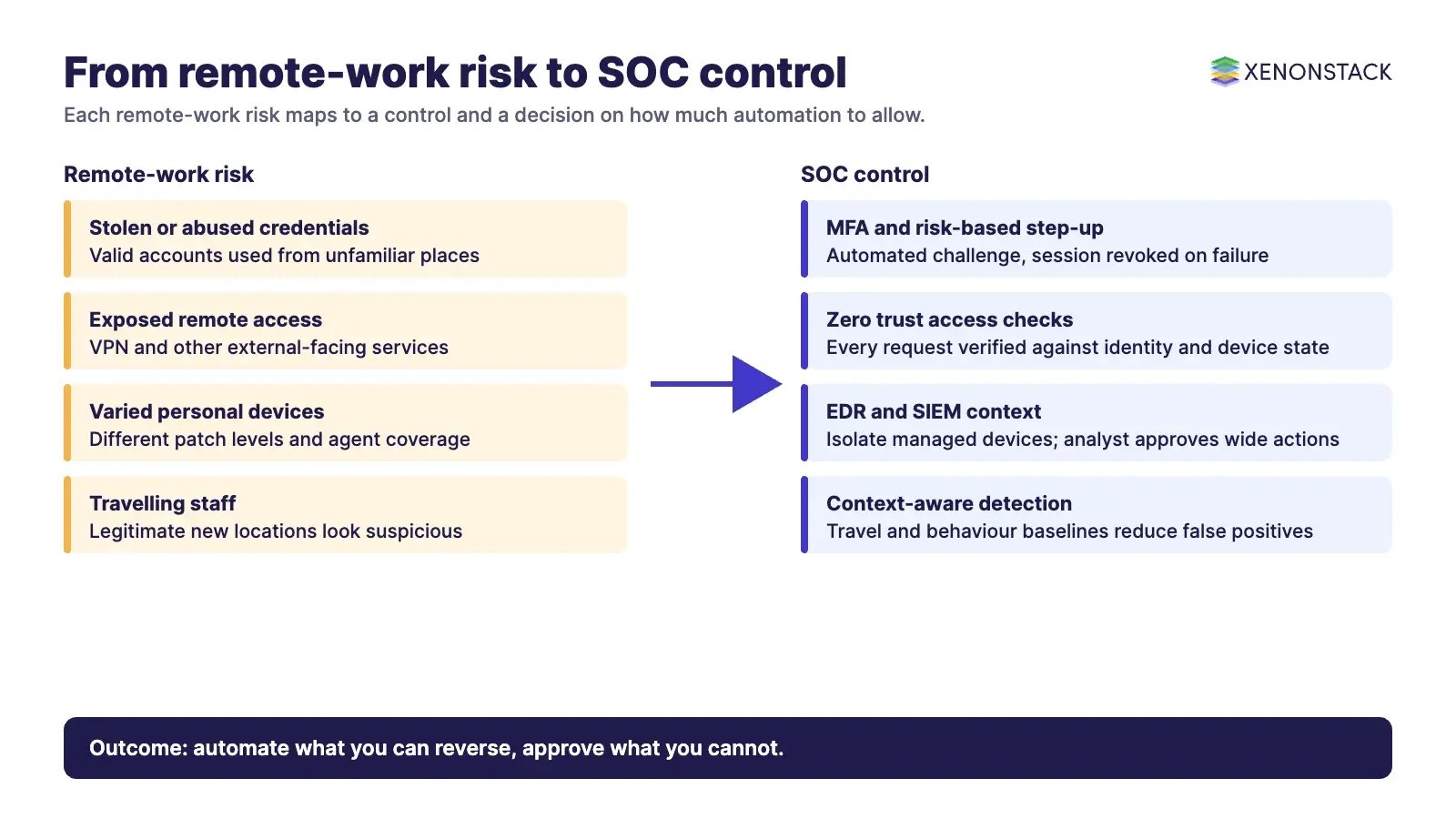
SOC automation for remote workforces works when it treats identity, device state and location context as the main inputs, not the office network. Automate enrichment, triage and reversible containment such as blocking a session or isolating an endpoint, and keep analyst approval for actions with a wide business impact. This guide covers the controls, the trade-offs and an adoption sequence for CISOs and SOC leads. It sits beside our guides on self-healing SOC systems and human-in-the-loop SOC automation.
Remote work is now a standing condition, not an exception. NIST SP 800-207 names remote workers, personal devices and cloud services outside enterprise control as the reasons to move defences away from static network perimeters. For a SOC this means alerts arrive from many networks and devices, and the question for each one is who is connecting, from what device, and whether the action is normal for them.
Why does remote work change SOC automation?
A remote workforce widens what the SOC must watch. Users reach applications over home and public networks, on managed and personal devices, from changing locations. The NIST SP 800-207 abstract states that there is no implicit trust granted to assets or user accounts, and that identity checks for users and devices happen before a connection to a resource is established. Automation is what makes that practical at the volume remote work creates.
Attackers use the same remote paths. MITRE ATT&CK lists External Remote Services (T1133), where adversaries use external-facing remote services such as VPNs to gain access or persist, and Valid Accounts (T1078), where they abuse credentials of existing accounts. Both are everyday remote-work conditions, so detection and response rules should be built around them.
Which remote-workforce actions should a SOC automate?
The useful split is by how reversible an action is and how many people it affects. Enrichment and ticketing carry no risk to users and can run unattended. Session and device actions are reversible and narrow, so they can run with limits. Account-wide or business-critical actions should wait for an analyst. The human-in-the-loop guide covers the approval patterns in more depth.
| Control | What automation does | When it fits | Watch for |
|---|---|---|---|
| SIEM | Collects logs from endpoints, cloud services and VPN gateways, correlates them and raises prioritised alerts | Always; it is the evidence base for every other control | Missing log sources from personal or unmanaged devices |
| SOAR playbooks | Runs enrichment and containment steps for common cases such as phishing reports or a suspect endpoint | Repeatable cases with clear evidence | Playbooks that act without a rollback path |
| EDR | Monitors device activity and can isolate a device or kill a process | Managed devices that run an agent | Isolating a device used for critical work without approval |
| CASB | Applies cloud access policy, such as blocking access from an unrecognised device | Heavy SaaS use by distributed staff | Policy conflicts with regional data rules |
| Zero trust access | Checks each access request against identity, device state and policy before allowing it | Applications reached from outside the corporate network | Overly strict rules that lock out legitimate travellers |
| Multi-factor authentication | Adds a second proof of identity at sign-in; step-up can be triggered by risk signals | All remote access and privileged accounts | Weak factors such as SMS; see the CISA note below |
On authentication, CISA's MFA guidance says any MFA is better than no MFA, and that FIDO/WebAuthn is the only widely available phishing-resistant authentication. It suggests number matching where phishing-resistant MFA is not yet possible. A SOC can automate the response to MFA fatigue or impossible-travel alerts, but the choice of factor is a platform decision. The zero trust security architecture guide explains the access model behind these controls.
What do you gain and what do you give up?
| Benefit | Why it matters for remote teams | Trade-off |
|---|---|---|
| Faster containment | Reversible actions run in seconds, before a compromised remote session spreads | A wrong automated action can lock out a legitimate user |
| Less alert fatigue | Ranking and deduplication leave analysts with the alerts that need judgement | Poor tuning can hide real events |
| Consistent policy | The same rule applies whichever country or device the user is on | Regional privacy rules may restrict what data a playbook can collect |
| Scale | The SOC can cover more devices and connections without a matching rise in analyst workload | Integration work across SIEM, SOAR and EDR is ongoing |
| Better user experience | Low-risk reports are handled without interrupting the employee | Fewer touchpoints can mean slower user feedback on false alarms |
What challenges do remote settings add?
Four challenges recur. Data privacy: telemetry from home networks and personal devices may be subject to regional rules, so collection and retention must be set by region, with legal counsel confirming the rules for your case. Device variability: patch level, configuration and agent coverage differ widely, so policy needs continuous checking. Tool integration: SIEM, SOAR, EDR and access controls must share context or gaps appear between them. False positives: a staff member travelling or working from a new place can look suspicious to a rule that has no context.
Context reduces the last problem most. Feed the rules with travel calendars, device posture and the user's normal pattern, and use behavioural models to rank risk. Our guide to behavioural analytics for SOC automation covers how user and entity baselines are built. For connected devices outside the office, see SOC automation for IoT security.
How do you keep automated response accountable?
Every automated action needs an owner, a stated reason and a record. NIST SP 800-61 Rev. 3 (April 2025) is a Community Profile for the NIST Cybersecurity Framework 2.0 that helps organisations build incident response into risk management, and it supersedes Rev. 2 of 2012. Use it to check that preparation, detection, response and recovery each have defined steps, including who may approve what.
As SOC automation adds AI agents, the same question applies to each agent action: which policy allowed it, on what evidence, and who can reverse it. ElixirData Context OS keeps governed context, versioned policy and decision traces in one decision layer above AI agents, and AgentGRC keeps autonomous agent actions inside policy, with the audit trail risk teams need. Teams building agent-based SOC workflows can also look at ElixirClaw, an agentic OS platform to build, orchestrate and govern AI agents and automation workflows while keeping humans in control. Our guide to security AI agents and the autonomous SOC covers the design in detail.
In what order should you adopt it?
- Map the remote attack paths. List remote access routes, identity providers, device classes and cloud services, and check which ones feed the SIEM. Use the two ATT&CK techniques above as a starting checklist.
- Automate enrichment and triage first. Add identity, device and location context to every alert before any action runs.
- Add reversible containment with limits. Session revocation and device isolation for managed devices, with time limits and a rollback step.
- Put approval gates on wide actions. Account-wide lockouts, server isolation and mass changes need an analyst decision.
- Review on a schedule. Track overrides, false positives and playbook failures each quarter, and update playbooks as the remote working model changes.
- Train users alongside the tooling. Keep awareness training on device hygiene and phishing, since user behaviour remains a large part of remote risk.
When should you not automate a remote-workforce response?
| Situation | Why to hold back | Better approach |
|---|---|---|
| Poor log coverage from personal devices | Automation acts on partial evidence | Fix coverage first or use access controls that do not rely on device logs |
| Action affects a whole team or a critical system | Business impact is hard to reverse | Require analyst approval |
| No tested rollback | A wrong action cannot be undone quickly | Build and test the rollback before enabling the action |
| Unclear regional data rules | Collection may breach local requirements | Confirm with legal and privacy teams, then set regional playbooks |
To map one remote-workforce decision your SOC should automate, and the context and policy it depends on, book a Context Workshop. See what happens in the workshop.
Frequently asked questions
What is SOC automation for remote workforces?
It is the use of automated enrichment, triage and response in a security operations centre to monitor and protect staff who work from varied networks and devices, with analysts keeping control of high-impact actions.
Which SOC tasks are safe to automate for remote staff?
Enrichment, ticketing and reversible containment such as revoking a session are the usual starting points. Wide or hard-to-reverse actions should need analyst approval.
Why does MITRE ATT&CK matter for remote work?
ATT&CK lists External Remote Services (T1133) and Valid Accounts (T1078), which describe how adversaries use remote access and stolen credentials. They give detection teams a concrete checklist.
Does zero trust replace SOC automation?
No. According to NIST SP 800-207, zero trust removes implicit trust and checks users and devices before access. The SOC still needs automation to monitor, detect and respond at volume.
How do we reduce false positives for travelling staff?
Add context such as device posture, travel information and each user's normal pattern to detection rules, and review false positives regularly.
Follow XenonStack on LinkedIn: XenonStack on LinkedIn for new guides on agentic AI, data and platform engineering.
Explore the XenonStack platform family: ElixirData · ElixirClaw · ElixirHub · NexaStack · MetaSecure · Neural AI · AgentGRC · AgentSRE · AgentAnalyst · AgentInstruct · AgentRAI · AgentScrum · AgentSearch · AgentForce · AI Aviator · SAIF Aviator · CohortIQ · XenonStack AI · XenonStack UAE