Key takeaway
- Learn how legal teams can use Microsoft Copilot: current licence tiers, what Microsoft says about data access, which tasks to pilot and controls.
Microsoft Copilot for legal work means using Microsoft's AI assistant inside the Microsoft 365 tools legal teams already use to draft, summarise and organise work, with a lawyer reviewing every output before it is relied on. It supports legal work and does not replace legal judgement.
This guide is for law firms, in-house legal teams and legal operations leads who are deciding whether and how to use Copilot. It covers licensing as Microsoft now describes it, what Microsoft says about data access and privacy, which tasks to test first, and the controls to put in place. For the wider context, see our primer on artificial intelligence.
What is Microsoft Copilot, and has it changed?
The Microsoft Copilot overview presents Copilot as a family of experiences, all powered by large language models, grounded in web or organisational data, with access scoped by user permissions. Two changes matter if you read older guides. Microsoft states that the Microsoft 365 Copilot Chat app is now called Microsoft Copilot Chat. It also describes licence tiers: Copilot Chat (Basic) is included with eligible Microsoft 365 licences, and Copilot in Word, Excel, PowerPoint and OneNote depends on the tier, with priority access for users with the Microsoft 365 Copilot add-on licence.
| Tier (per Microsoft) | Requirement | What it means for a legal team |
|---|---|---|
| Copilot Chat (Basic) | Included with eligible Microsoft 365 licences | Chat only. No Copilot in Word, Excel, PowerPoint or OneNote |
| Microsoft 365 Copilot (Basic) | No add-on; standard access | Standard access in Word, Excel, PowerPoint and OneNote |
| Microsoft 365 Copilot (Premium) | Microsoft 365 Copilot add-on licence | Priority access; uses web and organisational data automatically |
Older guides list fixed device and subscription requirements. Because licensing has changed, confirm the current position for your tenant with Microsoft or your reseller before planning a rollout.
What does Microsoft say about confidentiality and data access?
For legal work this is the first question. The Microsoft privacy documentation for Copilot says Copilot only surfaces organisational data to which individual users have at least view permissions, and that the Microsoft 365 permissions model can help stop data leaking between users, groups and tenants. It also says prompts, responses and data accessed through Microsoft Graph are not used to train foundation models. The page lists compliance offerings including GDPR, ISO 27001, HIPAA and ISO 42001.
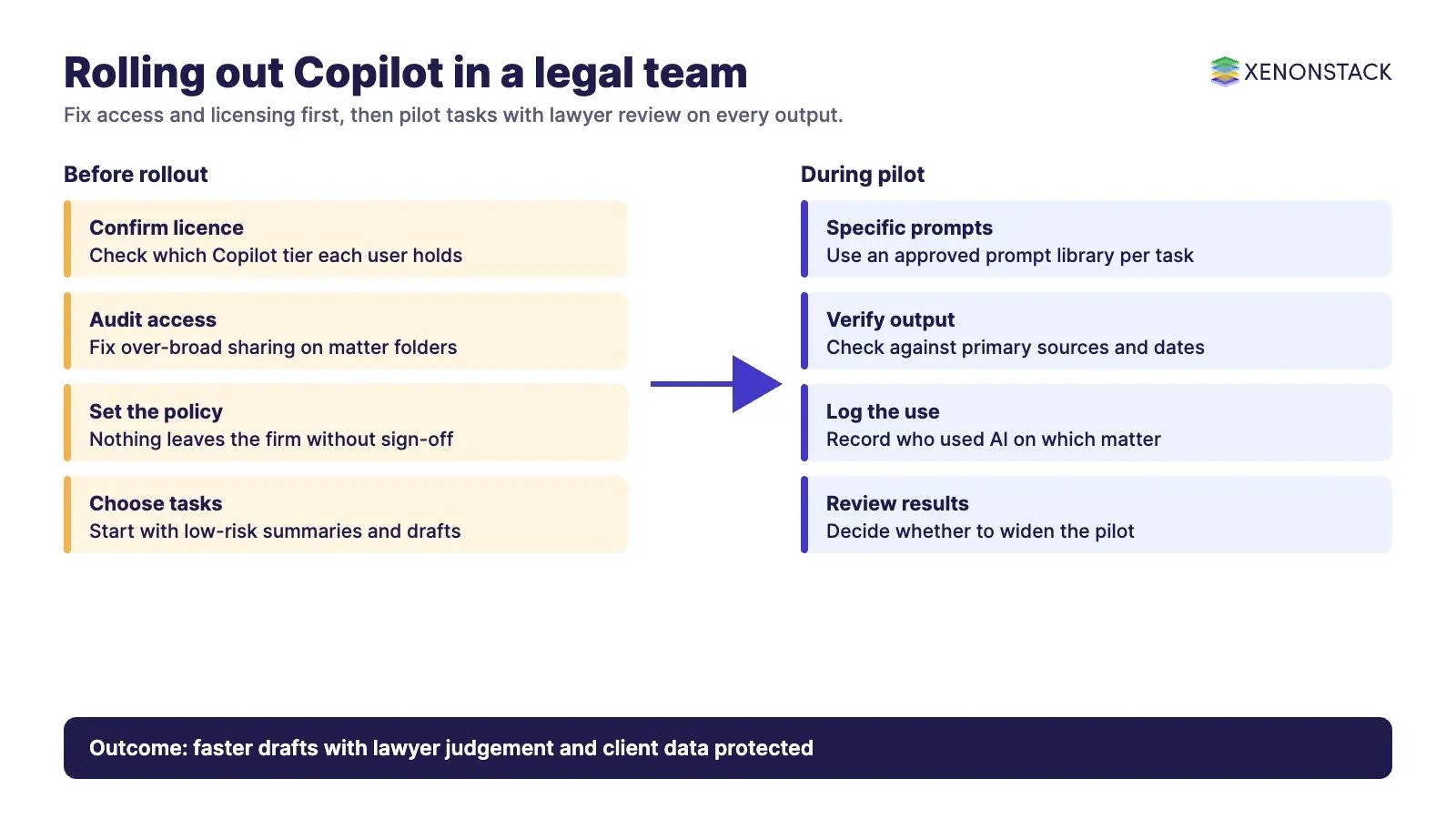
Read that permissions statement from the other side. If a document library is shared too widely today, Copilot can surface it to anyone who already has view access. Clean up matter-level access before you switch Copilot on. The same page also notes that Anthropic models as a subprocessor are currently excluded from the EU Data Boundary, which is worth checking against your client commitments.
Which legal tasks should you test first?
The Microsoft overview does not itself list legal document tasks, so treat these as pilot candidates to verify in your own tenant, not as promised features. Start where a wrong answer is cheap to catch.
| Task | What to try | What the lawyer must check |
|---|---|---|
| Contract review | Ask for a summary of indemnity, payment and confidentiality clauses in a DOCX or PDF | Every clause against the source text, and anything missed |
| Case preparation | Summarise a long opinion or build a timeline of deadlines and hearings | Citations, dates and whether the summary changes the meaning |
| Drafting | Produce a first draft of a routine letter or clause using firm templates | Tone, jurisdiction, defined terms and house style |
| Document handling | Tag and categorise a set of files for a matter | Misfiled or sensitive items |
Microsoft's own documentation says AI responses are not guaranteed to be 100% factual, that users should use their judgement before sharing output, and that Copilot gives drafts and summaries for review rather than full automation. Legal teams should adopt that as policy, not as a footnote.
What controls should a legal team put in place?
- Write specific, detailed prompts and keep a library of approved ones for common tasks.
- Verify every AI output against primary sources before it leaves the firm.
- Review matter-level permissions so Copilot cannot reach files a user should not see.
- Record who used AI on which matter, so supervision is possible.
- Tell clients how AI is used where your engagement terms or regulator require it.
How do AI agents change legal work beyond Copilot?
Copilot responds to a person's prompt. AI agents go further: they can run a defined workflow, such as intake, conflict check, clause extraction and routing, and pause for human approval at set points. That raises new questions about which data an agent may use and how each step is recorded. XenonStack's ElixirClaw is the AI agents computing platform for building and running such workflows. For related Microsoft guidance, see our articles on Microsoft Copilot for real estate operations, Microsoft Fabric on Azure and Azure innovations to watch.
What should you do first?
- Confirm which Copilot tier your firm holds and what it includes.
- Audit access to matter folders and fix over-broad sharing.
- Pick two low-risk tasks and run a four-week pilot with a small group.
- Set the review rule: nothing leaves the firm without lawyer sign-off.
- Measure time saved and errors caught, then decide whether to widen use.
To discuss a pilot, use Contact Us or Talk To Specialist.
To map one decision your legal agents make, and the data and policy it depends on, book a Context Workshop. See what happens in the workshop.
Frequently asked questions
Can lawyers rely on Microsoft Copilot output?
No. Microsoft states that responses are not guaranteed to be 100% factual and that users should use their judgement before sharing output. A lawyer should verify everything against primary sources.
Does Copilot use client data to train its models?
Microsoft states that prompts, responses and data accessed through Microsoft Graph are not used to train foundation models. Confirm the position for your own agreement and tenant.
What can Copilot see in our systems?
Microsoft states that Copilot only surfaces organisational data to which the user has at least view permissions. Over-broad sharing today means broader results tomorrow, so review access first.
Do we need a special licence for Copilot in Word and Excel?
Microsoft describes Copilot Chat (Basic) as included with eligible licences without Copilot in Word, Excel, PowerPoint or OneNote, and priority access for users with the Microsoft 365 Copilot add-on. Check current terms with Microsoft.
Where should a legal team start?
Start with a small pilot on low-risk tasks such as summarising a clause or a long opinion, with a mandatory lawyer review, and fix document permissions before wider rollout.
Follow XenonStack on LinkedIn: XenonStack on LinkedIn for new guides on agentic AI, data and platform engineering.
Ready to put AI agents to work? Explore ElixirClaw, the agentic OS platform to build, orchestrate and govern AI agents.
Explore the XenonStack platform family: ElixirData · ElixirClaw · ElixirHub · NexaStack · MetaSecure · Neural AI · AgentGRC · AgentSRE · AgentAnalyst · AgentInstruct · AgentRAI · AgentScrum · AgentSearch · AgentForce · AI Aviator · SAIF Aviator · CohortIQ · XenonStack AI · XenonStack UAE