Key takeaway
- Microsoft Copilot in Dynamics 365 Supply Chain Management summarises orders, products and vendors. See what it does, its limits and where agents fit.
Microsoft Copilot for supply chain operations is an AI assistant built into Microsoft business applications, most concretely Dynamics 365 Supply Chain Management, that summarises records and answers questions about data in natural language so planners, buyers and warehouse teams can review information in one place. A person still reads the output and takes the action.
This guide is for supply chain, operations and IT leaders who want to know where an assistant helps, where it does not, and what to set up first. It builds on artificial intelligence basics and on our overview of Microsoft Copilot services, and it separates what Microsoft documents from what is often claimed.
What is Microsoft Copilot in supply chain operations?
The Microsoft 365 Copilot overview says every Copilot experience is powered by large language models, grounded in web or organisational data through Microsoft Graph, with access scoped by user permissions. In supply chain, the most concrete use sits inside Dynamics 365 Supply Chain Management, where Copilot appears as generated summaries and prompts attached to screens people already use.
The interface is natural language processing: a user reads a summary or asks a question instead of building a report. The numbers underneath still come from your records, planning models and machine learning tools. A summary is not a forecast, and a forecast is not a decision.
What can Copilot do in Dynamics 365 Supply Chain Management?
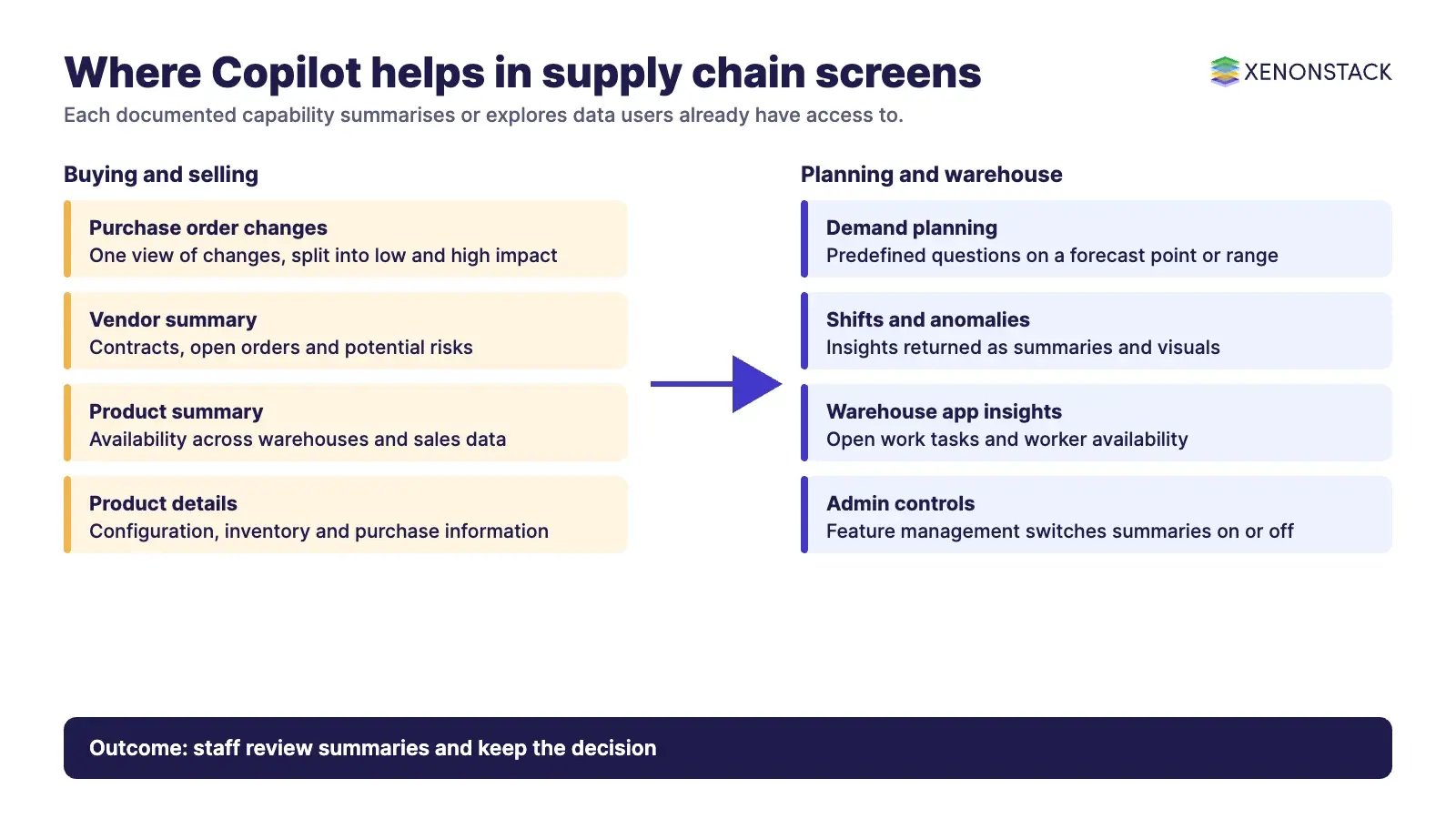
The Dynamics 365 Finance and Supply Chain Management Copilot capabilities page on Microsoft Learn, published in September 2024, and the demand planning release plan describe the following capabilities.
| Capability | What Microsoft says it does | Typical user |
|---|---|---|
| Confirmed purchase orders workspace | Consolidates purchase order changes in a single view, categorised into low and high impact, and lets users communicate with vendors from the application | Buyers |
| Vendor summary | A snapshot of key vendor information, including active contracts, open purchase orders and potential risks | Procurement |
| Product summary on the sales order form | A generated summary on hover that can include availability across warehouses and relevant sales data | Sales and fulfilment |
| Release product details summary | An overview of configuration, inventory levels, purchase information and sales data | Product and inventory teams |
| Warehouse mobile app insights | Real-time insights into open work tasks, with KPIs such as peak work lines and worker availability | Warehouse supervisors |
| Demand planning cursor prompts | Predefined questions about a data point or range in a forecast, returning insights into shifts, trends and anomalies as summaries and visuals | Demand planners |
Two notes on currency. The Learn page says these Finance and Supply Chain Management capabilities release directly to general availability and become enabled by default in updates in the second half of 2024, that administrators can switch summarisation features on or off in feature management, and that the summaries are not currently extendable. The demand planning page lists general availability on 31 October 2024 and is marked as archived, so confirm each item against Microsoft's current what's new documentation before you plan around it.
Which supply chain jobs suit an assistant?
Capabilities such as route planning, supplier risk modelling and automated contract renewal are often attributed to Copilot in articles about it. They do not appear on the Microsoft pages above, so confirm them in current documentation or treat them as separate systems that Copilot may help you read.
| Job | Where an assistant helps | What else you need |
|---|---|---|
| Demand planning | Explaining shifts and anomalies in a forecast | A forecasting model and clean sales history, including predictive analytics |
| Purchasing | Summarising order changes and vendor status | Approval rules and contract terms |
| Warehouse operations | Showing open tasks and worker availability | Accurate task and shift data |
| Logistics and routing | Summarising shipment status where data is connected | A routing or transport planning engine |
| Supplier risk | Summarising risks that are already recorded | Risk data sources and a named owner |
How does Copilot handle data access and governance?
Because Microsoft scopes access by user permissions, a person should only see in a summary what their role could already open. The overview also says administrators can manage web search through a policy, that an AI Administrator role gives least-privilege access to manage Copilot and AI features, and that admins control how users create and use agents. A summary is only as good as the underlying record, so fix vendor, product and warehouse master data before you judge the assistant.
How do AI agents change supply chain operations?
An assistant answers when asked. An agent works toward a goal across several steps and systems: it watches purchase order changes, drafts the vendor message, checks the rule that applies and routes the exception to a person. The Microsoft overview describes Copilot Studio as a low-code tool for creating agents and connecting them to other data sources. Once agents act, new questions appear: which decisions may an agent make, which data may it read, and how is each action recorded? ElixirClaw, the AI agents computing platform, is where XenonStack works on that layer, alongside Microsoft tools.
What should you do first?
- Pick one workflow, such as purchase order change review, and write down who decides and on what evidence.
- Check which Copilot features are enabled in feature management and which licences your users hold.
- Clean the master data the summaries will draw on.
- Run the assistant beside the current process for a few weeks and compare what people do with its summaries.
- Decide which steps, if any, an agent may take without approval, and how those actions will be logged.
To map one decision your agents make, and the data and policy it depends on, book a Context Workshop. See what happens in the workshop.
Frequently asked questions
What is Microsoft Copilot used for in supply chain management?
In Dynamics 365 Supply Chain Management, Microsoft documents generated summaries for purchase order changes, products, release product details and vendors, real-time insights in the warehouse mobile app, and prompts that help demand planners explore a forecast.
Does Copilot forecast demand on its own?
The Microsoft page describes Copilot cursor prompts that help users explore a data point or range in a forecast and return insights into shifts, trends and anomalies. It presents Copilot as a way to explore a forecast, not as a replacement for the planning model.
Can Copilot see all of my company data?
Microsoft says Copilot access is scoped by user permissions. Where it is grounded in organisational data, that data comes through Microsoft Graph, and the Basic tier cannot use organisational data through Microsoft Graph in Copilot Chat.
What is the difference between a copilot and an AI agent?
A copilot responds to a request with a summary or an answer. An agent pursues a goal across several steps and systems, so it needs clear limits on what it may do and a record of what it did.
Where should a supply chain team start?
Start with one workflow where people already review a lot of records, such as purchase order changes, and measure what they do with the summaries before you add automation.
Follow XenonStack on LinkedIn: XenonStack on LinkedIn for new guides on agentic AI, data and platform engineering.
Ready to put AI agents to work? Explore ElixirClaw, the agentic OS platform to build, orchestrate and govern AI agents.
Explore the XenonStack platform family: ElixirData · ElixirClaw · ElixirHub · NexaStack · MetaSecure · Neural AI · AgentGRC · AgentSRE · AgentAnalyst · AgentInstruct · AgentRAI · AgentScrum · AgentSearch · AgentForce · AI Aviator · SAIF Aviator · CohortIQ · XenonStack AI · XenonStack UAE