Key takeaway
- Azure Vision Studio lets teams try image analysis and OCR without code. See how it fits retail and logistics, what has changed, and how to start safely.
Azure Vision Studio is a set of UI-based tools that lets teams try Microsoft's computer vision services without writing code, then move to client libraries and REST APIs when they are ready to build. For retail and logistics, it is a fast way to test whether images of shelves, parcels and documents can become usable data.
This guide is for operations, data and engineering leaders who are weighing computer vision for stock, quality and supply chain visibility. It covers what the studio does, where vision helps in stores and warehouses, what Microsoft has changed in its vision services, and what to do first. It builds on our work with Microsoft Azure.
What is Azure Vision Studio?
According to the Vision Studio documentation, "using Vision Studio, you can start experimenting with the services and learning what they offer without needing to write any code. Then, use the available client libraries and REST APIs to embed these services into your own applications." The quickstarts it points to cover optical character recognition (OCR), Image Analysis and Face.
Microsoft's vision documentation is now titled "What is Azure Vision in Foundry Tools?". It describes the service as giving "access to advanced algorithms that process images and return information based on the visual features you're interested in." Expect product names in the portal and in older articles to differ from those used here.
What has changed in Azure vision services?
Check the status of every feature before you design around it. The Azure Vision overview labels both Image Analysis and OCR as legacy, and states that "the Image Analysis 4.0 service in Azure Vision in Foundry Tools is deprecated and will be retired on September 25, 2028, after which calls made to the service will fail." Microsoft recommends switching to the alternatives in its migration guide.
The practical point: use the studio to learn and prototype, but treat any pilot that depends on a legacy feature as having a migration cost, and plan for it from the start.
Why does computer vision matter for retail and logistics?
Both sectors run on physical things that nobody can query: products on shelves, pallets on docks, labels on parcels and paper delivery notes. Cameras and scanners already capture them. Computer vision turns those images into records that other systems can use, such as a stock count, a damage flag or an extracted order number. Our overview of real-time analysis explains how such events are processed once they exist.
How do the core capabilities map to retail and logistics?
| Capability | What Microsoft says it does | Example use |
|---|---|---|
| OCR | Extracts text from images, including printed and handwritten text, through the Read API | Reading labels, delivery notes and invoices |
| Image Analysis | Extracts visual features such as objects, faces and auto-generated text descriptions (legacy) | Tagging product photos, spotting items in a frame |
| Face | Detects, recognises and analyses human faces in images, as a separate service with its own documentation | Only where a lawful basis, consent and governance are in place |
The examples in the third column are ideas to test, not outcomes promised by the services. Face analysis carries the highest privacy risk, so involve legal and privacy teams before any pilot.
How do you get started with Azure Vision Studio?
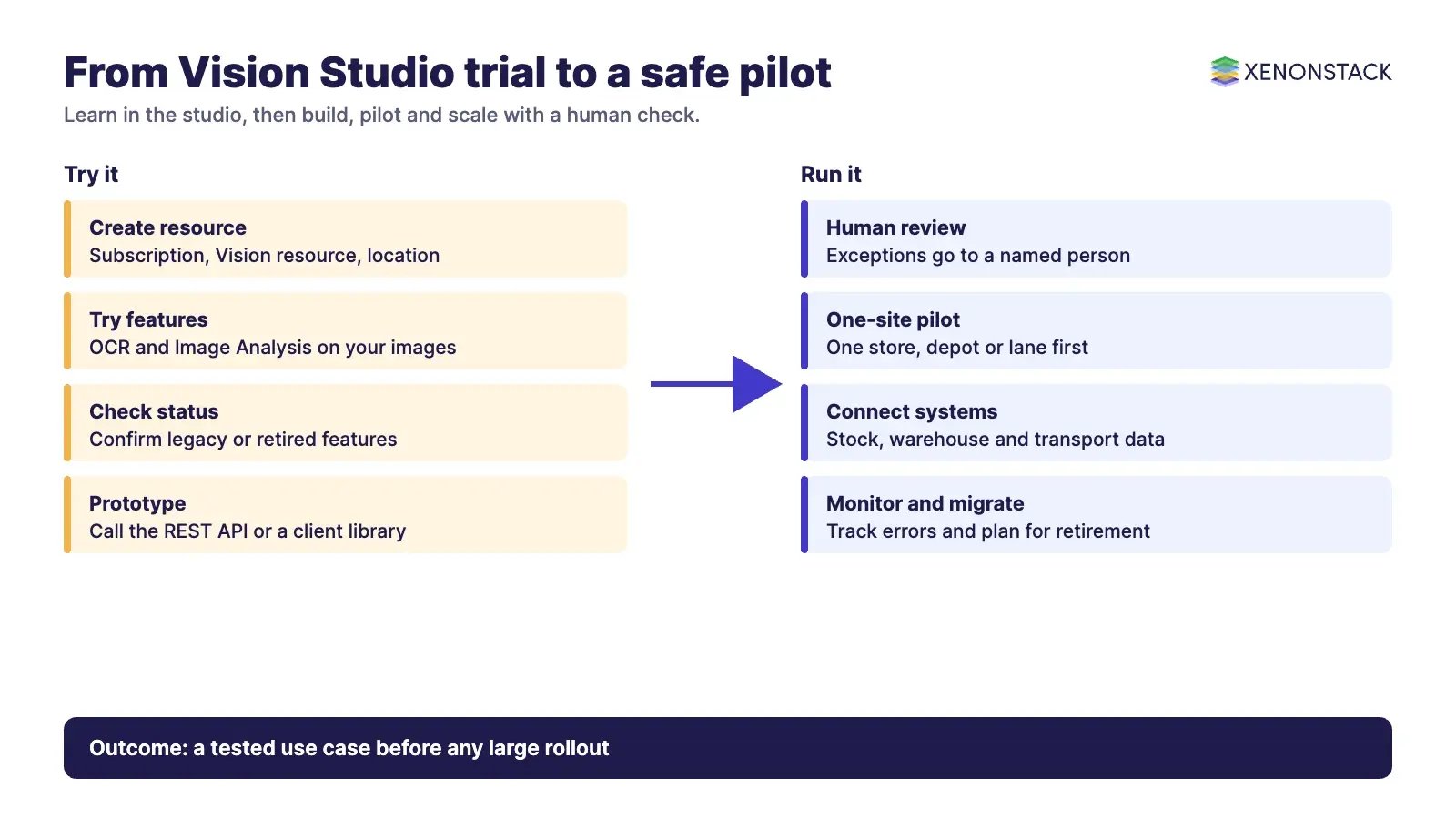
The documentation lists four steps: create an Azure subscription, open the Vision Studio website, choose or create a Vision resource (name, location and resource group), then try the features on the home page. Microsoft advises choosing a location close to you for lower latency, and notes that the free pricing tier keeps working after a free trial or service credit ends. You cannot delete a resource from the studio itself, so use the Azure portal or the Azure CLI for clean-up.
| Stage | What to do | What to decide |
|---|---|---|
| Explore | Try OCR and Image Analysis on your own sample images in the studio | Which images are representative: lighting, angles, damage |
| Prototype | Call the REST API or a client library from a small script | Accuracy you need, and who reviews the exceptions |
| Pilot | Run in one store, depot or lane with a human check | Data retention, privacy and rollback rules |
| Scale | Connect results to stock, warehouse and transport systems | Monitoring, cost and the migration plan for legacy features |
What should you watch for when you implement it?
Image quality, edge cases and security decide whether a pilot survives. Test with photos from the real environment, not stock images. Plan for adversarial inputs and manipulated images by reading our guide to robust computer vision. If the use case depends on live camera feeds, see real-time video analytics for the pipeline questions. Related Azure services appear in our guides to Azure Cognitive Search and generative AI and Azure Text Analytics and natural language processing, and operational support is covered under Microsoft Azure managed services.
How do AI agents change computer vision workflows?
A vision model returns a label or a block of text. An AI agent can take that output and act on it: check it against an order, route an exception to a person, or open a ticket, while recording why. That moves the question from "what is in the image" to "what should happen next, and who approved it". Agent policy is also where you set limits on what an agent may do without review. For camera and inference workloads at the edge, see XenonStack's inference infrastructure.
What should you do first?
- Pick one image-based task with a clear owner, such as reading delivery notes or checking shelf photos.
- Collect a small set of real images, including poor ones, and try them in Vision Studio.
- Check whether each feature you rely on is current or legacy before you commit.
- Define the human review step and the data retention rule.
- Run a one-site pilot and measure errors before connecting any downstream system.
If you want help choosing a first use case, talk to a specialist or contact us.
To map one decision your agents make from an image, and the data and policy it depends on, book a Context Workshop. See what happens in the workshop.
Frequently asked questions
Do I need to code to use Azure Vision Studio?
No. Microsoft says you can start experimenting without writing code, then use client libraries and REST APIs to embed the services in your own applications.
Is Image Analysis 4.0 still available?
Microsoft states that Image Analysis 4.0 is deprecated and will be retired on September 25, 2028, after which calls to the service will fail. Check the migration guide before you build on it.
What can OCR read?
Microsoft describes the OCR service as extracting text from images, and says it uses the Read API to extract printed and handwritten text.
Is there a free way to try it?
Microsoft says you can create an Azure subscription for free, and that the free pricing tier keeps working after a free trial or service credit expires.
Is face analysis suitable for retail?
It is technically available as a separate Azure service, but it carries privacy and legal obligations. Involve legal and privacy teams, and confirm consent and lawful basis, before any pilot.
Follow XenonStack on LinkedIn: XenonStack on LinkedIn for new guides on agentic AI, data and platform engineering.
Ready to put AI agents to work? Explore ElixirClaw, the agentic OS platform to build, orchestrate and govern AI agents.
Explore the XenonStack platform family: ElixirData · ElixirClaw · ElixirHub · NexaStack · MetaSecure · Neural AI · AgentGRC · AgentSRE · AgentAnalyst · AgentInstruct · AgentRAI · AgentScrum · AgentSearch · AgentForce · AI Aviator · SAIF Aviator · CohortIQ · XenonStack AI · XenonStack UAE