Key takeaway
- Kubernetes persistent storage: PVs, PVCs, StorageClasses and CSI drivers, which in-tree plugins were removed, and how to choose block, file or object.
Persistent storage in Kubernetes means a volume that outlives the pod that uses it. You request it with a PersistentVolumeClaim, a StorageClass tells the cluster how to provision it, and a CSI (Container Storage Interface) driver does the actual work against your block, file or object backend. Container storage is ephemeral, so without this chain a restarted database pod starts empty.
The main change since this guide was first written is that the old built-in storage plugins are gone. According to the Kubernetes persistent volumes documentation, the cephfs, glusterfs and rbd types are no longer available, and the AWS EBS and Azure Disk in-tree drivers were removed in v1.27. This guide shows what to use instead, how to choose between block, file and object storage, and how to run storage classes safely. For the wider picture of stateful workloads, see our guide to stateful and stateless applications.
What is persistent storage in Kubernetes?
Kubernetes separates storage into three objects. A PersistentVolume (PV) is a piece of storage in the cluster, created by an administrator or dynamically provisioned. A PersistentVolumeClaim (PVC) is a request for storage by a user, with a size and access mode. A StorageClass describes a class of storage and the provisioner that creates it. The persistent volumes documentation states that this split lets a workload ask for storage without knowing where it comes from.
Access modes decide how a volume can be shared. The same page defines them as follows:
| Access mode | Meaning (per Kubernetes docs) |
|---|---|
| ReadWriteOnce (RWO) | Mounted read-write by a single node. Several pods on that node can still use it. |
| ReadOnlyMany (ROX) | Mounted read-only by many nodes. |
| ReadWriteMany (RWX) | Mounted read-write by many nodes. |
| ReadWriteOncePod (RWOP) | Mounted read-write by a single pod across the whole cluster. Stable since Kubernetes v1.29. |
Choose RWOP when exactly one pod must ever write to a claim, for example a single-writer database. Choose RWX only when your application is built for shared writes and your backend supports it.
Which storage type fits: block, file or object?
| Type | How data is stored | Best fit | Trade-off |
|---|---|---|---|
| Block | Fixed-size blocks addressed by location | Databases and single-writer stateful services | Usually attached to one node at a time |
| File | Files and directories in a shared file system (for example NFS or CephFS) | Content shared by many pods | Shared writes need an application that copes with them |
| Object | Objects addressed by ID, accessed over an API (for example S3) | Backups, artefacts, data lakes | Not mounted as a normal disk, and latency is higher than block |
Object stores such as MinIO sit beside Kubernetes volumes rather than behind a PVC. Our MinIO architecture guide covers that pattern, and the RAID storage guide covers disk redundancy underneath block storage.
Which persistent storage option should you choose?
Every option below is consumed through a CSI driver. Driver names and access modes are taken from the Kubernetes CSI driver list, which notes that its table has not been validated by Kubernetes SIG-Storage, so confirm details on each vendor page.
| Option | CSI driver | Type and access (per CSI list) | When it fits |
|---|---|---|---|
| Amazon EBS | ebs.csi.aws.com | Block, single pod read-write | Workloads on AWS or Amazon EKS that need block volumes |
| Azure Disk | disk.csi.azure.com | Block, single pod read-write | Workloads on Azure or AKS |
| Google Compute Engine persistent disk | pd.csi.storage.gke.io | Block, single pod read-write | Workloads on Google Cloud or GKE |
| Ceph RBD | rbd.csi.ceph.com | Block, single pod read-write | On-premises or hybrid block storage, usually run through Rook |
| CephFS | cephfs.csi.ceph.com | File, many pods read-write | Shared file storage on an existing Ceph cluster |
| NFS | nfs.csi.k8s.io | File, many pods read-write | Simple shared storage where you already run an NFS server |
| OpenEBS | See the OpenEBS docs | Local volumes (single node) or replicated volumes | Clusters that turn node-attached disks into Kubernetes volumes |
Ceph and Rook. Rook describes itself as an open source cloud-native storage orchestrator for Ceph, hosted by the CNCF as a graduated project, and Ceph offers file, block and object storage. The Ceph documentation says Ceph block images are provisioned for Kubernetes by Ceph-CSI, and that older hand-edited manifests are superseded by the Ceph-CSI-Operator and Helm charts. Our Kubernetes operators guide explains why operators suit this kind of storage.
OpenEBS. According to its documentation, OpenEBS turns any storage available to Kubernetes worker nodes into local or replicated persistent volumes. Local volumes are accessible only from a single node, and replicated volumes copy data across nodes.
GlusterFS. Kubernetes no longer includes the glusterfs volume type. Check the project page for its current maintenance status before choosing it for a new design, and prefer CephFS or NFS for shared file storage.
What changed: which in-tree plugins are gone?
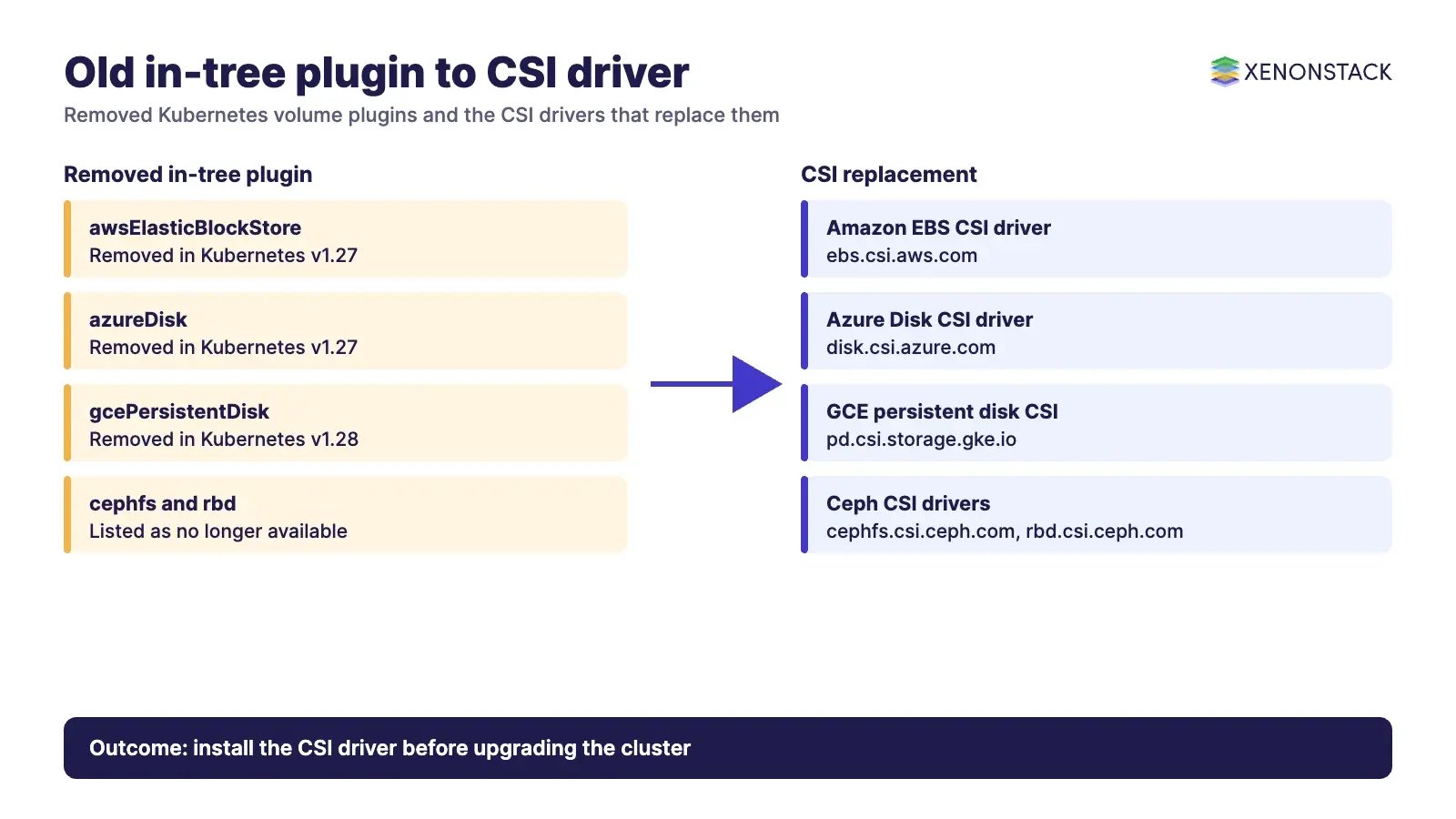
Kubernetes moved storage plugins out of its core code into CSI drivers. Existing claims can keep working through CSI migration only if the matching CSI driver is installed, because the Kubernetes docs say the core does not install it for you.
| Old volume type | Status per Kubernetes docs | Use instead |
|---|---|---|
| awsElasticBlockStore | In-tree driver deprecated in v1.19 and removed in v1.27 (StorageClass page) | Amazon EBS CSI driver |
| azureDisk | Deprecated in v1.19 and removed in v1.27 (StorageClass page) | Azure Disk CSI driver |
| gcePersistentDisk | Deprecated in v1.17 and removed in v1.28 (volumes page) | Google Compute Engine persistent disk CSI driver |
| cephfs | Removed in v1.31 (Kubernetes v1.31 upcoming changes post) | CephFS CSI driver |
| rbd | Listed as no longer available (persistent volumes page); v1.31 removal announced | Ceph RBD CSI driver |
| glusterfs | Listed as no longer available (persistent volumes page) | CephFS, NFS or a vendor CSI driver |
| nfs | Still supported as a volume type | NFS CSI driver if you want dynamic provisioning |
If you upgrade a cluster that still uses the removed types, install the CSI driver first and re-deploy workloads that reference the old plugin, as the Kubernetes v1.31 notes advise for CephFS and Ceph RBD.
How do StorageClasses work in Kubernetes?
A StorageClass names a provisioner and its parameters. The StorageClass documentation says each class contains provisioner, parameters and reclaimPolicy, and that the provisioner field must be specified. Dynamically created volumes use the class reclaim policy, which defaults to Delete if you do not set one. Use Retain for data you cannot afford to lose by accident.
- volumeBindingMode.
Immediateprovisions as soon as the claim is created.WaitForFirstConsumerdelays binding until a pod uses the claim, so the volume is created in a topology the pod can reach. This avoids unschedulable pods on zone-bound disks. - allowVolumeExpansion. Set to true to let supported volumes grow. The docs state you can grow a volume but not shrink it.
- Default class. The annotation
storageclass.kubernetes.io/is-default-class: "true"marks the default. If more than one class carries it, a claim with no class uses the most recently created default. - Local volumes. The docs say local volumes do not support dynamic provisioning, but you should still create a StorageClass to delay binding until the pod is scheduled.
- NFS. NFS has no internal provisioner, so use an external one or the NFS CSI driver.
A current StorageClass for the Amazon EBS CSI driver looks like this. Check the parameter names for your driver version in its own documentation.
apiVersion: storage.k8s.io/v1
kind: StorageClass
metadata:
  name: ebs-gp3
provisioner: ebs.csi.aws.com
parameters:
  type: gp3
reclaimPolicy: Retain
allowVolumeExpansion: true
volumeBindingMode: WaitForFirstConsumer
A claim that uses it, and a pod that mounts the claim:
apiVersion: v1
kind: PersistentVolumeClaim
metadata:
  name: app-data
spec:
  accessModes:
    - ReadWriteOnce
  storageClassName: ebs-gp3
  resources:
    requests:
      storage: 10Gi
---
apiVersion: v1
kind: Pod
metadata:
  name: app
spec:
  containers:
    - name: app
      image: registry.example.com/app:1.0
      volumeMounts:
        - name: data
          mountPath: /var/lib/app
  volumes:
    - name: data
      persistentVolumeClaim:
        claimName: app-data
For production stateful services, run databases through a StatefulSet or an operator rather than a bare pod, so each replica gets its own claim.
How do you deploy each storage backend?
- Amazon EBS. The EBS volume and the instance must be in the same Availability Zone, per the AWS documentation. On Amazon EKS, AWS recommends installing the EBS CSI driver as an EKS add-on, and EKS Auto Mode uses the
ebs.csi.eks.amazonaws.comprovisioner. EBS volumes cannot be mounted to Fargate pods. - Azure Disk. According to Microsoft Learn, each AKS cluster ships built-in Azure Disk storage classes backed by
disk.csi.azure.com, includingdefault(Standard SSD) andmanaged-csi-premium(Premium SSD). - Google Cloud. The GKE documentation names the driver
pd.csi.storage.gke.ioand says it is always enabled in Autopilot clusters, while Standard clusters need it enabled. - Ceph. Deploy Ceph-CSI through its operator or Helm chart, or run the whole cluster with Rook. Never paste Ceph keys into manifests or blog snippets; keep them in Kubernetes Secrets.
- NFS. You need your own NFS server with the share exported. The Kubernetes docs add that you cannot set NFS mount options in a pod spec, but you can through a PersistentVolume.
- OpenEBS. Follow the install steps in the OpenEBS documentation for your chosen volume type, and pin the chart version you tested.
How do you manage StorageClasses day to day?
- Create. Write the class as YAML and apply it with
kubectl apply -f. Use one class per service level, for example standard, fast and retained. - Change. Edit the manifest and re-apply it, then test on a new claim before relying on it.
- Delete.
kubectl delete storageclass <name>removes the class. Check which claims reference it first. - Review. List classes with
kubectl get storageclassand confirm exactly one default.
What should enterprise teams govern?
Storage choices carry security, cost and recovery decisions. Treat them as policy, not as defaults.
| Area | What to decide | Why it matters |
|---|---|---|
| Data protection | Reclaim policy, snapshots and backup ownership | Delete removes the backing storage asset, per the Kubernetes docs |
| Access | Access modes and who can create claims | RWX and shared file stores widen the blast radius of a bad write |
| Topology | WaitForFirstConsumer and zone placement | Zone-bound disks can leave pods unschedulable |
| Lifecycle | Driver versions and Kubernetes upgrades | Removed in-tree plugins break claims without a CSI driver |
| Cost | Volume size, class and expansion policy | Volumes can grow but not shrink |
AI agents and retrieval stores add stateful workloads, such as vector databases and agent memory, which need the same discipline. ElixirData Context OS keeps governed context, versioned policy and decision traces in one decision layer above AI agents, and ElixirClaw is an agentic OS platform to build, orchestrate and govern AI agents and automation workflows while keeping humans in control. Both depend on storage that is backed up, access controlled and recoverable.
When should you not use a given option?
- Do not put a single-writer database on an RWX file share only because it is available.
- Do not build new designs on GlusterFS or any removed in-tree plugin.
- Do not use
hostPathoutside single-node testing; the Kubernetes docs say it will not work in a multi-node cluster. - Do not skip restore tests; a retained volume is not a backup.
What is a sensible adoption sequence?
- Inventory every PV, claim and class, and note which use removed in-tree plugins.
- Install the CSI driver for each backend and confirm the version supports your Kubernetes release.
- Create a small set of classes with WaitForFirstConsumer and an explicit reclaim policy.
- Move stateful workloads to StatefulSets or operators, then test snapshot and restore.
- Review classes, defaults and drivers at every Kubernetes upgrade.
Related reading: Kubernetes architecture components, Helm for Kubernetes and Kubernetes operators.
To map one storage or data-protection decision your AI agents depend on, and the context and policy behind it, book a Context Workshop. See what happens in the workshop.
Frequently asked questions
What is persistent storage in Kubernetes?
It is storage that outlives a pod. You request it with a PersistentVolumeClaim, a StorageClass and a CSI driver provision it, and the data stays when the pod restarts.
Which in-tree storage plugins have been removed?
According to the Kubernetes documentation, awsElasticBlockStore and azureDisk were removed in v1.27, gcePersistentDisk in v1.28, and cephfs, glusterfs and rbd are listed as no longer available. Use the matching CSI drivers.
What does WaitForFirstConsumer do?
It delays volume binding and provisioning until a pod that uses the claim is scheduled, so the volume is created in a location the pod can reach. Immediate binds as soon as the claim is created.
What is the difference between RWO and RWOP?
ReadWriteOnce allows one node to mount the volume read-write, and several pods on that node can use it. ReadWriteOncePod, stable since Kubernetes v1.29, allows only one pod in the whole cluster.
Which storage should I use for shared files?
CephFS and NFS are listed in the Kubernetes CSI driver list as supporting read-write access from multiple pods. Confirm performance and support on each vendor page before choosing.
Follow XenonStack on LinkedIn: XenonStack on LinkedIn for new guides on agentic AI, data and platform engineering.
Explore the XenonStack platform family: ElixirData · ElixirClaw · ElixirHub · NexaStack · MetaSecure · Neural AI · AgentGRC · AgentSRE · AgentAnalyst · AgentInstruct · AgentRAI · AgentScrum · AgentSearch · AgentForce · AI Aviator · SAIF Aviator · CohortIQ · XenonStack AI · XenonStack UAE