Key takeaway
- Continuous testing runs automated checks at every pipeline stage. See how to apply it to integration data preparation, with test types and first steps.
Continuous testing is the practice of running automated tests at every stage of the delivery pipeline, so that each change gets fast feedback on quality and risk. IBM describes it as "automated feedback at different stages of the software development life cycle", and as a key part of making continuous integration and continuous delivery work. Applied to integration data, it means testing the data as it is gathered, cleansed, transformed and loaded, not only at the end.
This guide is for data engineers, QA leads and DevOps teams who prepare data for integration and want to catch errors early. It explains what continuous testing is, which tests matter, how to test each step of data preparation, the limits to expect and how AI agents change the work. For the wider practice, see our guide to continuous testing in DevOps.
What is continuous testing?
In a DevOps pipeline, continuous testing runs alongside continuous integration. According to IBM, it works to "automatically validate any new code integrated into the application": prepared test scripts run whenever new code is merged, usually starting with integration tests and moving through system, regression and user-acceptance testing. A failed test sends the change back to the developers; a change that passes moves to the next stage, usually continuous delivery.
The practical idea is to embed small quality checks throughout the pipeline rather than saving testing for the end. That is why it sits close to the culture change behind DevOps processes, where development, operations and QA share responsibility for quality. It is also a risk management activity: because it is not always viable to run every test on every change, teams choose which tests run where. Our article on continuous load testing shows the same idea applied to performance.
What is integration data and why does it need testing?
Integration data is the data you combine from several sources so that systems and analysts can use it together. Preparing it means identifying, cleansing and transforming raw data into usable sets, including correcting errors, reformatting fields and combining datasets. Our data preparation roadmap covers that process in detail.
Every step can introduce an error: a source changes a field name, a transformation drops a value, a load duplicates rows. If those errors are found only when a report looks wrong, tracing them back is slow. Testing at each step finds them while the cause is still close.
How do you test each step of integration data preparation?
The steps vary by industry and organisation, but the pattern is the same. The table pairs each step with a test that can run automatically on every change or data load.
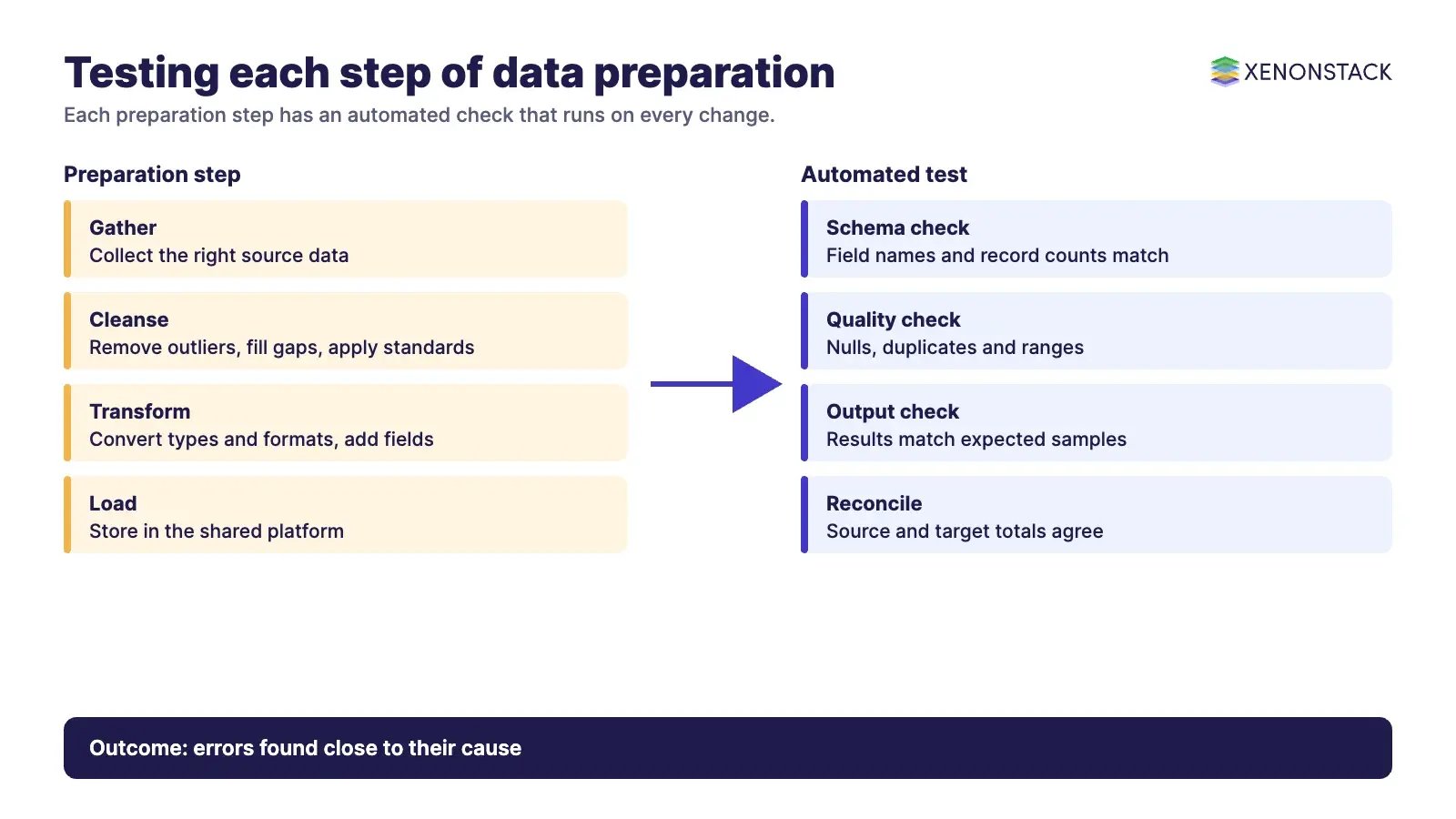
| Step | What happens | Automated test to run |
|---|---|---|
| Access or gather | Find and collect the right source data | Check the source schema, field names and record counts against expectations |
| Cleanse and assess | Remove outliers, fill missing values, apply standards | Check for nulls, duplicates, out-of-range values and invalid formats |
| Transform and enrich | Convert to target types and formats, add derived fields | Compare transformed output with expected results for sample records |
| Reformat | Make fields consistent for downstream tools | Validate data types, date formats and code lists |
| Store and use | Load to the warehouse or shared platform | Reconcile record counts and totals between source and target |
| Automate repeatedly | Rerun the pipeline whenever data or logic changes | Run the full suite on every merge and every scheduled load |
Test data itself needs planning. Useful requirements to define up front are the primary variables, field dependencies, injection points, data formats and expected outputs, so that inputs and outputs can be unified for test automation.
Which kinds of tests does continuous testing use?
IBM lists several test types that fit a continuous approach. Not all apply to data work, but most have a data equivalent.
| Test type | Purpose in general | Data preparation example |
|---|---|---|
| Shift-left | Begin testing early in the life cycle to prevent costly debugging later | Validate source contracts before building transformations |
| Unit | Small, focused checks across builds | Test one transformation rule on a handful of rows |
| Integration | Find errors when modules interact | Test a join between two prepared datasets |
| Regression | Confirm that fixes do not change existing behaviour | Rerun saved cases after a mapping change |
| Performance | Assess overall system performance | Time a full load on realistic volumes |
| Shift-right | Test later stages such as user experience and failure tolerance | Monitor live data quality after release |
What are the benefits and limits of continuous testing?
IBM lists faster error remediation, better user experience and lower disruption costs among the benefits, because granular testing catches errors that could otherwise cause wide-reaching outages. For integration data, the benefits are earlier failure detection, cleaner data for decisions and a repeatable record of what was checked.
The limits are real. The same source says "The physical environment of every one of the teams is impossible to reproduce for continuous testing", and recommends virtualisation to recreate dependencies. Inconsistent testing "generates a series of misleading test results". Data teams add their own challenge: realistic test data often contains sensitive information, so it must be masked or generated. Moving from manual checks to full automation also takes planning, which is why a staged approach works better than a big switch. For a managed service view, see big data testing consulting and services.
How do AI agents change continuous testing?
Agents can help at the points where testing is slow or repetitive: drafting test cases from a data mapping, triaging a failed run to the likely cause, proposing a fix for a reviewer to approve and rerunning the suite. They should work inside clear limits, with logs of what they ran and changed, and with a person approving anything that alters production data or pipeline logic. ElixirClaw is XenonStack’s AI agents computing platform for building and running agents and automation workflows.
What should you do first?
- Map your integration pipeline and list the steps where errors would be most costly.
- Add one automated check per step, starting with schema and record count checks.
- Run the checks on every merge and on every scheduled load, and fail the build on a mismatch.
- Define your test data requirements and decide how sensitive data will be masked.
- Review failures weekly and add a test for every defect that reaches production.
To map one decision your agents make, and the data and policy it depends on, book a Context Workshop. See what happens in the workshop.
Frequently asked questions
What is continuous testing in simple terms?
It is running automated tests at every stage of the delivery pipeline, so every change gets quick feedback on quality and risk instead of waiting for a late test phase.
Why test integration data continuously?
Errors can enter at every step of data preparation. Testing at each step finds them close to the cause, which makes them faster to trace and fix.
What is the difference between shift-left and shift-right testing?
Shift-left testing starts early in the life cycle to prevent costly debugging later. Shift-right testing focuses on later stages such as user experience, performance and failure tolerance.
Does continuous testing mean running every test on every change?
No. It is not always viable to run all tests every time, so teams decide which fast checks run on each change and which heavier tests run less often.
Which checks should data teams automate first?
Start with schema checks, record count reconciliation, and null and duplicate checks, because they are quick to run and catch many common integration errors.
Follow XenonStack on LinkedIn: XenonStack on LinkedIn for new guides on agentic AI, data and platform engineering.
Ready to put AI agents to work? Explore ElixirClaw, the agentic OS platform to build, orchestrate and govern AI agents.
Explore the XenonStack platform family: ElixirData · ElixirClaw · ElixirHub · NexaStack · MetaSecure · Neural AI · AgentGRC · AgentSRE · AgentAnalyst · AgentInstruct · AgentRAI · AgentScrum · AgentSearch · AgentForce · AI Aviator · SAIF Aviator · CohortIQ · XenonStack AI · XenonStack UAE