Key takeaway
- Progressive web apps framework guide for 2027: React, Angular, Vue, SvelteKit and Ionic options, iOS and Safari support, tooling and when to go native.
A progressive web apps framework is the front-end stack you use to build an installable, offline-capable web app: React with Next.js or Vite, Angular with its service worker package, Vue, SvelteKit, Ionic or Lit. The framework does not make an app a PWA on its own. What makes it one is a web app manifest, a service worker where you need offline or push, and delivery over HTTPS. The right framework is usually the one your team already runs well, plus the PWA tooling that fits it.
The platform has changed more than the frameworks. iOS and iPadOS 16.4 added Web Push for Home Screen web apps, iOS 26 opens every site added to the Home Screen as a web app, Chrome dropped the PWA category from Lighthouse, and Create React App is deprecated. This guide sets out what each option suits in 2026, what to check on iOS and Safari, and when a native app is still the better call. For the architecture view, see our companion piece on progressive web app development and architecture.
What is a progressive web apps framework?
MDN defines a progressive web app as "an app that's built using web platform technologies, but that provides a user experience like that of a platform-specific app". Two building blocks do most of the work. The web app manifest describes the app and how it integrates with the operating system, and the service worker acts as a proxy between the app, the browser and the network, so it can serve cached responses and handle push and background events.
A framework sits on top of these platform features. It shapes how you build the interface, render pages and manage state, and most now offer an official or well-supported way to generate the manifest and service worker. Because a PWA is still a web page, rendering cost matters as much as caching. Our guide to the render tree and the critical rendering path explains where that time goes.
| Building block | What it does | Required to install? |
| HTTPS | Secure delivery; service workers only run in secure contexts (localhost is allowed for development) | Yes |
| Web app manifest | Name, icons, start URL and display mode, linked from every page | Yes in Chromium browsers; no longer required on iOS 26 and macOS Add to Dock |
| Service worker | Offline caching, push and background events; runs off the main thread with no DOM access | Not for installability per MDN, but needed for offline and Web Push |
What has changed for PWAs since this guide was first written?
Several claims that were common a few years ago are now wrong. The table below lists the ones that most affect framework and tool choices.
| Older assumption | Current status | Source |
| PWAs cannot send push notifications on iOS | Web Push works for web apps added to the Home Screen since iOS and iPadOS 16.4; permission must follow a direct user action | WebKit, Feb 2023 |
| A site needs a manifest or meta tag to open as an app on iPhone | From iOS 26 and iPadOS 26, every site added to the Home Screen opens as a web app by default; a manifest still supplies icons and other settings | WebKit, Sep 2025 |
| Start a React PWA with Create React App | Create React App was deprecated for new apps on 14 February 2025; React recommends Next.js, React Router or Expo, or build tools such as Vite | react.dev |
| Score your app in the Lighthouse PWA category | Chrome removed the PWA category from Lighthouse; installability checks remain in Chrome DevTools | Chrome for Developers |
| A fetch-handling service worker is needed to install | Chrome dropped that requirement for installing from the browser menu (version 108 on mobile, 112 on desktop) | Chrome for Developers |
| Polymer is a leading PWA framework | Lit is described as "a successor to the Polymer library", built by the same team | lit.dev |
| Vue CLI is the standard Vue starter | Vue CLI is in maintenance mode; Vue recommends Vite via create-vue for new projects | vuejs.org |
Where do PWAs stand on iOS and Safari going into 2027?
iOS is no longer the blocker it once was, but it still behaves differently from Android and desktop Chromium. According to WebKit, iOS and iPadOS 16.4 added Web Push, the Badging API and support for the manifest id member for Home Screen web apps, and let third-party browsers offer Add to Home Screen. Push is available only after the user adds the app to the Home Screen, not to sites open in Safari.
WebKit's Safari 26.0 notes go further: on iOS 26 and iPadOS 26 any site added to the Home Screen opens as a web app by default, users can turn off "Open as Web App", and a manifest is no longer required, although its icons and settings are used when present. On the Mac, Add to Dock creates a web app with or without a manifest. Safari 27.0 (17 September 2026) added the Service Worker static routing API, which WebKit says lets high-performance PWAs skip the service worker for selected requests. WebKit has also proposed Declarative Web Push, which shows notifications from a JSON payload without needing an installed service worker; the post said it could be tested on iOS 18.4.
Two practical gaps remain. Chromium's beforeinstallprompt event does not work on Safari for iOS, so the Next.js PWA guide recommends showing iOS users a short "Share, then Add to Home Screen" instruction instead of a custom install button. And Firefox on desktop does not install PWAs from a manifest, according to MDN. In the EU, Apple planned to disable Home Screen web apps in iOS 17.4 under the Digital Markets Act, then reversed the decision on 1 March 2024, as reported by MacRumors. Platform policy can move, so test on real devices before each release.
| Platform | How users install | Push notifications |
| iOS and iPadOS 16.4 and later | Share menu, Add to Home Screen, in Safari, Chrome, Edge, Firefox and Orion | Yes, for Home Screen web apps after a user action |
| macOS (Safari 17 on Sonoma and later) | File, Add to Dock, with or without a manifest | Safari 16 on macOS 13 or later supports Web Push (per Next.js docs) |
| Android | Chrome with Google Mobile Services and Samsung Internet install a WebAPK; other browsers add a shortcut | Yes in Chromium browsers and Firefox |
| Desktop Chromium (Chrome, Edge) | Install from the address bar or menu once the manifest criteria are met | Yes |
Which progressive web app framework fits which team?
Pick the framework for your product and team first, then add the PWA layer. Each option below has a documented route to a manifest and service worker.
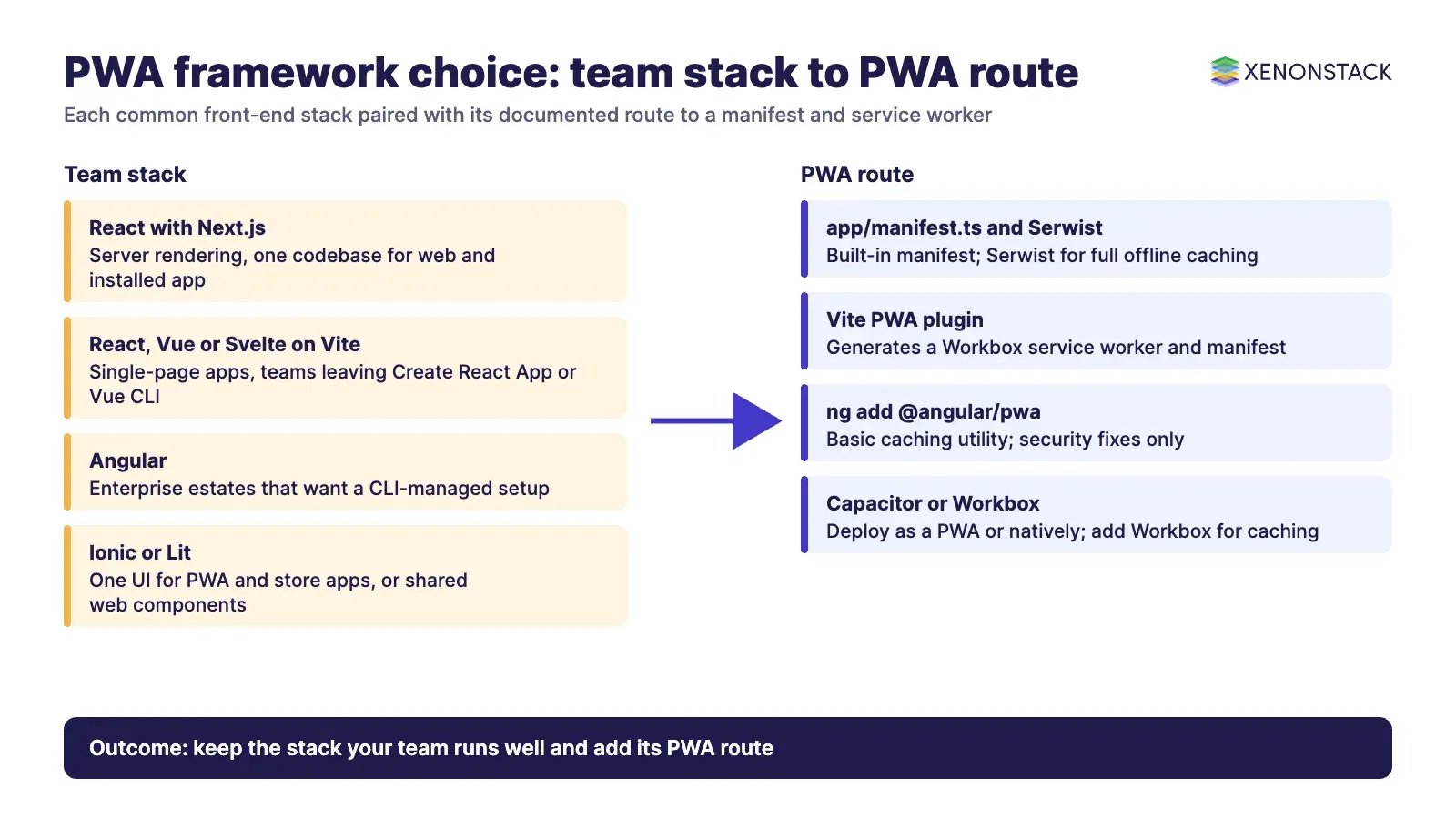
| Framework | PWA route | When it fits | Watch out for |
| React with Next.js | Built-in app/manifest.ts; Web Push guide; Serwist suggested for full offline caching |
React teams that want server rendering and one codebase for web and installed app | Offline caching is not built in; the useOffline hook is experimental |
| React, Vue, Svelte, Solid or Preact with Vite | Vite PWA plugin generates a Workbox service worker and manifest | Single-page apps and teams leaving Create React App or Vue CLI | You own the caching strategy and update prompts |
| Angular | ng add @angular/pwa adds the service worker package, manifest link, icons and ngsw-config.json |
Enterprise Angular estates that want a CLI-managed setup | Angular calls its service worker "a basic caching utility"; only security fixes are being accepted |
| SvelteKit | Built-in service worker file, bundled and registered automatically in production | Lean apps where you want direct control of the worker | SvelteKit suggests the Vite PWA plugin if you prefer Workbox |
| Ionic (v9) | UI toolkit for Angular, React and Vue; deploy as a PWA or natively through Capacitor | Teams that want one UI for a PWA and store apps | Native builds add store and plugin maintenance |
| Lit | Web components; pair with Workbox or Vite PWA | Design systems shared across several frameworks; Polymer migrations | Less application scaffolding than a full framework |
If your developers are moving between the two most common enterprise stacks, our learning paths for React for Angular developers and Angular for React developers cover the current versions and patterns.
Which tools support building, testing and shipping a PWA?
The tooling has settled around a small set of options. Older advice to use Webpack as the offline tool or to chase a Lighthouse PWA score no longer applies.
| Tool | What it does | Use it when |
| Workbox | "Production-ready service worker libraries and tooling" for routing and caching | You want tested caching strategies instead of hand-written fetch handlers |
| Vite PWA | Framework-agnostic Vite plugin; generates the service worker via Workbox; integrations for SvelteKit, Nuxt, Astro and others | Your build already runs on Vite |
| Serwist | Service worker library the Next.js docs point to for offline caching | Next.js apps that need full offline support |
| Chrome DevTools | Installability checks after the Lighthouse PWA category was removed | Every build; Lighthouse is still useful for performance, accessibility and SEO |
| PWABuilder and Bubblewrap | Package a PWA for app stores; Bubblewrap is the command-line tool PWABuilder uses for Android | You need a Google Play or Microsoft Store listing as well as the web app |
Lighthouse remains a good performance and SEO check, which our guide to Google Lighthouse covers. For store listings, web.dev notes that Google Play and the Microsoft Store charge a one-time developer fee while the Apple App Store charges an annual one.
PWA or native app: when does each fit?
A PWA ships updates the moment you deploy, with no store review, and reaches every platform from one codebase. A native app still wins where you need deep hardware access, heavy background work or a store-first distribution model. Many enterprises run both: a PWA for reach and quick tasks, native apps for power users.
| Need | PWA | Native app |
| Release speed | Deploy to the server; no store approval | Store review for each release |
| Discovery | Search engines and links; optional store listing | App store search |
| Push on iPhone | Only after Add to Home Screen | Standard |
| Device APIs and background work | Varies by browser; check support for each API | Full platform access |
| Offline | What the service worker caches, plus IndexedDB | Whatever the app stores locally |
What governance, security and cost questions should leaders ask?
A service worker is powerful because it sits between your app and the network. That also makes it a control point to govern. Service workers only run over HTTPS, and the Next.js guide recommends serving the worker file with Cache-Control: no-cache, no-store, must-revalidate and a strict Content Security Policy so users always get the latest, same-origin version. Decide which data may sit in browser caches and IndexedDB on shared or unmanaged devices, how long it stays, and how a forced update reaches users who keep an old version open. Our guide to website security covers the wider threat picture.
Cost usually falls compared with separate iOS, Android and web teams, but it does not vanish. Budget for device testing on iOS, Android and desktop, push infrastructure (VAPID keys and a subscription store), and optional store fees. When a PWA becomes the front end for AI agents that act on enterprise data, the governance question moves from the browser to the agent. ElixirClaw is an agentic OS platform to build, orchestrate and govern AI agents and automation workflows while keeping humans in control, and ElixirData Context OS keeps governed context, versioned policy and decision traces in one decision layer above AI agents.
How should an enterprise adopt a PWA framework?
- Start from the job, not the framework. List the tasks users must complete offline, the notifications they need, and the devices in use.
- Keep your current framework where it is healthy. Add the official or recommended PWA route (Next.js manifest,
@angular/pwa, Vite PWA, SvelteKit service worker) rather than switching stacks. - Retire deprecated starters. Move Create React App and Vue CLI projects to a supported framework or Vite before adding PWA features.
- Design the caching and update policy. Choose what is cached, for how long, and how users are told about a new version.
- Test install and push on real devices. Cover iOS Home Screen behaviour, Android WebAPK installs and desktop Chromium.
- Decide on store listings last. Use PWABuilder or Bubblewrap only where a store presence adds reach.
Teams that run this as a series of short increments can track the work in their delivery tooling; AgentScrum from ElixirClaw automates sprint planning and Scrum ceremonies with agentic AI.
When should you not build a PWA?
Skip the PWA layer, or keep it minimal, when the experience depends on normal browsing with the address bar, back and forward navigation and always-live content. Choose native when the product depends on hardware or background capabilities that browsers do not expose on your users' devices, or when push reach on iPhone cannot depend on users adding the app to the Home Screen. And do not rely on Angular's service worker for complex offline logic: Angular itself points to native browser APIs for advanced caching.
To map one front-end decision your agents should make, and the context and policy it depends on, book a Context Workshop. See what happens in the workshop.
What should you plan for in 2027?
Planning for 2027 means treating the platform as a moving target and keeping your framework choice simple. Three habits help most.
- Test on real devices before each release. Platform policy can move, so check install and push behaviour on iOS Home Screen, Android and desktop Chromium rather than relying on last year's notes.
- Keep a healthy framework and retire deprecated starters. Add the official PWA route for the stack you already run, and move Create React App and Vue CLI projects to a supported option before adding PWA features.
- Own the caching and update policy. Decide what is cached, for how long, and how users learn about a new version, and keep store listings as a last step.
Frequently asked questions
What is the best progressive web apps framework?
There is no single best one. React with Next.js or Vite, Angular with @angular/pwa, Vue or Svelte with the Vite PWA plugin, Ionic and Lit all have documented PWA routes. Choose the framework your team already runs well and add the matching PWA tooling.
Do PWAs support push notifications on iPhone?
Yes. Since iOS and iPadOS 16.4, web apps added to the Home Screen can request push permission in response to a user action. Sites open in Safari without being added to the Home Screen cannot.
Does a PWA need a service worker to be installable?
Not for installation. MDN says a service worker is not required for installability, and Chrome dropped the fetch-handler requirement for installing from the browser menu. You still need one for offline support and Web Push.
Can I still use Create React App for a PWA?
React deprecated Create React App for new apps on 14 February 2025. Use a framework such as Next.js or React Router, or a build tool such as Vite with the Vite PWA plugin.
Does Lighthouse still score PWAs?
No. Chrome removed the PWA category from Lighthouse because those checks were tied to installability criteria. Installability checks remain in Chrome DevTools, and Lighthouse still audits performance, accessibility and SEO.
Follow XenonStack on LinkedIn: XenonStack on LinkedIn for new guides on agentic AI, data and platform engineering.
Explore the XenonStack platform family: ElixirData · ElixirClaw · ElixirHub · NexaStack · MetaSecure · Neural AI · AgentGRC · AgentSRE · AgentAnalyst · AgentInstruct · AgentRAI · AgentScrum · AgentSearch · AgentForce · AI Aviator · SAIF Aviator · CohortIQ · XenonStack AI · XenonStack UAE