Key takeaway
- Run the Point Cloud Library on AWS EC2 for 3D vision: instances, install, pipeline stages, Spot costs, Panorama status and a 3 to 5 year outlook.
A point cloud is a set of (x, y, z) points, often with colour or intensity, captured by LiDAR, stereo cameras or depth sensors. The Point Cloud Library (PCL) is the open-source toolkit most teams reach for to filter, align and segment that data, and Amazon EC2 is a practical place to run it when datasets are large or batch jobs come in bursts. Use EC2 for processing and prototyping; plan a separate path for devices on site.
This guide is for architects and engineering leads who need to decide whether PCL on EC2 fits their 3D workload, how to set it up, and how to keep it secure and affordable. It also states plainly that AWS Panorama, once the managed AWS option for on-site vision, has ended support, and it looks at what is likely to change over the next three to five years. For the edge side, see our guide to cloud versus edge for vision workloads.
What is the Point Cloud Library and what does it do with 3D data?
According to its site, PCL is a large-scale, open project for 2D and 3D image and point cloud processing, with algorithms for filtering, feature estimation, surface reconstruction, registration, model fitting and segmentation. It is released under the 3-clause BSD licence, which its site describes as free for commercial and research use, and it is split into smaller libraries that can be compiled separately.
A raw point cloud is noisy and large, so most pipelines follow the same order: clean the data, find distinctive points, align scans, then separate objects from surfaces. The sections below follow that order.
When does Amazon EC2 fit a 3D vision workload?
EC2 fits when the work is batch or bursty, the datasets are too large for a workstation, or you want to prototype before committing to device hardware. It fits less well when results must arrive on a device next to the sensor within a fixed latency; that case is covered in cloud versus edge for vision workloads.
| Option | When it fits | Current status to confirm |
|---|---|---|
| Compute-optimised instances | CPU-bound steps such as filtering, registration and segmentation | AWS lists C9g and C9gd as current-generation compute-optimised families on its instance types page; older C5 should be checked there |
| GPU instances (G and P families) | Steps that use an accelerator, or a visualisation workload | AWS lists G7 and G7e as current-generation accelerated instances, and its instance reference also lists G4dn, G5, G6 and P4 to P6 families; P3 does not appear in that table |
| Amazon EC2 Spot Instances | Fault-tolerant, re-runnable batch jobs | AWS says Spot is available at up to a 90% discount against On-Demand prices |
| AWS Panorama | On-site camera inference | Support ended on 31 May 2026; no longer an option for new designs |
Treat the table as a starting point. Instance families change, so confirm the current generation, regional availability and price on the AWS instance types page before you size a cluster, and profile one representative scan to see which pipeline step is the bottleneck. PCL has optional CUDA support (minimum CUDA 9.2 per its build documentation), so check that the specific module you need can use an accelerator before paying for one.
How do you set up an EC2 instance for point cloud processing?
- Choose the instance. Start from a compute-optimised family and add an accelerator only if profiling shows a step that uses it.
- Launch with a standard Linux image. The PCL site gives apt instructions for Ubuntu; other distributions need a source build.
- Restrict network access. Open only the ports you need, such as SSH from known addresses.
- Attach an IAM role. AWS states that IAM roles let applications on an instance make API requests with temporary credentials, without you managing or distributing keys, and recommends least-privilege policies.
- Plan storage. Keep large point clouds on Amazon EBS or instance storage while processing, and use Amazon S3 for durable input and output.
Security and cost are decided here, not later. A role scoped to one S3 bucket is easier to audit than shared access keys, and a role works with Spot Instances and Auto Scaling groups, where AWS notes that distributing credentials is difficult. See our FinOps for AWS guide for how to track spend by workload.
How do you install PCL on an EC2 instance?
There are two routes. On Ubuntu, the PCL downloads page recommends the package manager:
sudo apt install libpcl-devThe packaged version can trail the project. The latest release on the PCL GitHub releases page when we checked was 1.15.1, dated 26 August 2025, so compare it with the version your distribution installs. To get a specific release, build from source at github.com/PointCloudLibrary/pcl.
The build documentation lists Boost (1.65 or later), Eigen (3.3 or later) and FLANN (1.9.1 or later) as mandatory, VTK (6.2 or later) only for the visualisation library, and CMake 3.5.0 or later. A standard source build creates a build directory, runs CMake, then compiles and installs:
git clone https://github.com/PointCloudLibrary/pcl.git
cd pcl
mkdir build && cd build
cmake -DCMAKE_BUILD_TYPE=Release ..
make -j$(nproc)
sudo make install
The PCL documentation notes that CMake might default to a debug build, so set the build type explicitly. Disabling modules you do not need shortens the build.
Which PCL algorithms run in a 3D vision pipeline, and in what order?
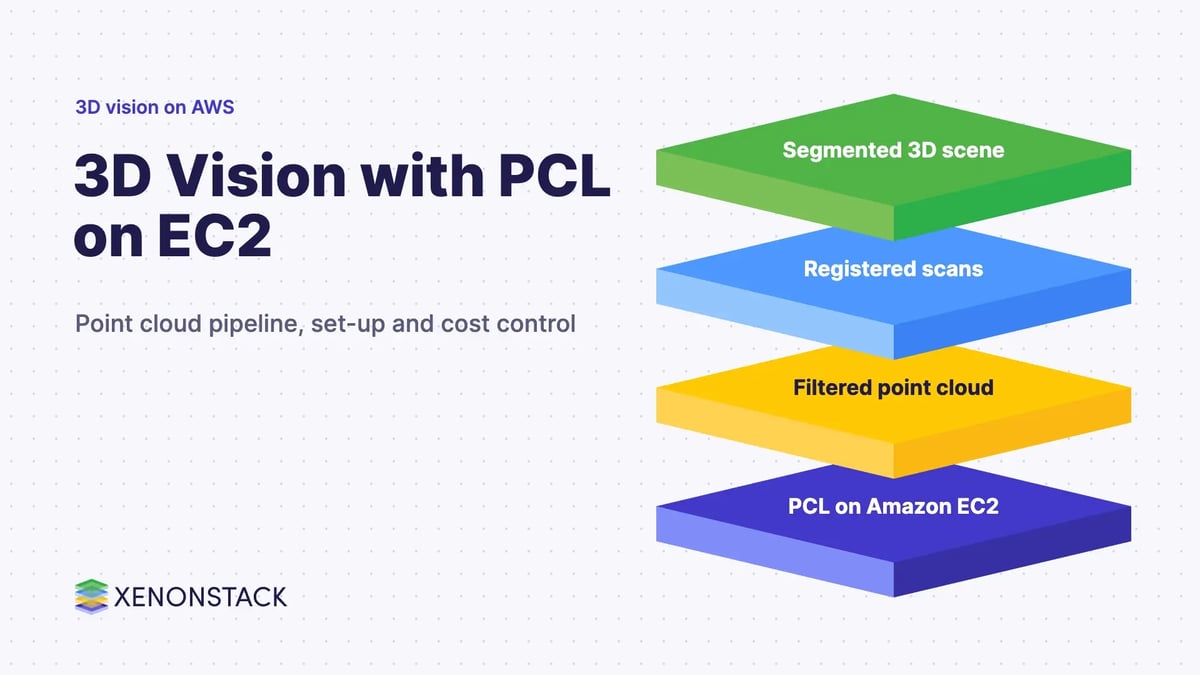
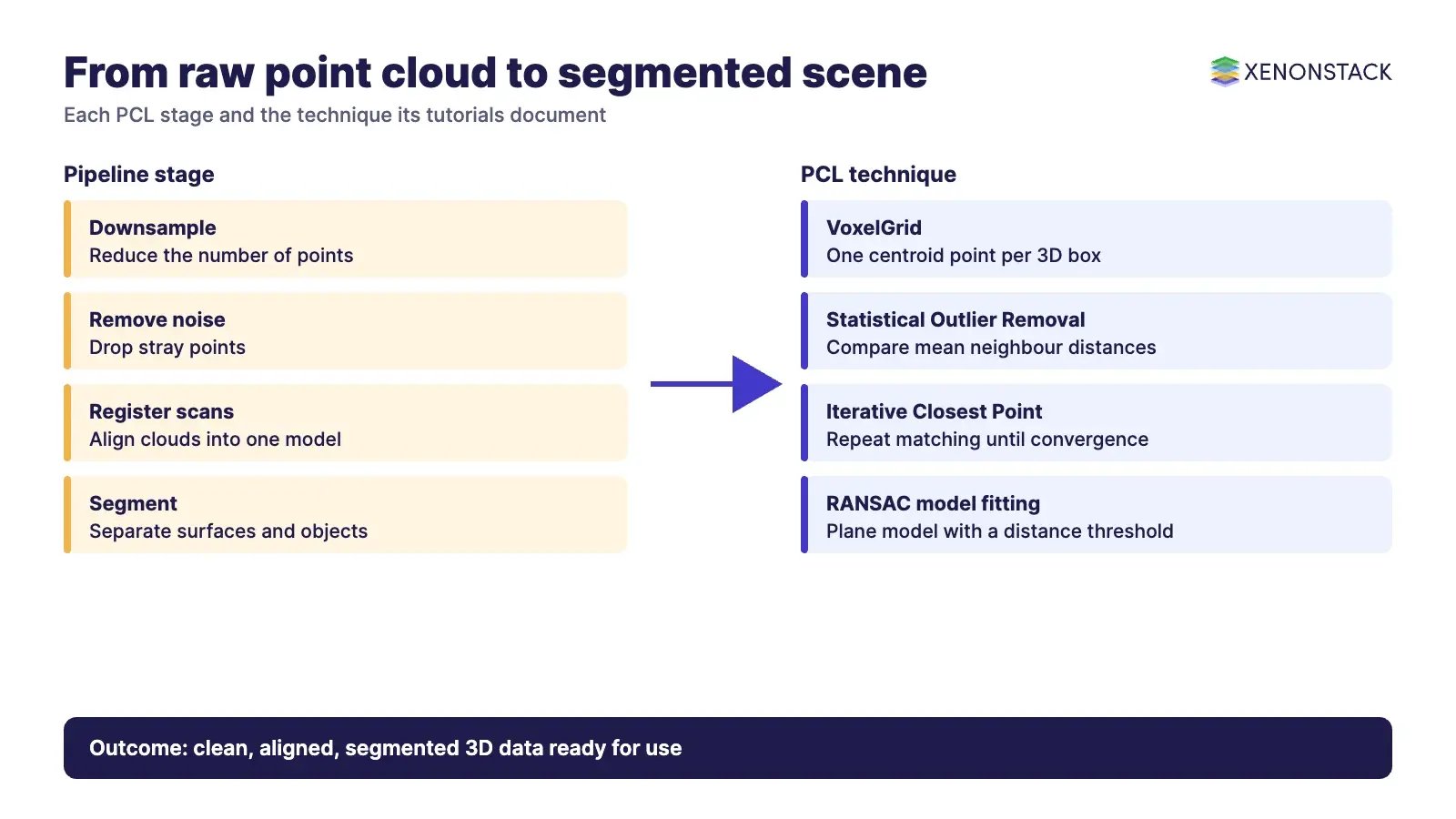
The table maps each stage to the PCL technique documented in its tutorials. The diagram for this section shows the same sequence.
| Stage | What happens | PCL technique (per its tutorials) |
|---|---|---|
| 1. Downsample | Reduce the number of points | VoxelGrid replaces the points in each 3D box with their centroid |
| 2. Remove noise | Drop stray points | Statistical Outlier Removal compares each point's mean distance to its neighbours against the dataset, using a neighbour count and a standard-deviation multiplier |
| 3. Features and keypoints | Pick distinctive points and describe them | Keypoint selection and feature descriptors, the first steps of the registration pipeline |
| 4. Register scans | Align clouds into one model | Correspondence estimation and rejection, then a rigid transformation; Iterative Closest Point repeats the cycle until a convergence criterion is met |
| 5. Segment | Separate surfaces and objects | RANSAC model fitting, for example a plane model with a distance threshold deciding which points count as inliers |
Order matters. Downsampling and outlier removal reduce the cost of everything after them, and poor registration spreads errors into segmentation. Tune each stage on a sample of your own scans before you scale the job out.
Where does this pipeline apply in practice?
- Autonomous driving and mobile robots. Segmenting ground planes from obstacles and registering successive scans are the core uses of PCL on LiDAR data. EC2 suits offline replay and testing of recorded drives; the vehicle itself needs on-board compute.
- Robot mapping. Registering scans from several viewpoints into one map is the same alignment problem described above, and batch merging of recorded scans can run in the cloud.
- AR, VR and scanning. PCL lists surface reconstruction among its algorithm families, which suits turning scanned point clouds into surfaces for later rendering.
How do you keep performance and cost under control?
- Run headless. Process on the instance without a display, and view results separately.
- Use Spot for re-runnable work. AWS describes Spot as suited to stateless, fault-tolerant or flexible workloads, so design jobs that can restart from stored intermediate results.
- Queue large jobs. AWS Batch is described on its site as batch processing at any scale that can run on Spot or On-Demand Instances.
- Keep data close to compute. Move scans once, process in the same region, and write only results back.
What are the trade-offs, and when should you not use PCL on EC2?
| Situation | Better approach | Reason |
|---|---|---|
| Results needed beside the sensor | Run inference on the device or an edge server | Cloud round trips add delay and depend on connectivity |
| Deep learning on 3D data is the main goal | Consider libraries built for it, such as Open3D | Open3D states it offers GPU acceleration for core 3D operations and 3D machine learning support with PyTorch and TensorFlow |
| One-off analysis of a small scan | A workstation | Cloud set-up adds overhead you do not need |
| A managed AWS camera appliance was the plan | Greengrass, SageMaker and standard servers | Panorama support ended on 31 May 2026 |
PCL and deep learning are complementary rather than rival. Classical filtering and registration often prepare data that a learned model then consumes, so a hybrid pipeline is a reasonable design. AWS Greengrass and SageMaker Neo covers the model-deployment side on AWS, and NexaStack is an agentic operating platform for physical AI that runs across on-premises, cloud and hybrid environments, which is relevant when the same vision logic must run in more than one place.
What has changed for vision on AWS, and what about AWS Panorama?
AWS has ended support for Panorama. Its documentation states: "On May 31, 2026, AWS will end support for AWS Panorama. After May 31, 2026, you will no longer be able to access the AWS Panorama console or AWS Panorama resources." It also stopped accepting new customers on 20 May 2025. For on-site vision, AWS suggests partner solutions from the AWS Solutions Library, or building with Amazon SageMaker, AWS IoT Greengrass, AWS Systems Manager, and EKS Anywhere or ECS Anywhere. Our earlier AWS Panorama post describes the original service and should be read with this status in mind. Do not start a new design on Panorama.
How should governance and security work for a cloud 3D vision pipeline?
Point clouds from sites, vehicles or buildings can reveal layouts and assets, so treat them as sensitive data. Use per-workload IAM roles with least privilege, keep buckets private, and record which dataset and parameters produced each result so a segmentation can be reproduced later. Where AI agents trigger or approve processing runs, AgentGRC keeps autonomous agent actions inside policy, with the audit trail risk teams need, and ElixirData Context OS keeps governed context, versioned policy and decision traces in one decision layer above AI agents. Our AWS services page lists the wider AWS services we work with.
What will change in 3D computer vision on AWS over the next 3 to 5 years?
The sources below show where the tooling is moving. The outlook column is our judgement from them, not a forecast from the source.
| Signal | Source | What it suggests by about 2029 to 2031 |
|---|---|---|
| PCL 1.15.0 (22 February 2025) parallelised several classes including ICP, and 1.15.1 (26 August 2025) added nanoflann as a faster alternative to FLANN for neighbour search | PCL GitHub releases | Core algorithms keep getting faster on multi-core CPUs, so measure before buying accelerators |
| AWS lists G7 and G7e as its current accelerated instances, alongside P-family instances using NVIDIA H100, H200 and B-series accelerators | AWS instance types and accelerated computing pages | New accelerator generations will keep arriving; build jobs that are not tied to one instance type |
| Open3D states it offers GPU acceleration for core 3D operations and PyTorch and TensorFlow support | Open3D site | Pipelines will increasingly mix classical geometry with learned models |
| AWS Panorama support ended on 31 May 2026, with Greengrass, SageMaker and standard servers suggested instead | AWS Panorama documentation | Managed edge appliances can be withdrawn; keep edge logic portable and use standard components |
| Spot Instances are offered for fault-tolerant workloads at up to a 90% discount | AWS Spot page | Batch 3D processing stays a strong cost fit if jobs are restartable |
Over the next three to five years we expect the split in this guide to harden: heavy batch work such as registration of large scan sets and model training in the cloud, and latency-critical inference on devices or edge servers. NexaStack is built for that mixed estate. Confirm every AWS product status on the AWS page before you commit, because services and instance families change.
What is a sensible adoption sequence?
- Weeks 1 to 2: take 10 to 20 representative scans, run the five stages on one compute-optimised instance and record time per stage.
- Weeks 3 to 4: add S3 input and output, an IAM role and headless runs; test one accelerator only if a stage can use it.
- Month 2: queue larger jobs with AWS Batch and try Spot with restartable steps.
- Month 3 onwards: decide which steps must move to the edge, and review the cost per processed scan.
To map one 3D vision decision your agents should make, and the context and policy it depends on, book a Context Workshop. See what happens in the workshop.
FAQ
Is the Point Cloud Library free to use commercially?
According to its site, PCL is released under the 3-clause BSD licence and is free for commercial and research use.
How do I install PCL on Ubuntu on EC2?
The PCL downloads page recommends sudo apt install libpcl-dev. For a specific release, build from source from the project GitHub repository with CMake. Compare the packaged version with the latest GitHub release, which was 1.15.1 (26 August 2025) when we checked.
Which EC2 instance type should I use for PCL?
Start with a compute-optimised family and profile one representative scan. Add a GPU instance only if a stage in your pipeline can use the accelerator, and confirm current families on the AWS instance types page.
Is AWS Panorama still available?
No. AWS documentation states that support ended on 31 May 2026, and new customers were no longer accepted from 20 May 2025. AWS suggests partner solutions or building with SageMaker, AWS IoT Greengrass, Systems Manager, and EKS or ECS Anywhere.
Can I cut the cost of PCL batch jobs on EC2?
Spot Instances suit fault-tolerant, restartable workloads, and AWS says they are available at up to a 90% discount compared with On-Demand prices. Design jobs to resume from stored intermediate results.
What will change in 3D computer vision on AWS over the next 3 to 5 years?
Sources point to faster core algorithms, new accelerator generations, more mixing of classical and learned methods, and managed edge services that can be withdrawn. Our judgement is to keep pipelines portable, process batches in the cloud and run latency-critical inference at the edge.
Follow XenonStack on LinkedIn: XenonStack on LinkedIn for new guides on agentic AI, data and platform engineering.
Ready to put AI agents to work? Explore ElixirClaw, the agentic OS platform to build, orchestrate and govern AI agents.
Explore the XenonStack platform family: ElixirData · ElixirClaw · ElixirHub · NexaStack · MetaSecure · Neural AI · AgentGRC · AgentSRE · AgentAnalyst · AgentInstruct · AgentRAI · AgentScrum · AgentSearch · AgentForce · AI Aviator · SAIF Aviator · CohortIQ · XenonStack AI · XenonStack UAE