Key takeaway
- ServiceNow AI agents for incident resolution: what Now Assist and the Orchestrator do, which tasks to automate, the controls to add and when not to.
How do ServiceNow AI agents resolve incidents autonomously?
ServiceNow says its AI agents act autonomously to get work done across IT, customer service and HR, and that they streamline incident management and request fulfilment (read on ServiceNow's AI Agents page). In practice, autonomous incident resolution means an agent reads an incident, gathers context, proposes or takes a fix inside limits you set, and records what it did. How far you let it act without a person is a governance choice, not a product default.
This guide separates what ServiceNow documents from the design choices your team must make. It covers the product names, a decision table, controls, a rollout sequence and when not to automate. For the wider ITSM picture, see ServiceNow AI agents for IT service management, and for the knowledge side see knowledge management with Now Assist. Our ServiceNow services page lists how we help.
What has changed in ServiceNow's AI offer?
Older write-ups, including earlier versions of this post, describe NowAssist as one product that monitors, diagnoses and fixes everything. ServiceNow's current pages describe separate pieces, so check names and licences with ServiceNow before you plan.
| Name | What ServiceNow says it is | Where to confirm |
|---|---|---|
| Now Assist for ITSM | Generative AI for service desks. The data sheet lists incident summarisation, resolution notes generation and knowledge generation | Now Assist for IT Service Management data sheet |
| AI Agents | Agents that act autonomously to get work done, including incident management and request fulfilment | ServiceNow AI Agents page |
| AI Agent Orchestrator | Coordinates teams of agents toward a shared goal | ServiceNow AI Agents page |
| AI Agent Studio | Build and customise agents, and set guardrails | ServiceNow AI Agents page |
| Super Intelligence Control Tower | Central hub to manage, monitor and optimise AI, and where agents are governed (the page also uses the short form Control Tower) | ServiceNow AI Agents page |
The AI Agents page lists releases including Zurich, Australia and Brazil, with Brazil shown as the latest when we read it on 12 November 2026. The Now Assist for ITSM data sheet does not describe AI agents or set out availability and licensing, so confirm which capability sits in which licence with your ServiceNow account team.
Why does manual incident management stop scaling?
Volume and noise. Hybrid estates produce more alerts than a service desk can read, so signals are missed or triaged late.
Sequential hand-offs. Detection, escalation and diagnosis each wait for the next person, which lengthens time to resolution.
Knowledge gaps. Fixes live in past tickets and in experts' heads, and are not always to hand during an outage.
Agents help by doing the reading and correlation at machine speed. They do not remove the need for clear runbooks, accurate configuration data and an owner for each service.
Which incident tasks can an AI agent take on, and which need approval?
The split below is our recommended starting design, not a ServiceNow setting. The summarisation and resolution-notes tasks come from ServiceNow's data sheet. Autonomy levels are choices you make with guardrails.
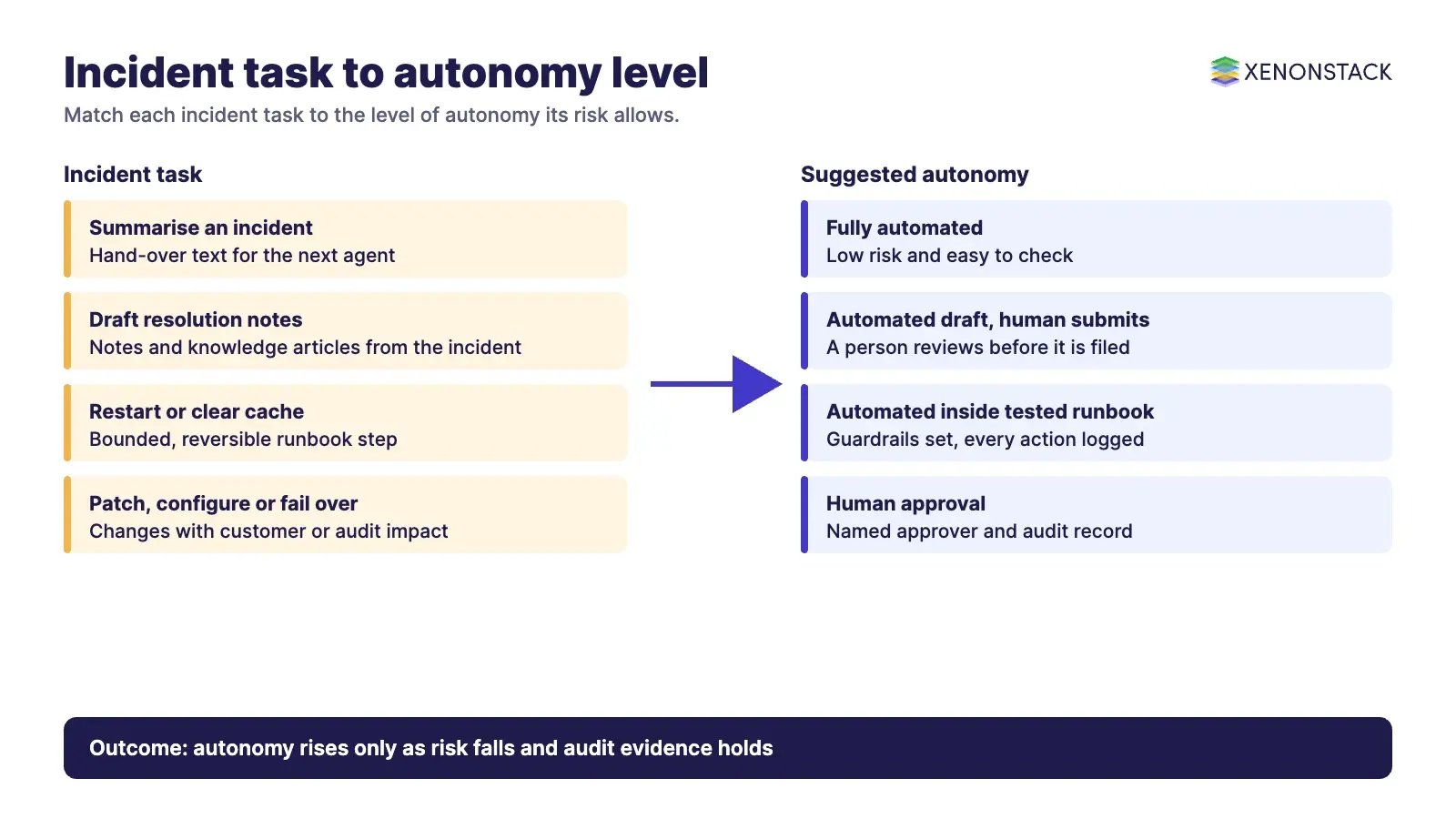
| Task | Suggested autonomy | Why |
|---|---|---|
| Summarise an incident for the next agent | Fully automated | Data sheet lists incident summarisation. Low risk, easy to check |
| Draft resolution notes and knowledge articles | Automated draft, human submits | Data sheet describes agents reviewing and submitting auto-generated resolution notes |
| Correlate alerts and propose root cause | Automated, shown to an engineer | Wrong correlation misleads responders |
| Restart a service or clear a cache | Automated inside a tested runbook | Reversible, bounded impact |
| Apply a patch or change configuration | Human approval | Change risk and audit needs |
| Roll back or fail over production | Human approval, named approver | Customer-facing impact |
AgentSRE describes a fleet of AI agents that automates detection, root cause analysis and remediation, and may suit estates that run SRE practices alongside ServiceNow.
How do you keep autonomous resolution governed and secure?
Set guardrails when you build the agent. ServiceNow says AI Agent Studio lets users set guardrails.
Test before deployment, then monitor. ServiceNow's page describes testing agents for safety and reliability before deployment, then monitoring performance and gathering feedback.
Keep a decision record. For each action log the trigger, the evidence, the policy applied and the approver. AgentGRC keeps autonomous agent actions inside policy, with the audit trail risk teams need, and Audit Agent assembles decision lineage, policies and approvals for compliance teams.
Limit access. Give agents the narrowest service account that lets them do the task, and review it each quarter.
Track cost. Licence terms and usage charges are set by ServiceNow, so model them with your account team and compare against the hours saved on your own incident data.
What does an incident look like end to end?
The short film below, titled AI Incident Response: 212 Alerts, One Incident, One Approver, is an ElixirData demonstration of the incident response pattern, not a ServiceNow product recording.
Video: AI Incident Response, 212 Alerts, One Incident, One Approver (ElixirData).
How should you roll out autonomous incident resolution?
Clean the foundations: service map, configuration data, assignment rules and runbooks.
Start with summaries, resolution notes and knowledge drafts, where a person reviews the output.
Pick two or three high-volume, low-risk incident types and automate their runbooks with testing.
Add approval steps for changes, and review every action for a set period.
Widen scope only when accuracy, reversals and audit records meet targets you defined up front.
Use the orchestrator for multi-agent workflows once single agents are stable.
When is autonomous resolution the wrong choice?
Incidents with no tested runbook or unclear ownership.
Regulated changes that need a named approver and evidence before action.
Services with poor monitoring data, where correlation would be guesswork.
Rare, high-impact failures where a wrong automated action costs more than the delay.
For HR and finance use of the same platform, see ServiceNow AI agents for HR service delivery and ServiceNow AI agents for banking. For the operations discipline behind this, read AIOps vs MLOps. ElixirData Context OS keeps governed context, versioned policy and decision traces in one decision layer above AI agents.
To map one incident decision your agents should make, and the context and policy it depends on, book a Context Workshop. See what happens in the workshop.
Frequently asked questions
What is autonomous incident resolution?
It is the use of AI agents to read, diagnose and act on IT incidents with limited human input. ServiceNow says its AI agents act autonomously and streamline incident management.
What does Now Assist for ITSM do for incidents?
ServiceNow's data sheet lists incident summarisation, resolution notes generation and knowledge generation.
How do I keep ServiceNow AI agents under control?
ServiceNow says AI Agent Studio lets users set guardrails and that agents are tested before deployment and then monitored. Add approvals for changes and keep an audit record of each action.
What is the AI Agent Orchestrator?
ServiceNow describes it as coordinating teams of agents toward a shared goal.
Should every incident be resolved without a person?
No. Start with summaries and low-risk runbooks, and keep human approval for patches, configuration changes and production failover.
Explore more
- ServiceNow AI Agents for HR Service Delivery
- ServiceNow AI Agents for Banking
- ServiceNow AI Agents for IT Service Management
- ServiceNow AI Platform
Follow XenonStack on LinkedIn: XenonStack on LinkedIn for new guides on agentic AI, data and platform engineering.
Ready to put AI agents to work? Explore ElixirClaw, the agentic OS platform to build, orchestrate and govern AI agents.
Explore the XenonStack platform family: ElixirData · ElixirClaw · ElixirHub · NexaStack · MetaSecure · Neural AI · AgentGRC · AgentSRE · AgentAnalyst · AgentInstruct · AgentRAI · AgentScrum · AgentSearch · AgentForce · AI Aviator · SAIF Aviator · CohortIQ · XenonStack AI · XenonStack UAE