Key takeaway
- WebAssembly is a compact binary format that runs beside JavaScript, not instead of it. See how they differ, how to load Wasm and when each one fits.
WebAssembly (Wasm) is a binary instruction format for a stack-based virtual machine, designed as a portable compilation target that runs alongside JavaScript rather than replacing it. The WebAssembly site says it is designed to be encoded in a size- and load-time-efficient binary format and aims to execute at native speed.
This guide is for web and platform engineers deciding whether Wasm belongs in their stack. It explains how the two technologies differ, how a browser loads a Wasm module, where each fits, how to benchmark fairly and how AI agents change the decision.
What is WebAssembly and how does it differ from JavaScript?
According to MDN WebAssembly concepts, Wasm is a low-level bytecode format originally designed for the web. It is not primarily intended to be written by hand. It is an effective compilation target for languages such as C, C++ and Rust. MDN states that Wasm is a different language from JavaScript but is not intended as a replacement: it is designed to complement and work alongside JavaScript. The W3C core specification describes it as a safe, portable, low-level code format designed for efficient execution and compact representation, and the version it covers is release 3.0.
| Question | JavaScript | WebAssembly |
|---|---|---|
| Form | High-level, dynamically typed, no compile step | Compact binary produced by compiling another language |
| Source languages | JavaScript and languages that compile to it | C, C++, Rust and others that target Wasm |
| Strength | Flexibility, huge ecosystem, direct DOM access | Efficient delivery and near-native execution speed for heavy computation |
| DOM access | Direct | Not directly: it calls JavaScript, which makes the Web API call |
| Safety model | Runs in the browser engine | Memory-safe, sandboxed execution enforcing same-origin and permissions policies |
The description of each column comes from MDN and the WebAssembly site. The practical reading is simple: JavaScript stays in charge of the page, and Wasm takes the compute-heavy parts.
How does a browser load and run WebAssembly?
MDN explains that JavaScript has complete control over how Wasm code is downloaded, compiled and run, so Wasm can be seen as a JavaScript feature for efficiently producing high-performance functions. Four building blocks appear in the JavaScript API: a module (a compiled Wasm binary), memory (a growable buffer of bytes), a table (a growable array of references) and an instance (a module paired with its runtime state).
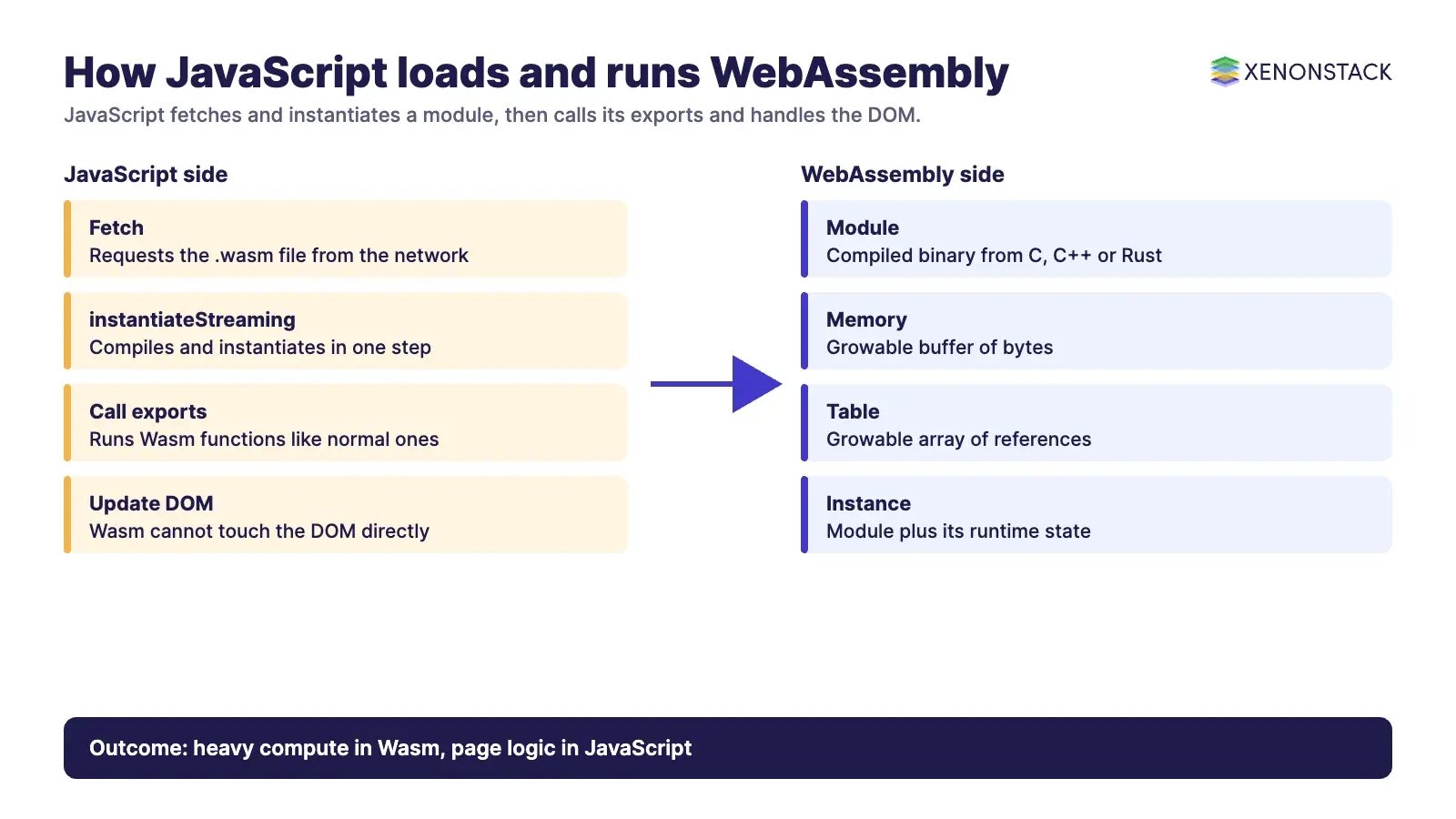
The MDN loading guide calls WebAssembly.instantiateStreaming() the quickest and most efficient way to fetch a module, because it fetches, compiles and instantiates in one step directly from the network stream. The older fetch, arrayBuffer and WebAssembly.instantiate route works but needs the extra buffer step. Exported functions are then called from JavaScript like normal functions, and Wasm can import JavaScript functions and call them synchronously. The same guide says Wasm is not yet integrated with script modules or import statements, so you load it through the JavaScript API.
When is WebAssembly faster than JavaScript?
MDN says JavaScript runs into performance problems on intensive uses such as 3D games, virtual and augmented reality, computer vision and image or video editing, and that the cost of downloading, parsing and compiling very large JavaScript applications can be prohibitive. Those are the cases where Wasm is aimed. It does not follow that every task gets faster. Small workloads can be dominated by the cost of moving data between JavaScript and Wasm, and carefully tuned JavaScript can compete well. Measure your own case.
- Use the same algorithm and the same dataset on both sides.
- Share common steps, such as parsing the input file, so you time only the part that differs.
- Test several input sizes: results at a few hundred records say little about millions.
- Record load, compile and run time separately, and test on the devices your users have.
Where is WebAssembly used?
MDN lists 3D games, virtual and augmented reality, computer vision and image or video editing as the demanding web uses. The WebAssembly site adds that the format also supports non-web embeddings, so Wasm is not limited to browsers. Our related guides cover edge computing, blockchain, serverless microservices in Java and KrakenD for microservices, and augmented and virtual reality.
For page speed, Wasm is one lever among many: see web performance optimisation. Wasm also changes testing. Services built with it still need microservices testing, and API boundaries still need API testing and API development best practices. Teams weighing service design can read microservices design patterns and microservices vs monolithic architecture. For the web-layer basics, see a beginner's guide to WebAssembly and functional programming in JavaScript. To shape the interface around the compute, see product design and user experience.
Will WebAssembly replace JavaScript?
Not by design. MDN states that Wasm is not intended as a replacement, and that browsers now load and run two types of code, JavaScript and WebAssembly. Because Wasm cannot currently access the DOM directly, JavaScript remains the glue for anything the user sees. The sensible question is which parts of your application deserve a compiled module.
How do AI agents change the WebAssembly choice?
Agents that run code, simulate environments or process media need a safe, portable place to execute it. Wasm's sandboxed execution model, described on the WebAssembly site, is relevant to that need, and our guide to AI simulations on WebAssembly goes further. For inference that runs close to users, NexaStack is XenonStack's inference infrastructure. Agents can also generate benchmark harnesses and compare runs, but a person should still decide which workloads move.
What should you do first?
- List the slowest user-facing computations and measure them in JavaScript first.
- Pick one hot function and compile it to Wasm in a language your team can maintain.
- Load it with
instantiateStreamingand keep DOM work in JavaScript. - Benchmark with the rules above, on real devices.
- Keep the Wasm path only where the measured gain justifies the extra build step.
To map one decision your agents make, and the data and policy it depends on, book a Context Workshop. See what happens in the workshop.
Frequently asked questions
What is WebAssembly?
WebAssembly is a binary instruction format for a stack-based virtual machine, designed as a portable compilation target for programming languages.
Is WebAssembly faster than JavaScript?
Wasm aims to execute at native speed and is aimed at intensive tasks such as games, computer vision and media editing. Not every task is faster, so benchmark your own workload with the same algorithm and data.
Can WebAssembly replace JavaScript?
No. MDN says Wasm is not intended as a replacement and is designed to complement JavaScript. Wasm cannot currently access the DOM directly, so it calls JavaScript for that.
How do you load a WebAssembly module?
Use WebAssembly.instantiateStreaming with fetch, which fetches, compiles and instantiates the module in one step. Then call its exported functions from JavaScript.
Which languages compile to WebAssembly?
C, C++ and Rust are the usual examples, and MDN also lists AssemblyScript, a strict variant of TypeScript, as a way to produce Wasm.
Follow XenonStack on LinkedIn: XenonStack on LinkedIn for new guides on agentic AI, data and platform engineering.
Ready to put AI agents to work? Explore ElixirClaw, the agentic OS platform to build, orchestrate and govern AI agents.
Explore the XenonStack platform family: ElixirData · ElixirClaw · ElixirHub · NexaStack · MetaSecure · Neural AI · AgentGRC · AgentSRE · AgentAnalyst · AgentInstruct · AgentRAI · AgentScrum · AgentSearch · AgentForce · AI Aviator · SAIF Aviator · CohortIQ · XenonStack AI · XenonStack UAE