

Key takeaway
- Build an AI skill once and reuse it across teams and industries. See how owners, versions and review work, and where portability stops today.
Reusable AI skills let you write a job's instructions once and use them across many teams, tools and industries, instead of rewriting them for every chat or project. A skill is a folder of instructions that an AI agent loads only when a task needs it, so one well-kept skill can serve finance, legal, operations or support. The catch is that reuse needs owners, versions and review, and portability has limits.
This guide is for business readers, team leads and anyone who has heard the word "skill file" and found it confusing. You will learn what a skill is in plain words, how one skill is shared across teams, how to keep a library of skills healthy, and where portability stops. Claims come from Anthropic's documentation and the open Agent Skills specification, all read on 13 November 2026.
What does "build once, deploy across industries" mean for AI skills?
Think of a recipe card. A good recipe is written once. Any cook in any kitchen can follow it, and the card is only taken out when that dish is on the menu.
A skill works the same way. According to Anthropic's announcement, skills are folders containing instructions, scripts and resources that Claude loads only when a task calls for them. The agent reads a short name and description of every skill at start-up. It opens the full instructions only when a request matches that description. The Agent Skills overview in the documentation puts the start-up cost at about 100 tokens per skill. A token is a small chunk of text, so this takes very little of the agent's working memory.
"Build once" means you capture a method, such as how to check an invoice or how to format a report in your house style. "Deploy across" means many people and tools can use that one card, without each person pasting their own version.
What does one skill look like when many teams use it?
The skill stays the same. The team using it changes. Anthropic's announcement quotes companies that describe how they use skills for different jobs, and the support documentation lists the kinds of skill that exist.
| Use | What the source says | Source |
|---|---|---|
| Finance workflows | Rakuten is quoted as saying skills streamline its management accounting and finance workflows | Anthropic announcement |
| Organisation-standard documents | Box is quoted as saying users can turn stored files into documents that follow their organisation's standards | Anthropic announcement |
| More predictable complex tasks | Notion is quoted as describing less prompt effort and more predictable results on complex tasks | Anthropic announcement |
| Office files | Anthropic builds skills for Excel, Word, PowerPoint and PDF files | Claude support article "What are skills?" |
| Own workflows | Organisations write custom skills, such as a data-analysis routine | Claude support article "What are skills?" |
These are the companies' own statements as published by Anthropic. We did not measure them and make no claim about outcomes.
Where does a skill live, and who owns it?
A skill is a folder, so it has to be stored somewhere. The documentation lists three common places in Claude Code: a personal folder, a project folder that is shared through version control, and plugins. It recommends plugins for sharing skills with a team.
In the Claude apps, the support article on managing skills for an organisation describes more control. Owners on Team and Enterprise plans can switch a skill on for everyone in the organisation (the page calls this provisioning). On Enterprise plans, they can give skills to chosen groups only. According to the page, these skills are on by default, and users can switch them off for themselves.
The same article describes a review step. A setting called "Requires review" means an owner must approve each submission. Reviewers see a fixed version. Authors can keep editing their own copy, but changes reach the organisation only after a new version is submitted and approved. Users stay on the approved version until then.
That is a plain, useful idea for any team: every skill needs a named owner and a clear way to say "this version is the approved one".
How do you keep a skill library healthy?
A library of skills is like a shared folder of job manuals. It stays useful only if someone looks after it. Each skill you add is one more thing to test, update and retire. The documentation does not give a cost figure, so we do not offer one. It does give practical habits.
- Keep each skill short. The best-practices page says the skill shares the agent's working memory with everything else, so add only what the agent does not already know. It advises keeping the main file under 500 lines and moving detail into separate files.
- Write a clear description. It should say what the skill does and when to use it, in the third person. The agent uses it to choose among many skills.
- Test before you trust. The page suggests writing at least three evaluations first and comparing against doing the task without the skill.
- Test on more than one model. The same page says a smaller model may need more guidance than a larger one.
- Mark old content. The page suggests keeping retired methods in a clearly labelled "old patterns" section.
- Review the files. Skills can contain scripts, so read every file, not just the main one.
The pattern is the one you already use for documents and code: an owner, a version, a review, a test and a retirement date.
How portable are skills, really?
More portable than a pasted prompt, but not without limits. Anthropic's announcement says skills use the same format across the Claude apps, Claude Code and the API. The December 2025 update added Agent Skills as an open standard. The agentskills.io site describes skills as portable, version-controlled folders and says you can build one and use it in any skills-compatible agent.
The limits matter just as much.
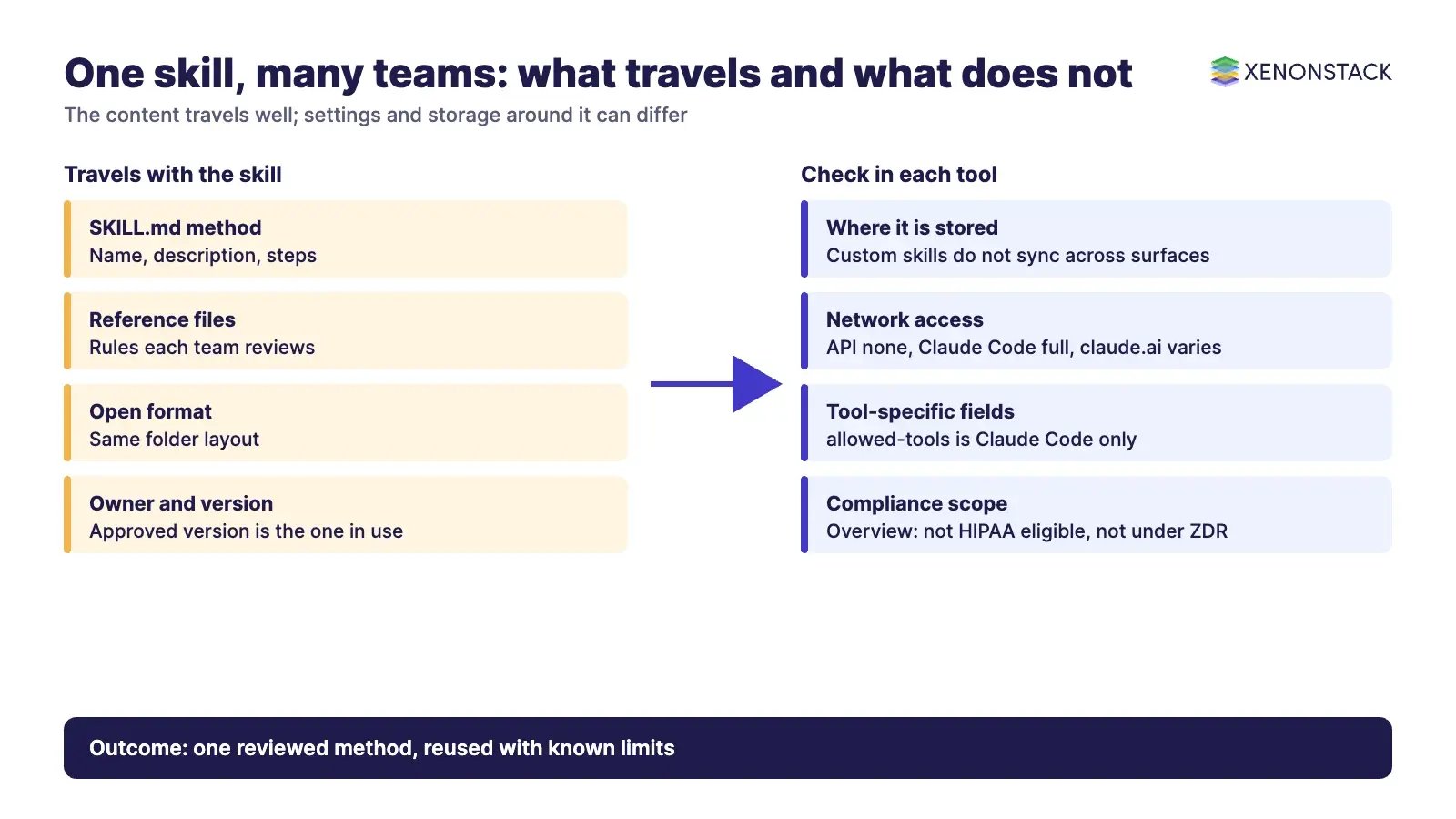
| Limit | What the documentation says |
|---|---|
| Custom skills do not sync | A skill uploaded to claude.ai must be uploaded separately to the API. Claude Code skills are filesystem-based and separate from both. |
| Network access differs | The API has no network access. Claude Code has the same access as the user's machine. In claude.ai it depends on user or admin settings. |
| Some fields are tool-specific | The optional allowed-tools field is supported only in Claude Code. |
| Compliance exclusions | According to the overview, skills are not covered by Zero Data Retention (a contract term where data is not stored) and are not HIPAA eligible. Check the current page for your case. |
| Other tools vary | The agentskills.io site says a growing number of products have adopted the standard. Support can differ by tool (our advice), so test in each one. |
So the honest summary is this. The content of a skill travels well. The settings, permissions and storage around it do not always travel with it.
What does a skill not do?
A skill tells an agent how to work. It does not, by itself, decide whether an action is allowed. A skill that says "approve invoices under a limit" does not give anyone the authority to approve them. That needs policy, an approval step and an audit record around the agent.
Security needs the same care. The overview says to use skills only from sources you trust, such as ones you wrote or got from Anthropic. It says a malicious skill can direct the agent to call tools or run code in ways that do not match its stated purpose. The overview adds that skills which fetch data from outside web addresses carry extra risk, because the fetched content can hold harmful instructions, and that even a trusted skill can be compromised if those outside sources change. On Enterprise, the documentation describes optional scanning of uploaded skills, which does not cover the Skills API or the Claude Console.
If you want to see how decisions, data and agents fit together on the data side, our agentic analytics guide covers it in more detail.
Related reading
These posts in the series cover the neighbouring questions.
- Composable Agent Skills: Future of Agentic AI: How small skills combine into bigger workflows, and where the field is heading.
- AI Agent Skills for Healthcare, Finance and More: Worked skill examples for healthcare, manufacturing, finance and government.
- AI Agent Skills: Turning General AI into Specialists: How to make a general model act like a sector specialist, and test it.
Try it on one decision first
Before you build a library, pick one live decision and see where a reusable skill would sit next to policy and audit. ElixirData is a XenonStack product company, and it offers the Context Workshop and Context OS. The free half-day Context Workshop is built for that. ElixirData architects help your team map one live decision, and you leave with a one-page decision map and a go or no-go call. You can request a Context OS demo or book the Context Workshop.
Sources
- Agent Skills overview, Claude documentation
- Agent Skills best practices, Claude documentation
- Skills in Claude Code, Claude documentation
- What are skills?, Claude support
- Provisioning and managing skills for your organization, Claude support
- Introducing Agent Skills, Anthropic announcement
- Equipping agents for the real world with Agent Skills, Anthropic engineering
- Agent Skills specification
Frequently asked questions
What is a reusable AI skill?
It is a folder with a SKILL.md file that tells an AI agent how to do one kind of job and when to do it. The agent loads it only when a task matches, so the same skill can be reused by many people.
Can one skill really work across different industries?
The method can. A checklist for checking a document works anywhere that document type appears. As our own suggestion, keep each industry's facts, limits and rules in separate reference files that the owner of each team reviews.
Do skills work in every AI tool?
Not automatically. Agent Skills is an open standard that a growing number of products have adopted, but support can differ by tool. According to Anthropic's documentation, custom skills do not sync between claude.ai, the API and Claude Code.
Who should own a skill?
One named person or team. They approve changes, keep the version record and retire the skill when the method changes. Anthropic's support documentation describes a review and approval flow for organisation skills.
What does it cost to maintain skills?
The documentation gives no figure. The cost is the time to write, test, review and update each skill, so start with a few that save the most effort and retire any that nobody uses.
Does a skill decide what an agent is allowed to do?
No. A skill describes how to do a task. Permissions, approvals and audit records must come from the policy and controls around the agent.
Follow XenonStack on LinkedIn: XenonStack on LinkedIn for new guides on agentic AI, data and platform engineering.
Ready to put AI agents to work? Explore ElixirClaw, the agentic OS platform to build, orchestrate and govern AI agents.
Explore the XenonStack platform family: ElixirData · ElixirClaw · ElixirHub · NexaStack · MetaSecure · Neural AI · AgentGRC · AgentSRE · AgentAnalyst · AgentInstruct · AgentRAI · AgentScrum · AgentSearch · AgentForce · AI Aviator · SAIF Aviator · CohortIQ · XenonStack AI · XenonStack UAE


