Key takeaway
- GUI agents operate software by screen, mouse and keyboard. See how they work, where they fit, the risks and controls, and the 3 to 5 year outlook.
GUI agents are AI agents that operate software the way a person does: they read the screen, move a pointer, click, type and scroll. That makes them useful where an application has no usable API, such as legacy ERP screens, vendor portals and desktop tools. They sit one layer below agentic workflows: the workflow decides what should happen, and a GUI agent is one of the tools that carries out a step.
The 2026 picture is more cautious than the 2024 hype. Benchmarks show agents are much better than they were, yet the vendors that sell them still advise isolated environments and human confirmation for consequential actions. This guide covers how GUI agents work, where they fit, what the sourced evidence says, how to control them, and what to expect over the next 3 to 5 years.
What is a GUI agent, and how is it different from an API integration or an RPA bot?
A GUI agent perceives a graphical interface from screenshots, decides the next action with a multimodal model, and acts through a virtual mouse and keyboard. The survey GUI Agents with Foundation Models: A Comprehensive Survey (Wang et al., arXiv, submitted 7 November 2024, revised 13 February 2025) describes this as agents built on large language models and multimodal large language models that carry out tasks by simulating actions such as clicking and typing.
| Approach | How it works | When it fits | Current status |
|---|---|---|---|
| API or MCP integration | Calls a documented interface directly | The system exposes an API; the task is high volume and stable | Preferred where available, as it is faster and easier to audit |
| Scripted RPA bot | Follows recorded steps and element selectors | The screens rarely change and the rules are fixed | Mature, but brittle when layouts change; see agentic process automation |
| GUI agent | Reads the screen and chooses actions with a multimodal model | No API exists, screens vary, or the task needs judgement | Improving quickly; vendors still advise isolation and human confirmation |
| Agentic workflow with GUI agent as a tool | A workflow plans the task and calls API, MCP or GUI tools as needed | Mixed estates of modern and legacy systems | The pattern we recommend; see agentic workflows |
In our own solution work, GUI agents have been demonstrated for legacy integration with systems that have no API, while API and MCP integrations are used wherever they exist. That ordering is the practical rule: use the API when there is one, and use the screen when there is not.
Video: how agentic process automation moves beyond scripted bots, from the XenonStack channel.
How do GUI agents work?
Most current GUI agents follow the same loop, and the vendor documents describe it consistently.
Perceive, plan, act, check
The agent takes a screenshot, a multimodal model interprets what is on screen, the model proposes an action such as a click or keystroke, and the result is checked on the next screenshot. According to its documentation, the Anthropic computer use documentation describes a tool that provides screenshot, mouse and keyboard control, where the application runs each requested action in an environment it controls and returns the result. The OpenAI Computer-Using Agent post (23 January 2025) describes its Computer-Using Agent as combining GPT-4o vision with reinforcement-learning-based reasoning, working from screenshots, a virtual mouse and a keyboard without specialised APIs.
Grounding is the hard part
The OSWorld paper (Xie et al., arXiv, April 2024) names GUI grounding and operational knowledge as the main weaknesses of the agents it tested. Grounding means turning an intention such as "open the invoice tab" into the right place on the screen. The Anthropic documentation adds that the model might make mistakes or hallucinate when outputting specific coordinates, so clicks can miss their target.
Where the older building blocks sit
Earlier GUI agent designs were described as a mix of object detection for interface elements, language models for command interpretation and reinforcement learning for task optimisation. Those pieces still exist, but the current vendor tools put a single multimodal model at the centre of the loop. If you are comparing vendors, ask where perception, planning and action are handled, and which parts you can inspect.
What has changed in GUI agents since 2024?
| Date | What happened | Source |
|---|---|---|
| April 2024 | OSWorld introduced 369 real computer tasks; humans completed over 72.36%, the best model 12.24% | OSWorld paper (arXiv) |
| 22 October 2024 | Anthropic released computer use in public beta; Claude 3.5 Sonnet scored 14.9% screenshot-only on OSWorld, 22.0% with more steps allowed; described as at times cumbersome and error-prone | Anthropic announcement |
| 23 January 2025 | OpenAI reported its Computer-Using Agent at 38.1% on OSWorld (human 72.4%), 58.1% on WebArena (human 78.2%) and 87% on WebVoyager | OpenAI post |
| 28 July 2025 | OSWorld was upgraded to OSWorld-Verified | OSWorld site |
| 26 June 2026 | The OSWorld site states that OSWorld 2.0 is available as the latest version | OSWorld site |
Read the table as direction, not as a league table. The benchmarks, task sets and scoring rules differ between rows, and the OSWorld site that we read did not display current leaderboard scores, so we do not quote any. For current numbers, check the live OSWorld site before you rely on a figure.
Where do GUI agents fit in the enterprise?
The strongest case is work that people already do by hand across screens that have no API. The table groups the use cases from our earlier guide by what the agent does and how much care each needs. The "fit" column is our assessment, not a measured result.
| Use case | What the agent does | Fit | Control to apply |
|---|---|---|---|
| Software testing | Imitates user steps through an application and checks results | Good: failures are cheap and visible | Run in a test environment only |
| Workflow automation in ERP and BI tools | Moves data between applications, enters records, compiles reports | Good where no API exists | Log every action; sample outputs |
| Customer support tooling | Works inside help-desk software to look up and update tickets | Medium | Human approval for customer-facing changes |
| Healthcare administration | Updates records, schedules appointments, cross-checks claim data | Medium: sensitive data | Least privilege, no access to clinical systems without review |
| Banking and financial services | Handles routine queries and application data entry | Cautious | Approval before any payment or account change |
| HR onboarding | Extracts details from forms and enters them in the HR system | Good for low-risk data entry | Check personal data handling |
| Data migration | Moves records through old interfaces when no export exists | Medium | Reconcile counts and samples after each run |
| E-commerce and retail operations | Updates order and stock screens | Medium | Cap actions per run; watch for layout changes |
| Education administration | Handles timetable and records screens | Medium | Human review of grading changes |
When a GUI agent hits a case it cannot settle, such as a policy breach or a conflicting rule, route it to a person. The Exception Handling Agent on ElixirData describes this on its site as spotting workflow cases that need human judgement, gathering the background, finding the right approver and logging the resolution in a decision trace.
Key Statistics on GUI Agents

Market Potential
The global RPA (Robotic Process Automation) market, closely tied to GUI agent growth, was valued at $1.89 billion in 2021 and is expected to reach $13.74 billion by 2028
Software Testing Impact
Automated GUI agents reduce testing time by up to 70% and cut software development costs by 30-40%, making them valuable in agile environments

Workplace Automation
By 2025, it’s estimated that 60% of large organizations will deploy GUI agents to automate workflows across departments like HR, customer support, finance (Gartner)

Productivity Boost
Studies show that GUI agents improve task completion speed by up to 50% for repetitive data entry and processing tasks, saving significant labour hours across industries
The cards above are indicative figures carried over from our earlier edition. The dated, source-linked benchmark figures are in the table in the section on what has changed since 2024.
What are the security and governance risks of GUI agents?
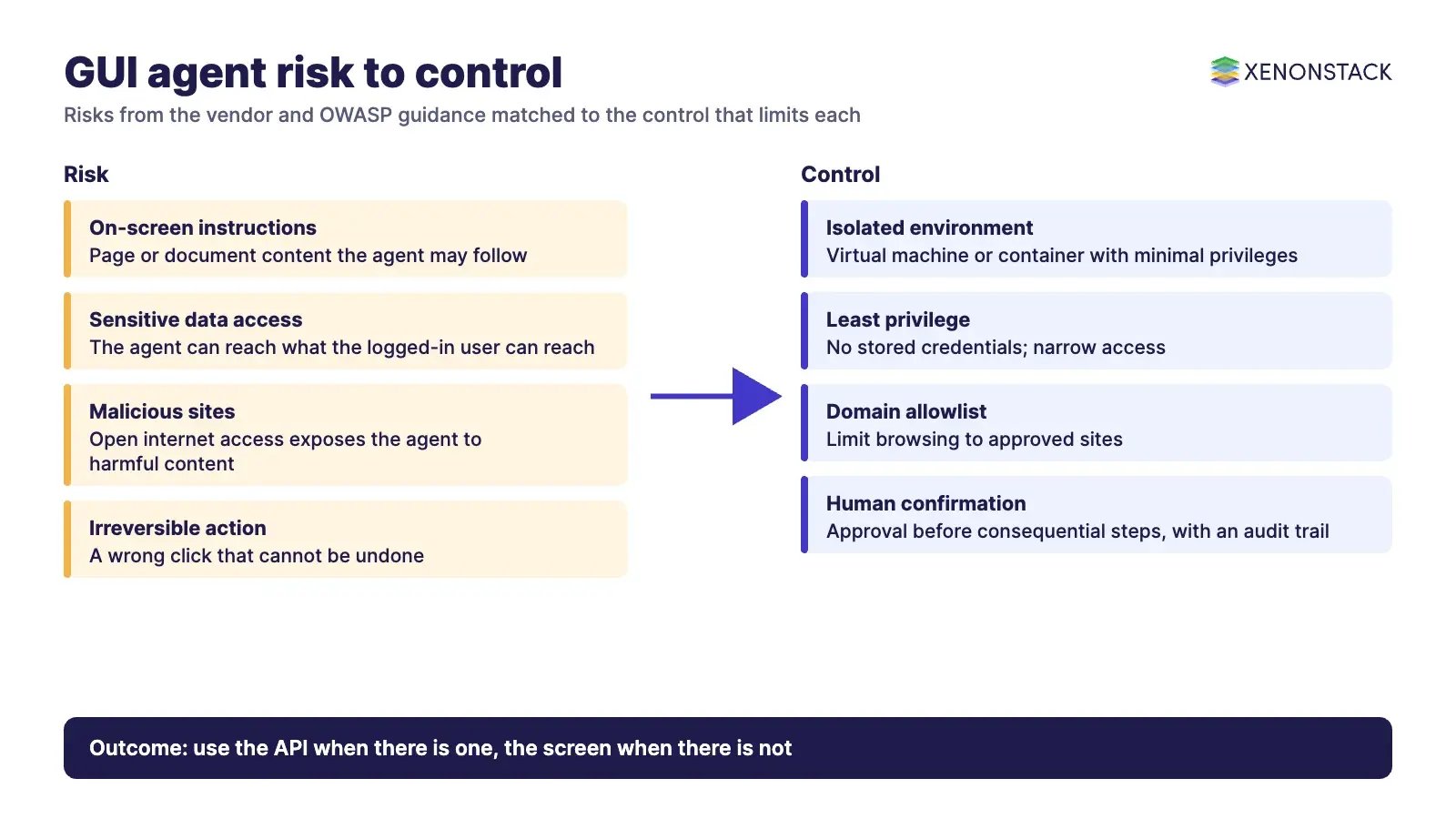
An agent that can click anywhere a user can click can also do harm anywhere a user can. The OWASP prompt injection guidance defines prompt injection as inputs that alter a model's behaviour in unintended ways, notes that injected content can be hidden from humans, and says there may be no foolproof prevention, so the aim is to limit impact. A web page or document on screen is untrusted input to the agent.
| Risk | Control | Source |
|---|---|---|
| Agent follows instructions found in on-screen content | Isolate the environment; classifiers help but do not replace precautions | Anthropic documentation says Claude may follow commands found in content even when they conflict with the operator instructions |
| Agent reaches sensitive data or systems | Dedicated virtual machine or container with minimal privileges; no login credentials in reach | Anthropic documentation |
| Agent reaches malicious sites | Limit internet access to an allowlist of domains | Anthropic documentation |
| Irreversible action taken in error | Human confirmation for consequential actions, such as financial transactions or agreeing to terms | Anthropic documentation; OpenAI describes confirmation before actions with external effects, and a watch mode on sensitive sites |
| Excess privilege | Least privilege and human approval for high-risk actions | OWASP guidance |
| No record of what the agent did | Decision traces and audit logs for each action | Vendor site claims, see below |
For the policy layer, AgentGRC on ElixirData says on its site that it maps company policies and approval rules onto agent actions so they are checked before an agent reaches a system of record, and that organisations typically start in a shadow mode where agents run alongside people. ElixirClaw says on its site that it provides policies, approval limits and audit trails for agent actions, with four autonomy levels (L1 to L4) that can be set per agent, domain or action. Both are vendor statements; validate them in a pilot. For the privacy side, see data privacy with agentic AI.
What limits GUI agents today?
| Limit | What the sources say | What to do about it |
|---|---|---|
| Speed | The Anthropic documentation says computer use might be too slow compared with human-directed actions and suggests tasks where speed is not critical | Schedule batch work; avoid latency-sensitive steps |
| Accuracy of clicks and edits | Anthropic notes possible coordinate errors; OpenAI says text editing is imprecise and error-prone | Verify each result on screen; keep steps short |
| Unfamiliar or varied interfaces | OpenAI says the agent struggles with unfamiliar interfaces; Anthropic says reliability might be lower in niche applications or across several applications at once | Start with one stable application; retest after each interface release |
| Precision and sensitive tasks | Anthropic advises against tasks needing perfect precision or sensitive information without human oversight; OpenAI says its agent declines tasks such as banking transactions | Keep a person in the loop for these |
| Gap to humans | OpenAI reports its agent below human performance on OSWorld and WebArena | Treat success rates as something to measure on your own tasks |
How should an enterprise adopt GUI agents?
List the systems that have no API. Use API or MCP integration wherever it exists, and keep the GUI agent for the rest.
Pick one low-risk, high-repetition task. Software testing and read-only data lookups are safer first steps than payments.
Run in an isolated environment. Use a virtual machine or container, an allowlist and no stored credentials.
Start in shadow mode. Let the agent record intended actions next to a person, then compare.
Add approvals and logs. Require confirmation for consequential steps and keep a trace of every action.
Measure on your own tasks. Track completion rate, rework and time per task against the manual baseline before extending autonomy.
When not to use one: where a stable API exists, where a mistake cannot be reversed and no human checks it, or where the task needs perfect precision. If the process itself is the problem, fix the process first.
What will change in GUI agents over the next 3 to 5 years?
| Signal | What the source says | Source and date read |
|---|---|---|
| Benchmarks keep moving | OSWorld went from a best model of 12.24% (2024 paper) to a 2.0 release announced on its site (26 June 2026), so scoring is being made harder as agents improve | OSWorld paper and site, read 12 November 2026 |
| Project failure risk | Gartner forecasts that over 40% of agentic AI projects will be cancelled by the end of 2027 because of rising costs and unclear business value | Reuters report as published by The Star (25 June 2025), read 12 November 2026; Gartner page could not be opened |
| Controls stay in place | Vendor documents currently recommend isolation, allowlists and human confirmation for consequential actions | Anthropic documentation and OpenAI post, read 12 November 2026 |
| Open research problems | The 2025 survey sets out key challenges and future research directions for GUI agents built on foundation models | Survey, arXiv v2, 13 February 2025 |
| Physical and visual interfaces | Agents that read screens share techniques with vision systems; see computer vision at the edge for the edge side of that shift | XenonStack guide |
Our reading, and not a forecast from any of these sources: expect GUI agents to be absorbed into broader agent platforms as one tool among several, with approvals, traces and autonomy limits set by policy. Expect cost and value to decide which programmes survive, as the Gartner forecast suggests, so measure early. See also the future of agentic AI.
To map one GUI-driven task your agents should perform, and the context and policy it depends on, book a Context Workshop. See what happens in the workshop.
Frequently asked questions
What is a GUI agent?
A GUI agent is an AI agent that completes tasks by operating a graphical interface, reading the screen and acting through a virtual mouse and keyboard, in the way a person would. The 2025 survey describes agents that use large language models and multimodal models to simulate actions such as clicking and typing.
When should we use a GUI agent instead of an API?
Use an API or MCP integration whenever one exists, because it is faster and easier to audit. Use a GUI agent for systems that have no usable API, such as legacy screens, where the alternative is manual work.
How accurate are GUI agents?
They have improved but still trail people. OSWorld reported humans above 72% against a best model of 12.24% in 2024, and OpenAI reported 38.1% for its agent in January 2025 against 72.4% for humans. Measure success on your own tasks.
What are the main security risks of GUI agents?
The main risks are prompt injection from on-screen content, access to sensitive data and irreversible actions. The vendor and OWASP guidance recommends isolated environments, least privilege, domain allowlists and human confirmation for consequential actions.
Are GUI agents the same as RPA?
No. A scripted RPA bot follows recorded steps and selectors, while a GUI agent chooses actions from what it sees. In practice the two can be combined inside an agentic workflow, where the workflow decides which tool to call.
What will change in GUI agents over the next 3 to 5 years?
Benchmarks are being replaced by harder versions, as the OSWorld 2.0 release shows, and Gartner expects over 40% of agentic AI projects to be cancelled by the end of 2027 on cost and value grounds. Expect GUI agents to become one governed tool inside larger agent platforms.
Related reading: data privacy with agentic AI, agentic process automation.
Explore the XenonStack platform family: ElixirData · ElixirClaw · ElixirHub · NexaStack · MetaSecure · Neural AI · AgentGRC · AgentSRE · AgentAnalyst · AgentInstruct · AgentRAI · AgentScrum · AgentSearch · AgentForce · AI Aviator · SAIF Aviator · CohortIQ · XenonStack AI · XenonStack UAE