Key takeaway
- Azure Digital Twins explained: DTDL models, the twin graph, IoT Hub data, Azure Data Explorer history and how it differs from Fabric twin builder.
Azure Digital Twins is a Microsoft platform as a service (PaaS) that builds a live graph of a whole environment, such as a building, factory, energy network or railway, from digital models you define. Each real thing becomes a twin, each twin is an instance of a model, and the relationships between twins form the graph that applications query.
This guide is for enterprise architects and IoT, operations and data leads who need to decide whether a twin graph fits their estate. It explains how models, twins and queries work, how device data flows in and history flows out, how the service differs from device twins and Fabric digital twin builder, and what to do first. For the wider concept, read our guide to digital twin technology.
What is Azure Digital Twins?
The Azure Digital Twins overview describes it as a PaaS offering that enables "the creation of twin graphs based on digital models of entire environments", and it lists buildings, factories, farms, energy networks, railways, stadiums and even entire cities. It lets you connect IoT devices and business systems, run a query API against the live graph, build 3D visualisations, and query historised data alongside other Azure data, analytics and AI services.
When we read the overview in November 2026 it carried no retirement or deprecation notice. It does flag two items as preview, 3D Scenes Studio and digital twin builder in Fabric, and it states that Azure Digital Twins is a different product from both digital twin builder and the device twins used by IoT Hub.
How do models, twins and the graph work?
Models are written in the Digital Twins Definition Language (DTDL). The models documentation says to think of models as "the nouns in a description of your world", similar to a class in an object-oriented language. A twin is an instance of a model, and relationships between twins form the graph.
| Element | What it does | Note from the documentation |
|---|---|---|
| Model | Defines the data shape for one concept, such as a building or a pump | Stored as JSON |
| Property | Holds the state of a twin | Use properties, not DTDL telemetry, for twin state |
| Relationship | Links one twin to another | Can carry its own properties |
| Component | Describes an integral part that needs no separate identity | Only one level of nesting is allowed |
Azure Digital Twins supports DTDL versions 2 and 3, and Microsoft recommends version 3 for its array properties, relaxed version rules, higher inheritance limits and feature extensions. The two versions can be mixed, but a version 2 interface cannot extend a version 3 interface. The Explorer tool fully supports version 2 and only partly supports version 3, so version 3 models must be loaded with the APIs, SDKs or Azure CLI. For industries with a modelling standard, Microsoft suggests starting from an existing ontology instead of designing models from scratch.
How does data get into and out of the twin graph?
According to the overview, IoT Hub connects IoT and IoT Edge devices so that hub-managed devices appear in the twin graph and drive the model. Data can also arrive through REST APIs or connectors such as Logic Apps. Our article on IoT analytics platform architecture covers the device side of that flow.
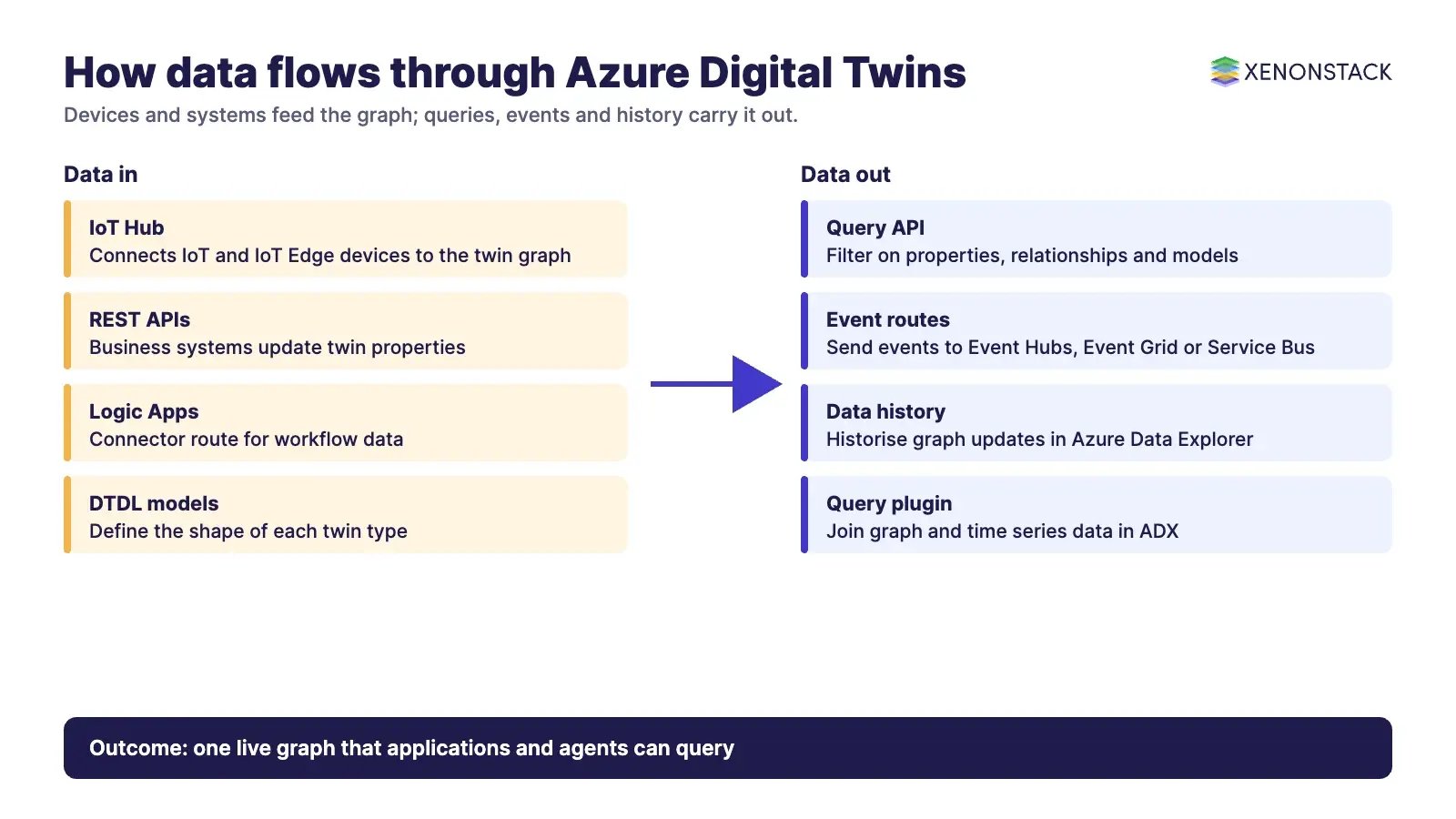
| Direction | Mechanism | Purpose |
|---|---|---|
| In | IoT Hub, REST APIs, Logic Apps connector | Keep twin properties current against the real environment |
| Query | Query API | Filter on property values, relationships, relationship properties and model information |
| Out (events) | Event routes to Event Hubs, Event Grid or Service Bus | Send graph events to custom flows, for example into Azure Data Lake |
| Out (history) | Data history to Azure Data Explorer | Historise graph updates and query them with the Azure Digital Twins query plugin |
How does it differ from device twins and Fabric digital twin builder?
| Option | What it is | When to consider it |
|---|---|---|
| Azure Digital Twins | PaaS twin graph defined in DTDL, with a query API, event routes and data history | You need relationships between assets, spaces and processes, and applications that react to graph changes |
| IoT Hub device twins | The device-level twin that IoT Hub keeps for a registered device | Device state and configuration; Azure Digital Twins can connect to these twins |
| Digital twin builder in Fabric | A separate product, marked preview on the overview page | Read its own documentation before choosing it, because it is not the same service |
| Time series store alone | Telemetry kept in a store such as Azure Data Explorer | Relationships are simple and no graph is needed |
Where does a twin graph pay off?
The value comes from relationships: which sensor sits in which room, which machine feeds which line, which asset depends on which supply. Typical starting points include:
- Manufacturing lines and equipment, as in our IoT data analytics use case and our guide to digital twins in Industry 4.0.
- Smart buildings, where spaces, floors and equipment are linked so readings can be queried by location.
- Asset-heavy networks such as energy and rail, where a fault must be traced through dependencies.
If you want design help, our digital twin solutions team covers the modelling and integration work.
When is a twin graph the wrong choice?
Azure Digital Twins asks for real engineering effort: DTDL modelling, event handling and operational ownership of connected Azure services. It is a poor fit when you only need telemetry dashboards, when relationships between assets are flat, or when a lighter option already answers the question. The Explorer and 3D Scenes Studio tools carry preview labels, so confirm their status before you depend on them.
How do AI agents change digital twins?
A twin graph gives an agent the context a raw telemetry feed lacks: what an asset is, what it connects to and what depends on it. That makes the graph a natural input for agents that recommend maintenance or energy decisions. It also means the agent needs governed access, clear limits and a record of why it acted. Running such agents at the edge or across sites calls for NexaStack, XenonStack's inference infrastructure.
What should you do first?
- Pick one operational question that depends on relationships, such as which assets to service next.
- Model only the entities that question needs, in DTDL version 3, starting from an industry ontology where one exists.
- Connect one IoT Hub or business feed and verify the twins update correctly.
- Turn on data history to Azure Data Explorer if analysts need past states.
- Decide who owns each model and who approves changes before you add sites.
To map one asset or maintenance decision your agents should make, and the context and policy it depends on, book a Context Workshop. See what happens in the workshop.
Frequently asked questions
What is Azure Digital Twins used for?
It builds twin graphs from digital models of whole environments, such as buildings, factories, energy networks and railways, so applications can query how things relate and react to changes.
What is DTDL?
DTDL, the Digital Twins Definition Language, is the JSON-like language used to define models. Azure Digital Twins supports versions 2 and 3, and Microsoft recommends version 3.
Is Azure Digital Twins the same as IoT Hub device twins?
No. Microsoft's overview states that Azure Digital Twins is different from the device twins used by IoT Hub, although it can connect to them to send and receive live data.
Is Azure Digital Twins the same as digital twin builder in Fabric?
No. The overview presents digital twin builder in Fabric as a separate product and labels it preview.
How is twin history stored?
The data history feature connects an instance to an Azure Data Explorer cluster so graph updates are historised there and can be queried with the Azure Digital Twins query plugin.
Follow XenonStack on LinkedIn: XenonStack on LinkedIn for new guides on agentic AI, data and platform engineering.
Ready to put AI agents to work? Explore ElixirClaw, the agentic OS platform to build, orchestrate and govern AI agents.
Explore the XenonStack platform family: ElixirData · ElixirClaw · ElixirHub · NexaStack · MetaSecure · Neural AI · AgentGRC · AgentSRE · AgentAnalyst · AgentInstruct · AgentRAI · AgentScrum · AgentSearch · AgentForce · AI Aviator · SAIF Aviator · CohortIQ · XenonStack AI · XenonStack UAE