Key takeaway
- Pipeline as code with Jenkins: how a Jenkinsfile works, Declarative vs Scripted Groovy, a minimal example, adoption steps, trade-offs and governance.
What is pipeline as code with Jenkins and Groovy?
Pipeline as code means the whole delivery flow, from build to test to deploy, is written in a text file called a Jenkinsfile and kept in source control beside the application. According to the Jenkins Pipeline documentation, the definition of a Pipeline is written into that file, and this is generally considered best practice.
Groovy comes in through Scripted Pipeline, which the Pipeline Syntax page describes as effectively a general-purpose DSL built with Groovy. Declarative Pipeline wraps a stricter structure around the same idea. The rest of this guide shows how to choose between them, move off hand-built jobs, and keep pipelines governed. For a full delivery example, see our continuous delivery pipeline with Jenkins guide.
Why move from chained jobs to a Jenkinsfile?
Older Jenkins setups create one Freestyle job per step (build, test, deploy) and chain them with post-build actions. The Jenkins documentation notes that Jenkins has always allowed this kind of rudimentary chaining, and that Pipeline makes sequential tasks a first-class citizen. The documented benefits of a Jenkinsfile in source control are:
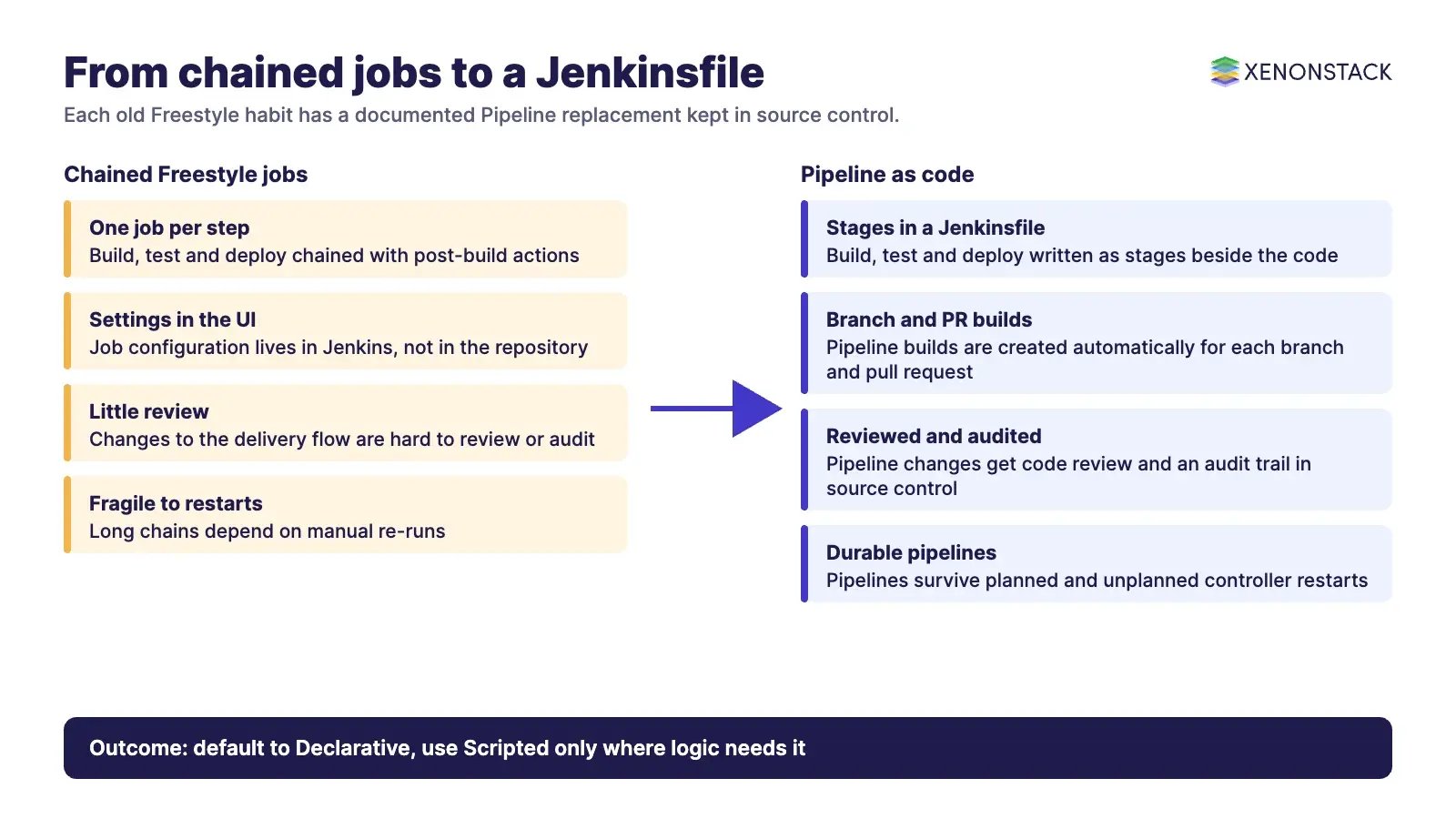
- An automatic pipeline build for each branch and pull request.
- Code review of the pipeline itself.
- An audit trail of pipeline changes.
- A single source of truth that the whole team can see.
Pipeline is also described as durable, surviving planned and unplanned controller restarts, and it can pause for human approval. Source: Jenkins Pipeline documentation.
Declarative or Scripted: which should you use?
Both styles share many steps, such as sh and junit, but they are built differently. The Pipeline Syntax page sets out the trade-off.
| Style | What it is | When it fits |
|---|---|---|
| Declarative | A pipeline block with a strict, pre-defined structure | Simpler delivery pipelines; easier to read and review |
| Scripted | node blocks governed mainly by Groovy, with very few limits | Advanced cases with complex logic and experienced authors |
The script step lets a Declarative pipeline run a block of Scripted code. The documentation calls it an escape hatch and recommends moving large or complex script blocks into Shared Libraries.
What does a minimal Jenkinsfile look like?
This example follows the style of the Jenkins Pipeline Syntax page. The agent section says where the pipeline or a stage runs and is required at the top level. Parameters include any, none, label, node, docker and dockerfile.
pipeline {
    agent any
    stages {
        stage('Build') {
            steps {
                echo 'Building the project'
            }
        }
        stage('Test') {
            steps {
                echo 'Running the tests'
            }
        }
    }
}
How do you adopt pipeline as code step by step?
- Install Jenkins and confirm the Pipeline plugin suite is present. For a Kubernetes install, follow our Jenkins on Kubernetes setup guide.
- Pick one existing chain of Freestyle jobs and write its build, test and deploy steps as stages in a Declarative Jenkinsfile.
- Commit the Jenkinsfile to the application repository and point a Pipeline or Multibranch job at it.
- Run it on a branch, compare results with the old chain, then retire the old jobs.
- Add review rules for Jenkinsfile changes, as for any code.
- Move repeated logic into Shared Libraries instead of long
scriptblocks.
What are the limits and trade-offs?
Because Pipeline must survive a controller restart, it serialises data back to the controller. The Pipeline Syntax page says Scripted Pipeline must serialize data back to the controller, and that some Groovy idioms, such as certain collection.each patterns, are not fully supported. Scripted freedom also costs readability. Keep Declarative as the default and use Scripted only where logic needs it. Check the Jenkins security documentation before running shared or untrusted pipeline code.
How does this fit governance and the wider delivery checklist?
A Jenkinsfile in source control is a policy surface: who may change a pipeline, who reviews it and what a deploy stage may touch all become reviewable. Pair it with a broader DevOps checklist. When AI agents start proposing or running pipeline changes, ElixirData Context OS keeps governed context, versioned policy and decision traces in one decision layer above AI agents, and AgentGRC keeps autonomous agent actions inside policy, with the audit trail risk teams need.
To map one pipeline decision your agents should make, and the context and policy it depends on, book a Context Workshop. See what happens in the workshop.
Frequently asked questions
What is pipeline as code in Jenkins?
It means the definition of a Jenkins Pipeline is written into a text file, called a Jenkinsfile, that can be committed to source control. According to the Jenkins documentation, this treats the pipeline as part of the application, to be versioned and reviewed.
Do I need to learn Groovy to write a Jenkinsfile?
Not for simple pipelines. Declarative Pipeline is designed to make writing and reading pipeline code easier, with a strict, pre-defined structure. Scripted Pipeline is built on Groovy and gives more freedom, so Groovy knowledge matters when you use it.
What is the difference between Declarative and Scripted Pipeline?
According to the Jenkins documentation, Declarative uses a structured pipeline block and suits simpler delivery pipelines, while Scripted uses node blocks, is governed mainly by Groovy and suits advanced users with complex needs.
Why is a Jenkinsfile better than chained Freestyle jobs?
Jenkins has always allowed rudimentary chaining of Freestyle jobs, but Pipeline makes sequential delivery a first-class feature. A Jenkinsfile in source control also gives review, an audit trail and one source of truth, as the Jenkins documentation lists.
What happens to a running pipeline if the Jenkins controller restarts?
The Jenkins documentation describes Pipeline as durable: it survives both planned and unplanned controller restarts. This is why scripted code must serialise data, and why some Groovy idioms are not fully supported.
Follow XenonStack on LinkedIn: XenonStack on LinkedIn for new guides on agentic AI, data and platform engineering.
Ready to put AI agents to work? Explore ElixirClaw, the agentic OS platform to build, orchestrate and govern AI agents.
Explore the XenonStack platform family: ElixirData · ElixirClaw · ElixirHub · NexaStack · MetaSecure · Neural AI · AgentGRC · AgentSRE · AgentAnalyst · AgentInstruct · AgentRAI · AgentScrum · AgentSearch · AgentForce · AI Aviator · SAIF Aviator · CohortIQ · XenonStack AI · XenonStack UAE