Key takeaway
- Snowflake unstructured data guide for CTOs: stages, directory tables, URL types, AI_PARSE_DOCUMENT, AI_EXTRACT, Cortex Search and Document AI status.
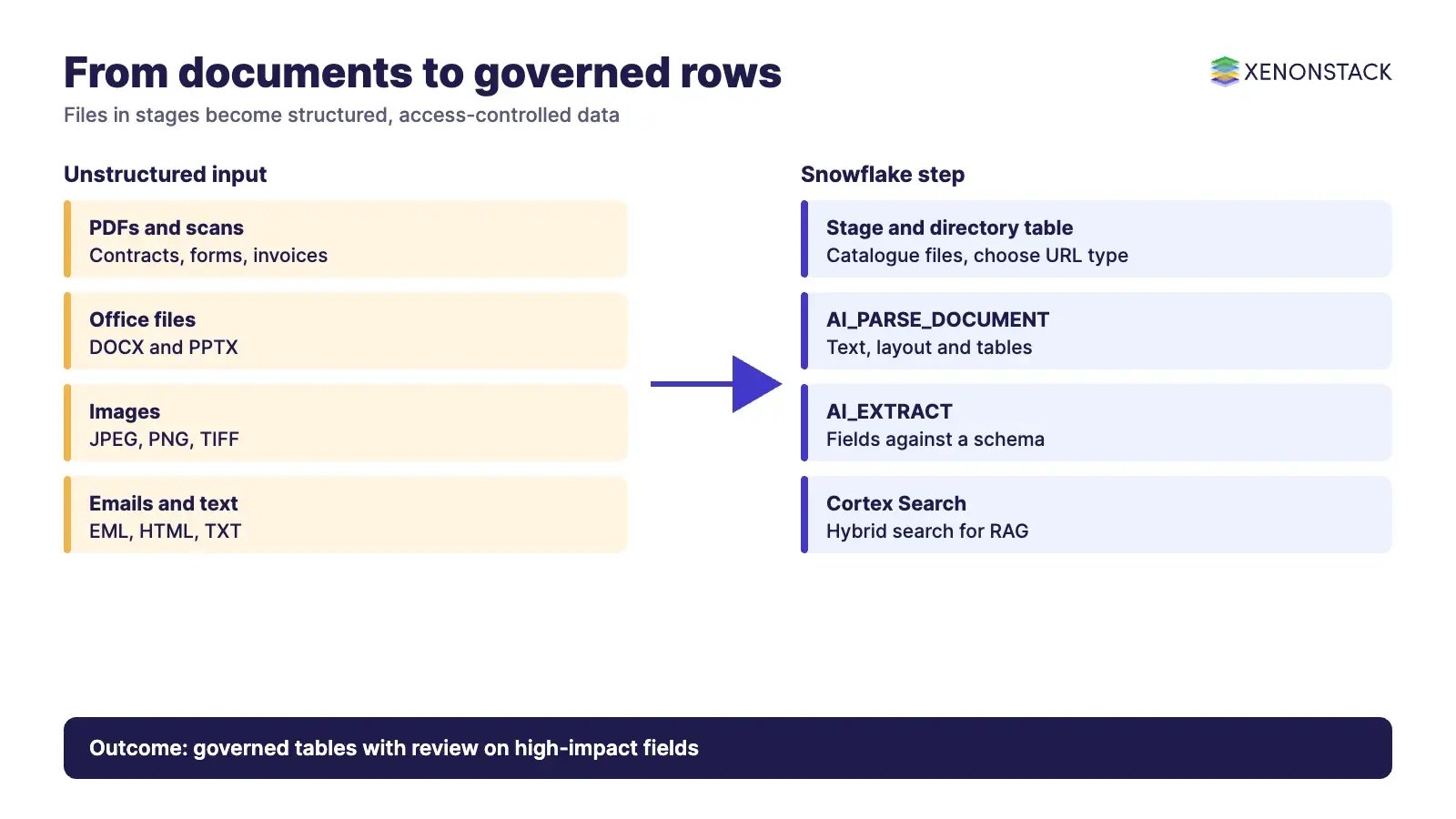
Snowflake can hold unstructured files such as PDFs, scanned forms, contracts, images and emails in stages, catalogue them with directory tables, and read them with SQL functions such as AI_PARSE_DOCUMENT and AI_EXTRACT. The result is structured rows that sit next to your tables, under the same roles and audit controls.
This guide is for CTOs, data leaders and architects who need to decide how to turn documents into governed data. It covers storage, access, extraction, search, security and an adoption sequence, with every product claim taken from Snowflake's own documentation. For the wider multimodal picture, see our guide to Snowflake multimodal AI.
What counts as unstructured data in Snowflake?
Unstructured data is any file without a predefined row and column model: documents, scanned images, presentations, emails, audio and video. In Snowflake these files live in stages and are handled as files, not as table rows. Extraction functions then produce text, JSON or table output that you can store and query like any other data.
Where do the files live and how are they catalogued?
According to Snowflake's docs, unstructured data can sit in external stages (Amazon S3, Google Cloud Storage and Azure Blob storage, Data Lake Storage Gen2 and general-purpose accounts) or in internal stages managed by Snowflake. A directory table catalogues the staged files, and roles with enough privileges can query it to get file URLs. Because the catalogue is queryable with SQL, you can filter by name, size or modification time before spending anything on extraction.
Internal stages are client-side encrypted by default, and those files cannot be read through pre-signed, file or scoped URLs. To allow URL-based access, create the stage with ENCRYPTION = (TYPE = 'SNOWFLAKE_SSE'). The encryption type cannot be changed after the stage is created, and SSE does not support Tri-Secret Secure (use SNOWFLAKE_FULL if you need it). Decide this before loading data.
Which URL type should you use to give access to files?
Snowflake offers three URL types, and they differ in who can use them and for how long. Pick by the consumer, not by convenience.
| URL type | Who can use it | Lifetime | Shared through secure views |
|---|---|---|---|
| Scoped URL (BUILD_SCOPED_FILE_URL) | Only the user who generated it | Ends with the query results cache, currently 24 hours | Yes |
| File URL (directory table or BUILD_STAGE_FILE_URL) | A role with USAGE (external stage) or READ (internal stage) | Permanent | No |
| Pre-signed URL (GET_PRESIGNED_URL) | Anyone holding the URL, with no Snowflake sign-in | Set by expiration_time | Yes |
According to Snowflake's docs, scoped URLs suit custom applications and sharing, and Snowflake logs who used them and when. Pre-signed URLs suit BI tools but are open to anyone with the link, so keep expiry short. (Source: docs.snowflake.com, unstructured data introduction.)
How do you turn documents into structured data?
The current route is Cortex AI Functions called from SQL. The document processing overview lists four core functions: AI_PARSE_DOCUMENT converts documents to text and can extract images, AI_EXTRACT pulls structured data against a schema, AI_CLASSIFY sorts documents into categories you define, and AI_COMPLETE runs a model of your choice. The docs say these are available in select regions.
| Function | What it does | Documented limits and status | When it fits |
|---|---|---|---|
| AI_PARSE_DOCUMENT | Converts documents to JSON containing text. Modes: LAYOUT (Markdown with tables and headers), OCR (fast text, no layout), AGENTIC (summarises charts and diagrams) | Formats: PDF, PPTX, DOCX, JPEG, JPG, PNG, TIFF, TIF, HTML, TXT. Up to 100 MB and 2,000 pages. AGENTIC mode is a preview feature. Billed per page | Scanned or layout-heavy files where you need clean text first |
| AI_EXTRACT | Extracts entities, lists and tables from a file or text, with optional confidence scores | Files under 100 MB. Up to 125 pages, or 1,000 pages with cross-region inference. Up to 100 entity questions or 10 table questions per call. Docs do not label it preview or GA | Invoices, contracts and forms where you know the fields you want |
| AI_CLASSIFY | Sorts documents into categories you define | Listed as a core function; confirm limits on the function page | Routing documents before extraction |
| AI_COMPLETE | General model call where you choose the model | Model, size and region limits vary; see the multimodal guide | Summaries and free-form questions over a document |
Sources: AI_PARSE_DOCUMENT and AI_EXTRACT. Callers need the SNOWFLAKE.CORTEX_USER database role, and for both functions the docs recommend a warehouse no larger than MEDIUM. The AI_PARSE_DOCUMENT page gives two different page-size limits (33.3 inches and 50 inches) without reconciling them, so test your largest drawings before committing.
What happened to Document AI?
If you built on Document AI, check your plan. Snowflake's release notes state that the Document AI UI and the <model_build_name>!PREDICT method were decommissioned on 16 March 2026, and that models not migrated to the Snowflake Model Registry are no longer available for inference. Snowflake points users to AI_EXTRACT, which uses token-based billing, and says migrated models can no longer be fine-tuned. (Source: Document AI decommission. Confirm the current position on that page.)
Can you search documents and build question answering on them?
Yes. According to Snowflake's docs, Cortex Search is a managed hybrid (vector and keyword) search service with a semantic reranking step, and it is positioned as the retrieval layer for RAG chatbots, enterprise search and Cortex Agents. You define it over a source query, and a target lag controls how far behind the base data it may fall. Documented limits include fewer than 400M rows for best serving performance, 20 queries per second for one service, and no cloning. Indexing files straight from a stage in Snowsight is in preview. (Source: Cortex Search overview.) For agents built on top, see agentic AI with Snowflake.
You can also process files with code. The docs describe Java and Python UDFs, UDTFs and stored procedures that read staged files, the Snowpark API, and external functions that call services such as Amazon Textract. Choose code when no built-in function fits, and built-in functions when governance and simplicity matter more.
How do you keep unstructured data secure and governed?
Treat extracted text as sensitive as the source file, because it often carries personal or contractual data. Snowflake's access model is built on roles and ownership, and the URL rules above decide how a file travels. A practical control set:
- Grant file access by role on the stage, and prefer scoped URLs over pre-signed ones for anything leaving your team.
- Choose the stage encryption type before loading, since it cannot be changed later.
- Store extraction output in tables with their own grants, and record which function and model produced each row.
- Keep a human review step for fields that drive payments, legal terms or customer decisions.
- Check the data quality monitoring approach for extracted fields, and watch credit use with FinOps for Snowflake.
Snowflake's docs do not describe business-level decision records. That layer is where ElixirData Context OS fits: it keeps governed context, versioned policy and decision traces in one decision layer above AI agents. For plain-language questions over the structured output, AgentAnalyst lets teams ask questions of enterprise data in plain language, and ElixirClaw is an agentic OS platform to build, orchestrate and govern AI agents and automation workflows while keeping humans in control.
What does a sensible adoption sequence look like?
- Pick one document type with a clear owner and a measurable outcome, such as supplier invoices.
- Stage the files, decide the encryption type, and build the directory table.
- Run AI_PARSE_DOCUMENT or AI_EXTRACT on a sample and compare the output with a human-checked set.
- Write results to governed tables, add review for high-impact fields, and set a credit budget.
- Add Cortex Search or agents only after extraction quality is stable.
- Widen to more document types and regions, checking regional availability each time.
When is this not the right approach?
Avoid it when files must stay outside your cloud account, when the target region does not offer the function you need, or when documents are so varied that no schema fits. Very large drawings or files beyond the documented size and page limits need pre-processing or a different tool. Also be careful with cost: parsing is billed per page and extraction by tokens, so estimate volumes first.
To map one document decision your agents should make, and the context and policy it depends on, book a Context Workshop. See what happens in the workshop.
What should you plan for in 2027?
Snowflake publishes dated behaviour changes that touch the functions used in this guide. Two are worth checking against your own account before 2027 planning is final.
- January 2027: Snowflake's behaviour change notes say CORTEX_MODELS_ALLOWLIST is deprecated and can only be set to 'None', with accounts moving to model role based access and the rollout completing in January 2027. Review which roles may call Cortex functions (Snowflake behaviour change notes).
- Document AI: the UI and PREDICT method were decommissioned on 16 March 2026, so any workload still relying on them should move to AI_EXTRACT now (Document AI decommission).
- Each quarter: recheck regional availability and credit budgets for parsing and extraction.
Frequently asked questions
Can Snowflake store and query unstructured data?
Yes. Files are held in internal or external stages, catalogued with directory tables, and read through functions, UDFs or the Snowpark API, according to Snowflake's documentation.
Which function should I use to extract fields from documents?
Use AI_EXTRACT when you know the fields you want, and AI_PARSE_DOCUMENT when you first need clean text, layout or tables. Both need the SNOWFLAKE.CORTEX_USER database role.
Is Document AI still available?
Snowflake's release notes say the Document AI UI and the PREDICT method were decommissioned on 16 March 2026, and point users to AI_EXTRACT. Confirm on the release notes page.
Which URL type is safest for sharing files?
A scoped URL is limited to the user who generated it and expires with the query results cache, currently 24 hours. A pre-signed URL works for anyone who holds it until it expires.
How are these functions billed?
AI_PARSE_DOCUMENT is billed per page processed, and AI_EXTRACT cost depends on pages, input tokens and output tokens. Check the current pricing pages before planning volumes.
Follow XenonStack on LinkedIn: XenonStack on LinkedIn for new guides on agentic AI, data and platform engineering.
Explore the XenonStack platform family: ElixirData · ElixirClaw · ElixirHub · NexaStack · MetaSecure · Neural AI · AgentGRC · AgentSRE · AgentAnalyst · AgentInstruct · AgentRAI · AgentScrum · AgentSearch · AgentForce · AI Aviator · SAIF Aviator · CohortIQ · XenonStack AI · XenonStack UAE