Key takeaway
- What is RDD in Spark? A plain guide to Spark RDD transformations, actions, lineage, persistence, RDD vs DataFrame and Spark Connect limits in Spark 4.x.
An RDD (Resilient Distributed Dataset) is Apache Spark's original programming abstraction: a fault-tolerant collection of elements partitioned across the nodes of a cluster that can be operated on in parallel. You build RDDs from a collection in the driver program or from files in HDFS, object storage or any Hadoop InputFormat source, then process them with lazy transformations and result-producing actions. If a partition is lost, Spark rebuilds it from the lineage of transformations that created it.
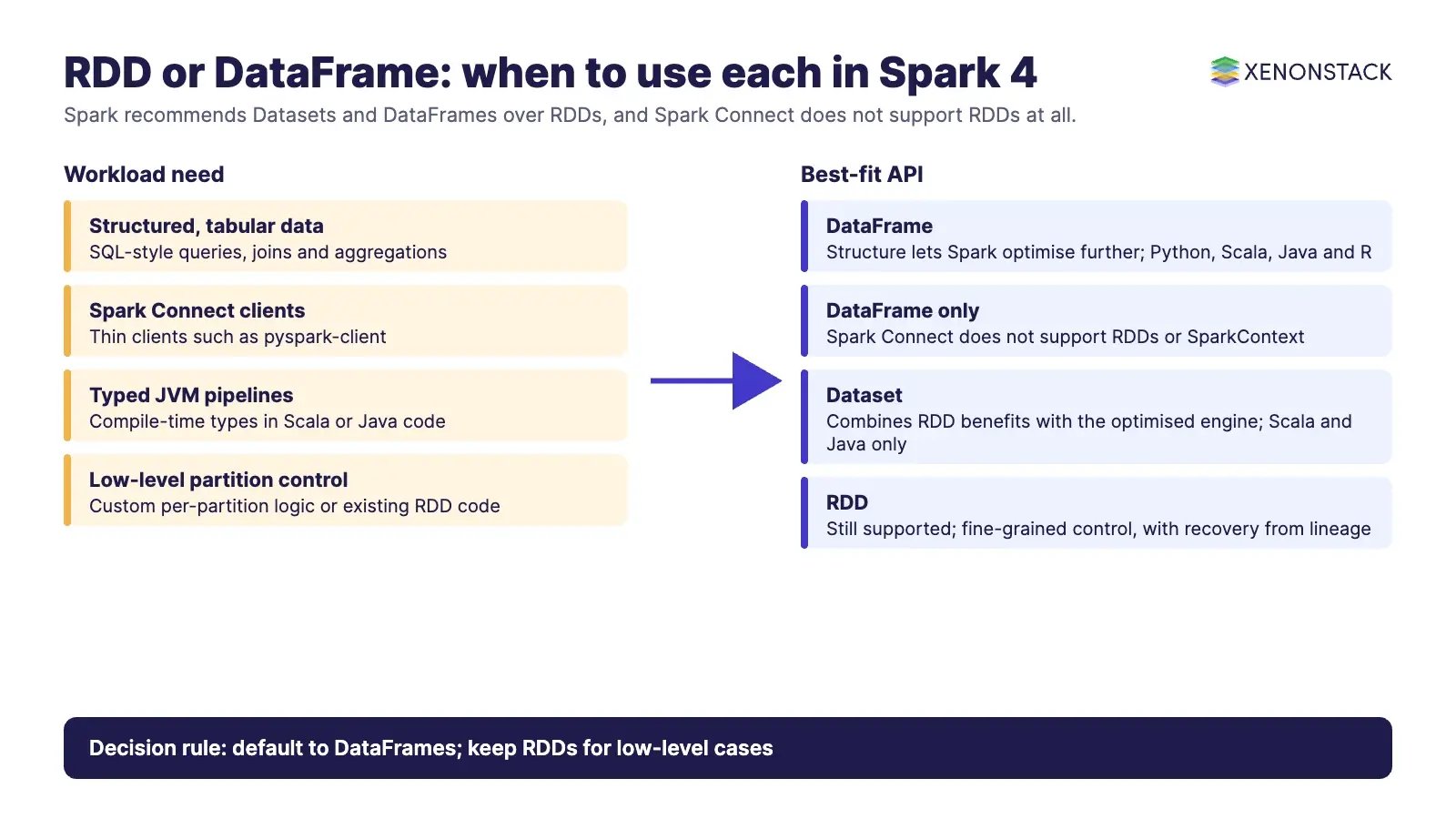
In Spark 4.x the RDD API is still supported (the current release is Spark 4.3.0, published on 30 October 2026), but the Spark project recommends Datasets and DataFrames for most work because they run through the Spark SQL optimised engine. RDDs are also not available through Spark Connect, the client-server interface Spark has been building out since 3.4. For enterprise teams, that makes RDDs a specialist tool for low-level control rather than the default way to write new pipelines.
What is an RDD in Spark?
The Spark RDD programming guide defines an RDD as "a fault-tolerant collection of elements that can be operated on in parallel". Each Spark application has a driver program that runs the main function and launches parallel operations on the cluster; the RDD is the unit of data those operations work on. For the wider picture of drivers, executors and cluster managers, see our guide to Apache Spark architecture.
Four properties define how an RDD behaves:
Partitioned: the data is split into partitions spread across the cluster, and Spark runs one task per partition in parallel.
Immutable: a transformation never changes an existing RDD; it returns a new one. This makes data safe to share across tasks.
Lazily evaluated: transformations are recorded, not run, until an action needs a result.
Resilient: lost partitions are recomputed from lineage, so RDDs recover automatically from node failures.
How do you create an RDD?
The programming guide describes two ways to create an RDD:
Parallelise an existing collection in the driver program with
SparkContext.parallelize(). This is useful for tests and small reference data, because the whole collection must first exist in the driver.Reference an external dataset in a shared filesystem, HDFS, HBase or any data source offering a Hadoop InputFormat, for example
sc.textFile("data.txt"), which reads a file as a collection of lines.
A third route follows from the first two: every transformation on an existing RDD produces a new RDD. Both creation methods go through SparkContext, which matters later when we look at Spark Connect.
What is the difference between RDD transformations and actions?
RDDs support two types of operation. Transformations create a new dataset from an existing one. Actions run a computation and return a value to the driver program or write output to storage. In the words of the guide, "All transformations in Spark are lazy": Spark remembers the transformations applied to a base dataset and only computes them when an action requires a result. This lets Spark plan the work as a whole instead of materialising every intermediate step.
| Operation type | What it does | Common examples | Triggers execution? |
| Transformation (no shuffle) | Returns a new RDD; each output partition depends on one input partition | map, filter, flatMap, mapPartitions, sample, union |
No, recorded in lineage |
| Transformation (shuffle) | Returns a new RDD; data is redistributed across partitions | groupByKey, reduceByKey, aggregateByKey, join, cogroup, repartition, distinct |
No, but creates a stage boundary when the job runs |
| Action | Returns a value to the driver or writes to storage | count, collect, reduce, first, take(n), takeOrdered, countByKey, foreach, saveAsTextFile |
Yes |
Two practical points for engineering leads. First, collect() brings every element back to the driver, so it is only safe after a filter or aggregation has reduced the data to a small result. Second, the guide recommends reduceByKey or aggregateByKey over groupByKey when the goal is a per-key aggregation.
Why do shuffles matter?
A shuffle is Spark's mechanism for redistributing data so it is grouped differently across partitions. The guide calls it "a complex and costly operation" because it involves disk I/O, data serialisation and network I/O. Repartitioning (repartition, coalesce), most "ByKey" operations and joins can all trigger a shuffle. Shuffle files are kept until the related RDDs are garbage collected, so long-running jobs can consume a large amount of local disk space under spark.local.dir. Operations that do not need a shuffle are often called narrow transformations, and those that do are called wide transformations.
How do lineage and fault tolerance work in an RDD?
Every RDD remembers the chain of transformations that produced it from stable input data. This chain is its lineage. When an action runs, Spark turns the lineage into a directed acyclic graph (DAG) of stages and tasks and runs them on executors. If an executor fails and a partition is lost, Spark does not need a copy of that partition: as the guide puts it, a lost partition "will automatically be recomputed using the transformations that originally created it".
A common misunderstanding, which an earlier version of this article repeated, is that RDDs are fault tolerant because Spark replicates data across executors. By default it does not. Recovery comes from recomputation. Replication only happens if you choose a replicated storage level such as MEMORY_ONLY_2, which trades extra memory for faster recovery. Spark also keeps some intermediate shuffle output automatically so that a node failure during a shuffle does not force the whole input to be recomputed.
Which RDD persistence level should you choose?
Persisting (caching) an RDD keeps its partitions in memory or on disk after the first action computes them, so later actions reuse them instead of recomputing the lineage. You call persist() with a storage level, or cache(), which is shorthand for the default level MEMORY_ONLY.
| Storage level | What happens | When it fits |
MEMORY_ONLY (default for cache()) |
Deserialised objects in the JVM; partitions that do not fit are recomputed when needed | Data fits comfortably in memory; the most CPU-efficient option |
MEMORY_AND_DISK |
Partitions that do not fit in memory are written to disk and read back | Recomputing a partition is expensive |
MEMORY_ONLY_SER / MEMORY_AND_DISK_SER (Java and Scala) |
Serialised objects, one byte array per partition; smaller but more CPU to read | Memory is tight; pair with a fast serialiser |
DISK_ONLY |
Partitions stored only on disk | Large intermediate results that are costly to rebuild |
MEMORY_ONLY_2, MEMORY_AND_DISK_2 and similar |
Same as the base level, with each partition replicated on two nodes | Fast recovery matters, for example when Spark serves interactive requests |
OFF_HEAP (experimental) |
Like MEMORY_ONLY_SER but in off-heap memory; off-heap memory must be enabled |
Reducing JVM heap pressure, after testing |
In PySpark, stored objects are always serialised with Pickle, so the serialised and deserialised variants make no difference. The Python levels are MEMORY_ONLY, MEMORY_ONLY_2, MEMORY_AND_DISK, MEMORY_AND_DISK_2, DISK_ONLY, DISK_ONLY_2 and DISK_ONLY_3. The guide also advises against spilling to disk unless the functions that computed the data are expensive or filter a large amount of it, because recomputing a partition can be as fast as reading it back. Spark evicts cached partitions on a least-recently-used basis; call RDD.unpersist() to release them explicitly. For broader tuning advice, see our guide to Apache Spark optimisation techniques and performance tuning.
How do RDD, DataFrame and Dataset compare?
The Spark SQL guide explains the key difference: unlike the basic RDD API, the Spark SQL interfaces give Spark more information about the structure of both the data and the computation, and Spark uses that information to perform extra optimisations. A Dataset combines the benefits of RDDs (strong typing and lambda functions) with Spark SQL's optimised execution engine. A DataFrame is a Dataset organised into named columns; in Scala it is simply a type alias of Dataset[Row].
| Feature | RDD | DataFrame | Dataset |
| What it is | Partitioned collection of objects of any type | Dataset organised into named columns, like a relational table | Typed distributed collection of JVM objects |
| Languages | Scala, Java, Python | Python, Scala, Java, R | Scala and Java only |
| Schema | None; Spark sees opaque objects | Named columns with types | Schema derived from the object type |
| Optimisation | None automatic; you control partitioning and operations | Spark SQL engine optimises the query plan | Spark SQL engine optimises the query plan |
| Type checking | Typed in Scala and Java (RDD[T]); dynamic in Python |
Column names and types checked when the plan is analysed | Compile-time type checking |
| Spark Connect support | Not supported | Supported | Supported in the Scala client |
| Current status in Spark 4.x | Supported; Spark recommends switching to Dataset | Main API for Python and SQL users | Main typed API for Scala and Java |
The Spark quick start is direct about the direction of travel: "After Spark 2.0, RDDs are replaced by Dataset", the RDD interface "is still supported", but "we highly recommend you to switch to use Dataset, which has better performance than RDD".
What has changed for RDDs in Spark 4.x?
Spark 4.0.0 was released on 23 May 2025, and the 4.x line has continued through Spark 4.3.0 on 30 October 2026. Across that line, the RDD API has not been deprecated or removed: the RDD programming guide is still published for 4.3.0, and the 4.3.0 release notes mention RDDs only for maintenance changes, such as enabling spark.rdd.compress by default and checksums to detect non-deterministic local checkpoints. What has changed is the centre of gravity of the platform.
Why can you not use RDDs with Spark Connect?
Spark Connect, introduced in Spark 3.4, separates the client application from the Spark cluster. The client sends unresolved logical plans to the server, which is why the documentation states that the Spark Connect protocol "does not support all the execution APIs of Spark, most importantly RDDs". The client also has no access to the SparkContext. Spark Connect has supported most PySpark APIs since 3.4 and most Scala APIs since 3.5, but in both cases SparkContext and RDD APIs are unsupported.
Spark 4.0 pushed Spark Connect further: a lightweight Python client (pyspark-client, about 1.5 MB), an extra release tarball with Spark Connect enabled by default, ML on Spark Connect and a new spark.api.mode setting to switch applications between Spark Classic and Spark Connect. Any code that depends on sc.parallelize, df.rdd or other RDD calls will need rework before it can run in that mode.
When should enterprises still use RDDs?
| Situation | Use RDDs? | Reason |
| Structured or semi-structured analytics, ETL, SQL workloads | No | DataFrames and Datasets get Spark SQL optimisation; RDDs do not |
| New PySpark applications or notebooks on Spark Connect | No | RDD and SparkContext APIs are unsupported in Spark Connect |
| Data with no useful schema, such as arbitrary binary records or custom objects | Sometimes | Functional operations on opaque objects are the RDD model's strength |
| Fine-grained control of partitioning, custom partitioners or per-partition logic | Sometimes | mapPartitions, repartitionAndSortWithinPartitions and custom partitioners give low-level control |
| Existing, stable RDD jobs on Spark Classic | Keep for now | The API is still supported; plan migration where Spark Connect or optimisation gains justify it |
What are the governance, security and cost implications of RDD code?
Cost: RDD jobs miss the automatic query optimisation that DataFrames receive, so inefficient shuffles and caching choices fall to the developer. Poor use of
groupByKey,collect()or over-caching translates directly into larger clusters and longer runtimes.Governance: because RDD functions operate on opaque objects, Spark cannot see which columns a job reads or writes. Column-level controls and lineage tools that work on query plans have less to work with than they do for SQL and DataFrame code. If AI agents will act on the outputs of these jobs, ElixirData Context OS keeps governed context, versioned policy and decision traces in one decision layer above those agents.
Platform alignment: RDD code ties an application to Spark Classic and direct
SparkContextaccess. That limits the move to Spark Connect's thin-client model, where applications run separately from the cluster.Skills: RDD code needs engineers who understand partitioning, serialisation and shuffle behaviour. Document why each RDD job exists so that future teams do not inherit it blindly.
How should teams move from RDDs to DataFrames?
Inventory: search code bases for
SparkContext,sc.parallelize,textFile,.rddand RDD-only operations, and list the jobs that use them.Classify: mark each job as structured (a straightforward DataFrame port), semi-structured (a DataFrame with nested or variant types) or genuinely low-level (keep as RDD).
Port and compare: rewrite structured jobs with DataFrames or Datasets and compare outputs, runtimes and resource use on the same input.
Isolate what remains: keep RDD logic in small, documented modules that run on Spark Classic, and convert to a DataFrame as early as possible in the pipeline.
Adopt Spark Connect where it fits: once jobs no longer depend on RDD or
SparkContextAPIs, they can be tested with Spark Connect clients.
If you are reviewing the wider processing stack at the same time, our overview of big data tools and technologies covers where Spark sits alongside other engines. Once pipelines land data in governed tables, AgentAnalyst lets teams ask questions of enterprise data in plain language and get real-time insights.
What are the trade-offs and when should you not use RDDs?
The RDD model gives you complete control and works on any object type, but you pay for that control. Do not choose RDDs for tabular data that DataFrames can express, for teams that mainly write Python or SQL, for workloads you intend to run through Spark Connect, or where the same result can be produced with built-in functions. In those cases you lose engine optimisation and portability without gaining anything a DataFrame cannot already provide. RDDs remain a reasonable choice for genuinely unstructured processing, custom partitioning logic and stable legacy jobs that are not worth rewriting yet.
To map one data-driven decision your agents should make, and the context and policy it depends on, book a Context Workshop. See what happens in the workshop.
Frequently asked questions about RDD in Spark
What does RDD stand for in Spark?
RDD stands for Resilient Distributed Dataset, a fault-tolerant collection of elements partitioned across a cluster that can be operated on in parallel.
Is the RDD API deprecated in Spark 4?
No. The RDD interface is still supported and documented in Spark 4.3.0, but the Spark documentation recommends switching to Datasets, which perform better than RDDs.
Is reduce a transformation or an action?
reduce is an action because it returns a value to the driver. reduceByKey is a transformation because it returns a new RDD of key-value pairs.
How does an RDD recover from failure?
Spark recomputes a lost partition using the lineage of transformations that originally created it. Replication only applies if you choose a replicated storage level such as MEMORY_ONLY_2.
Can I use RDDs with Spark Connect?
No. The Spark Connect documentation states that RDD and SparkContext APIs are not supported in either the Python or the Scala client.
What is the default storage level for cache()?
cache() uses MEMORY_ONLY, which stores deserialised objects in memory and recomputes any partitions that do not fit.
Ready to put AI agents to work? Explore ElixirClaw, the agentic OS platform to build, orchestrate and govern AI agents.
Explore the XenonStack platform family: ElixirData · ElixirClaw · ElixirHub · NexaStack · MetaSecure · Neural AI · AgentGRC · AgentSRE · AgentAnalyst · AgentInstruct · AgentRAI · AgentScrum · AgentSearch · AgentForce · AI Aviator · SAIF Aviator · CohortIQ · XenonStack AI · XenonStack UAE