
Key takeaway
- How Amazon Q Business supports IT service management: connectors, permissions, plugins and sync, plus the AWS availability change and what AI agents add.
Amazon Q Business is AWS's generative AI assistant for answering questions, summarising and completing tasks from a company's own data, and in IT service management it is used as an assistant in front of tickets, knowledge articles and approved actions. AWS documents it as giving permissions-aware responses with citations, for use cases such as IT, HR and benefits help desks.
This guide is for IT service management (ITSM) leaders and platform architects weighing an AWS-based assistant for the service desk. It covers what the service does, a reference flow for an ITSM setup, how it handles access and data freshness, where it stops, and one important availability change you should know before planning.
What is Amazon Q Business, and is it still available?
The AWS documentation describes Amazon Q Business as "a fully managed, generative-AI powered assistant that you can configure to answer questions, provide summaries, generate content, and complete tasks based on your enterprise data." It is built on Amazon Bedrock.
Availability has changed. The same page states that Amazon Q Business is no longer open to new customers and points to Amazon Quick for similar capabilities. A new ITSM project should check the current AWS pages before committing. The rest of this guide describes what AWS documents for Amazon Q Business, which is also a useful checklist for evaluating any assistant of this kind.
How does ITSM fit with a generative AI assistant?
ITSM is the practice of designing, delivering, managing and improving IT services to meet business goals. Much of the daily load is incident handling, service requests and knowledge upkeep. Our guide to ITSM with Now Assist shows the same problem approached on the ServiceNow platform, and our overview of generative AI use cases places it in context. An assistant helps most where answers already exist in documents and tickets but are hard to find.
What is a reference architecture for ITSM with Amazon Q Business?
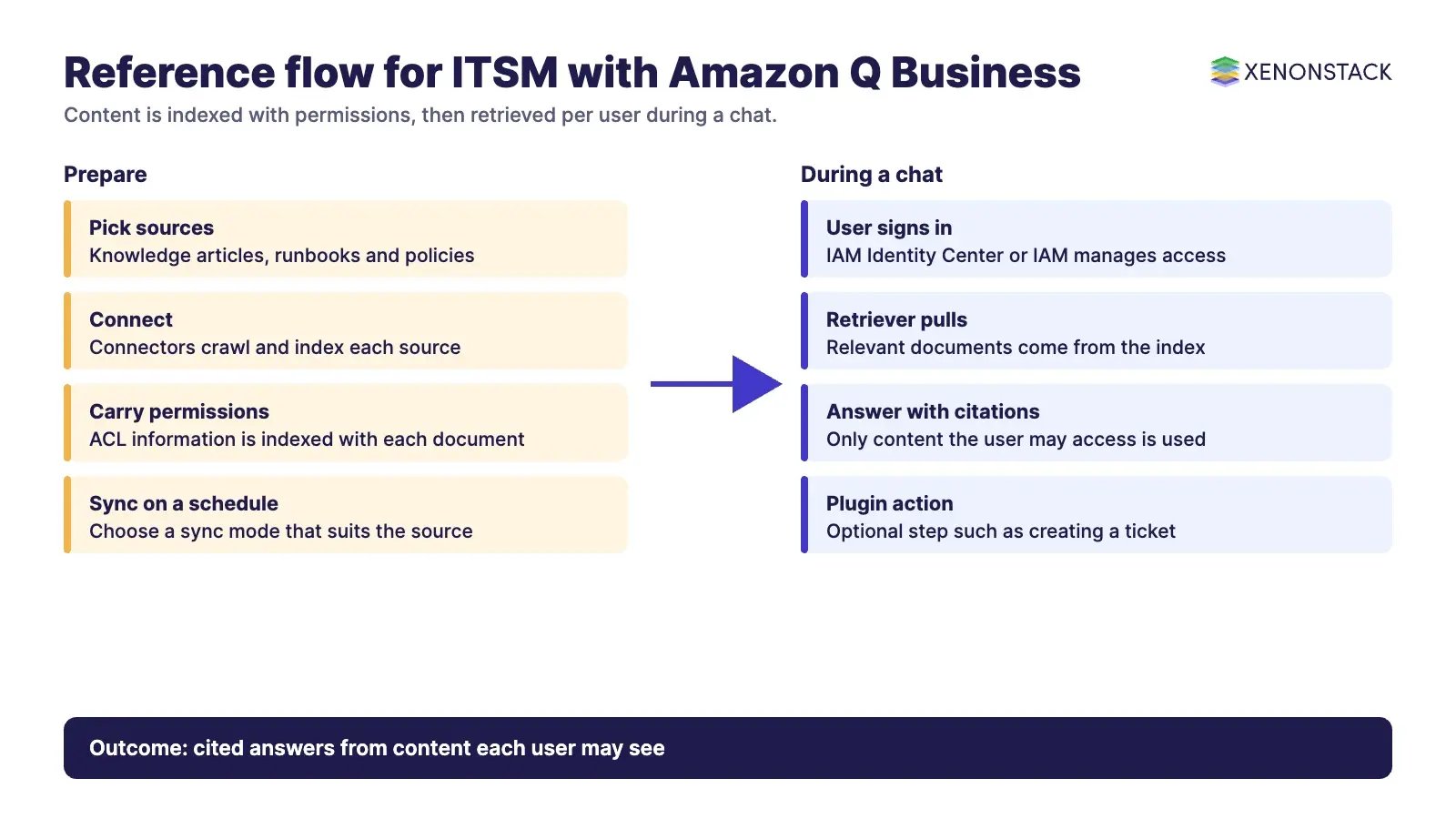
The key concepts page defines the building blocks. An application environment is the main resource for creating a chat solution. An index is a corpus of documents, and a retriever pulls data from that index in real time during a conversation. A user's question flows through that path, with access managed through AWS IAM Identity Center or AWS Identity and Access Management, as the overview page states.
| Building block | What AWS documents | ITSM example |
|---|---|---|
| Data source connectors | Crawl content from sources such as Amazon S3, Microsoft SharePoint and Salesforce and index it | Runbooks, policies and knowledge articles |
| Index and retriever | An index holds the documents; a retriever pulls from it during a conversation | Searching the knowledge base for a fix |
| Access control | Responses are based on content the end user has permission to access | Staff see only the documents they may read |
| Plugins | Interact with third-party services such as Jira and Salesforce, for example to create a ticket | Raising a ticket from the chat |
| Guardrails | Global and topic-level controls over sources and topics | Keeping answers to approved IT topics |
How does it keep answers permission-aware and current?
The connector concepts page explains that connectors index the access control list (ACL) information attached to a document along with the document itself, and that this is used to filter chat responses by the user's access. ACL changes are picked up each time the data source is crawled, so regular re-syncing matters. The page also lists sync modes, including full sync, new or modified content sync, and change log, and notes that available modes vary by connector. It adds a safeguard: a maximum deletion percentage that skips the delete phase if too many documents would be removed.
Two cautions apply to ITSM. Once ACL and identity crawling is on, it cannot be turned off. And updating the User Store should be treated as a privileged operation with a documented approval process. For dashboards and reporting on service performance, see our page on Amazon QuickSight.
What can and cannot it automate in service management?
AWS documents answers with citations, summaries, content generation, plugin actions and task automation such as submitting requests. Specific outcomes, such as how many tickets a team can deflect or how much downtime falls, are not guaranteed by the documentation, and this guide does not quote any. Predictive analytics on infrastructure health, cost optimisation and compliance automation are separate capabilities that you would need to confirm in AWS documentation or build with other services. For security use cases, read Cyber Security with Generative AI and Amazon Q and our overview of AI in cyber security.
How do AI agents change IT service management?
An assistant answers a question. An agent decides on a sequence of steps, such as checking an entitlement, requesting approval and updating a record across several tools. That raises the stakes for permissions, approval paths and an audit trail. ElixirClaw, the AI agents computing platform, is where XenonStack builds and runs agents that work alongside the platforms an IT team already uses, including AWS services.
What should you do first?
- Confirm current availability and the supported path with AWS before you design anything.
- Pick one ticket category with a good knowledge base, such as access requests or password help.
- Connect only the sources that category needs and confirm the permissions carry through.
- Limit actions to ones a human can approve, and log each one.
- Review wrong or uncited answers weekly and fix the source documents.
To map one decision your agents make, and the data and policy it depends on, book a Context Workshop. See what happens in the workshop.
Frequently asked questions
What is Amazon Q Business?
AWS describes it as a fully managed, generative-AI powered assistant that answers questions, provides summaries, generates content and completes tasks based on enterprise data.
Is Amazon Q Business open to new customers?
AWS documentation states that Amazon Q Business is no longer open to new customers and suggests exploring Amazon Quick for similar capabilities.
How does it respect who can see what?
Connectors index document ACL information, and responses are filtered by what the end user has permission to access.
Can it create tickets?
AWS documents a plugins feature for interacting with third-party services such as Jira and Salesforce, including actions like creating a ticket from the chat.
How fresh is the data it answers from?
It depends on how often each data source is synced. Sync modes include full sync, new or modified content sync and change log, and available modes vary by connector.
Follow XenonStack on LinkedIn: XenonStack on LinkedIn for new guides on agentic AI, data and platform engineering.
Ready to put AI agents to work? Explore ElixirClaw, the agentic OS platform to build, orchestrate and govern AI agents.
Explore the XenonStack platform family: ElixirData · ElixirClaw · ElixirHub · NexaStack · MetaSecure · Neural AI · AgentGRC · AgentSRE · AgentAnalyst · AgentInstruct · AgentRAI · AgentScrum · AgentSearch · AgentForce · AI Aviator · SAIF Aviator · CohortIQ · XenonStack AI · XenonStack UAE