Key takeaway
- PaaS vs IaaS explained with the NIST definitions: what you manage in each model, how they differ, how to choose, and how AI agents change cloud operations.
PaaS (platform as a service) lets you deploy your own applications onto a platform the provider runs, while IaaS (infrastructure as a service) gives you raw processing, storage and network resources to build on. The practical difference between them is how much of the technology stack you still have to manage yourself.
This page is for engineers, architects and technology leaders deciding between the two models. It covers the standard definitions, who is responsible for what, the benefits and challenges of each, how to choose, and how AI agents change day-to-day cloud operations.
What do PaaS and IaaS mean?
The most widely cited definitions come from the US National Institute of Standards and Technology in NIST SP 800-145. It describes three service models. With software as a service, the consumer uses the provider's applications running on a cloud infrastructure. With platform as a service, the consumer deploys consumer-created or acquired applications onto the cloud infrastructure. With infrastructure as a service, the consumer can provision processing, storage, networks and other fundamental computing resources.
The same document lists five essential cloud characteristics that apply to all three: on-demand self-service, broad network access, resource pooling in a multi-tenant model, rapid elasticity and measured service. These explain why billing is usage-based and why capacity can grow or shrink as demand changes.
What is the difference between PaaS and IaaS?
NIST states that in both models the consumer does not manage or control the underlying cloud infrastructure. What differs is what the consumer does control, summarised below alongside the split described in the Microsoft shared responsibility documentation.
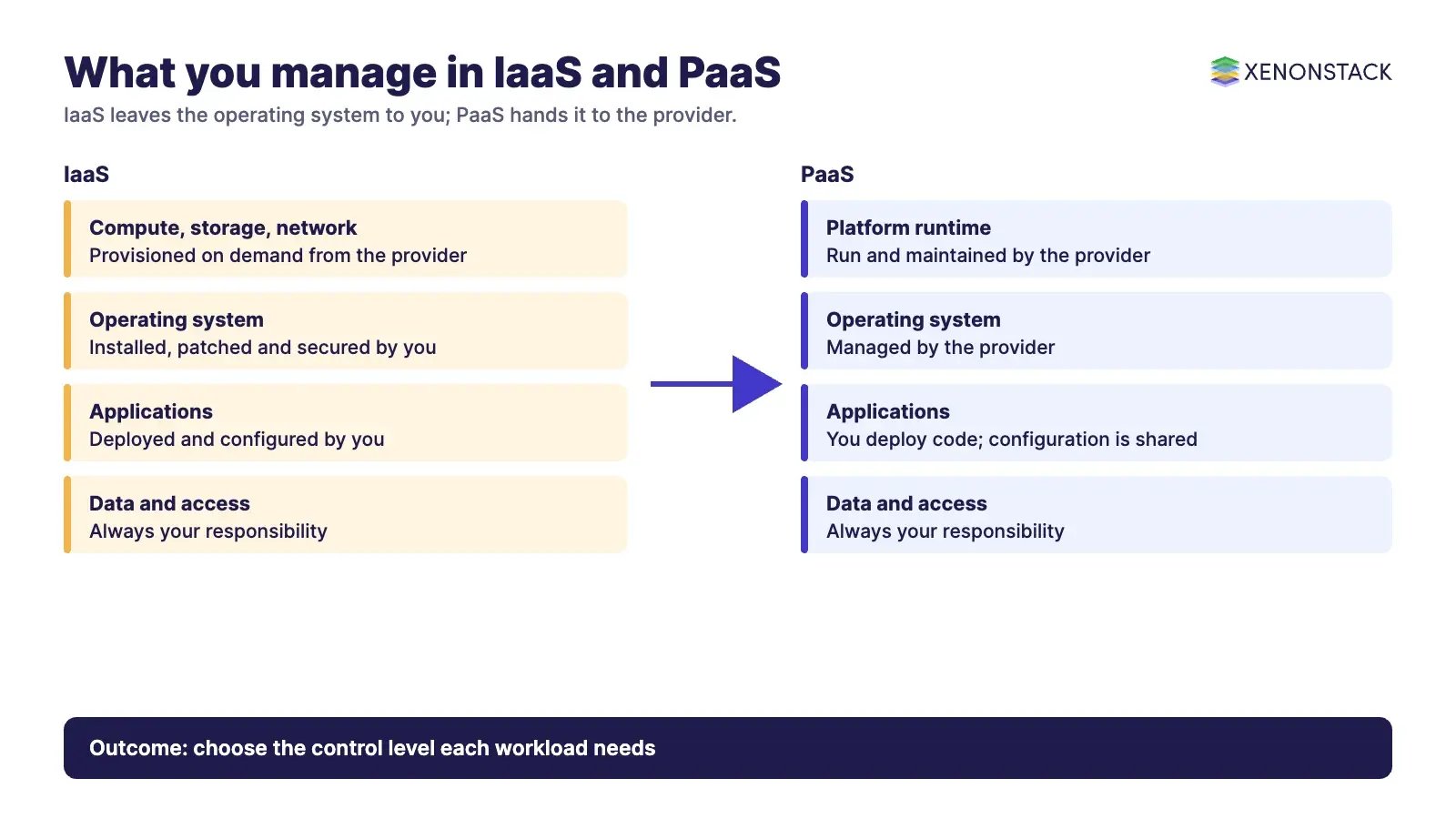
| Aspect | IaaS | PaaS |
|---|---|---|
| What you get | Fundamental computing resources: processing, storage and networks | A platform onto which you deploy your applications |
| What you control (NIST) | Operating systems, storage and deployed applications, and possibly limited control of select networking components | Deployed applications and possibly configuration settings for the application-hosting environment |
| Operating system | Managed by you | Managed by the provider |
| Applications | Managed by you | Shared: you still own application configuration, code security and access controls |
| Typical fit | Teams that need control over the operating system and network layout | Teams that want to ship application code without running servers |
| Main trade-off | More control, more to patch, monitor and secure | Less effort, but less room to customise the environment |
Who is responsible for what in each model?
The Microsoft documentation puts it simply: responsibility moves toward the provider as you go from on-premises to IaaS, PaaS and SaaS, but some duties never move. Regardless of the deployment type, you always retain responsibility for your data, including classification, protection, encryption decisions and compliance with data governance requirements, and for managing user accounts and access.
This matters when you adopt a model for speed. Choosing PaaS removes operating system patching from your list, but it does not remove data protection or access management. Monitoring across both models is covered in our guide to cloud management and monitoring tools.
What are the benefits of IaaS and PaaS?
Benefits of IaaS:
- Control over the operating system, middleware and runtime, which suits workloads with specific requirements.
- Elastic capacity that can be provisioned and released as demand changes, billed by measured use.
- Environments that can be created and updated through code. See Infrastructure as Code on AWS for how that works on one provider.
Benefits of PaaS:
- Faster development, because you do not set up or maintain the underlying infrastructure. Our guide PaaS: an efficient cloud computing service goes deeper.
- A managed operating system and runtime, so your team spends its time on application code and data.
- A consistent environment from development to production, which simplifies releases.
What are the challenges of IaaS and PaaS?
- Network dependency: NIST lists broad network access as a defining characteristic, so capabilities are reached over the network and a poor connection affects your work in either model.
- Multi-tenancy: resource pooling uses a multi-tenant model, so isolation and configuration need deliberate attention, especially on IaaS where you own more of the security settings.
- Operational load on IaaS: patching, hardening and monitoring the operating system remain your job.
- Lock-in and compatibility on PaaS: a platform supports specific runtimes and services, so check that your language, libraries and data stores fit before you commit.
- Limited customisation on PaaS: you configure the hosting environment only as far as the platform allows.
How do you choose between PaaS and IaaS?
Start from the workload. If the application needs a specific operating system, kernel setting or network design, IaaS is the natural base. If it is a standard web or API workload and the goal is to release quickly, PaaS usually removes the most work. Many organisations use both, with PaaS for applications and IaaS for the exceptions. Whichever you choose, write down who owns patching, monitoring, backup and access so that nothing sits in the gap between provider and customer.
How do AI agents change PaaS and IaaS operations?
Cloud operations are full of repeatable decisions: provisioning an environment, checking a deployment, reviewing a configuration, responding to an alert. AI agents can take on some of these steps, calling provider APIs and following runbooks, with people approving the risky ones. The responsibility model above still applies: an agent acting in your account acts with your permissions, so it needs scoped access, an audit trail and clear approval rules. XenonStack's ElixirClaw is the AI agents computing platform for building and running agents of this kind.
What should you do first?
- List the workloads you plan to move and note which need operating system or network control.
- Map each one to IaaS or PaaS using the control and responsibility table above.
- Write down the duties that stay with you in every model: data, accounts and access.
- Pilot one workload and measure the operational effort it removes.
- Decide which routine steps an agent may perform and which need human approval.
Related reading: our cloud consulting services and cloud services pages, plus guides to Google Cloud Platform IoT services and machine learning platforms.
To map one decision your agents make in the cloud, and the data and policy it depends on, book a Context Workshop. See what happens in the workshop.
Frequently asked questions
What is the main difference between PaaS and IaaS?
With IaaS you control operating systems, storage and deployed applications. With PaaS you control the deployed applications and possibly some hosting configuration, and the provider runs the rest of the platform.
Is PaaS cheaper than IaaS?
It depends on the workload. PaaS reduces the effort of running servers, while IaaS gives more control over sizing. Compare the total cost, including the staff time spent on operations, rather than the unit price alone.
Do I still manage security in PaaS?
Yes. You always retain responsibility for your data, accounts and access management, and in PaaS you also own application configuration, code security and access controls.
Where does SaaS fit in?
SaaS means using the provider's finished applications. It sits above PaaS and IaaS and leaves you with the least to manage, and the least to customise.
Can AI agents run cloud infrastructure?
They can perform routine steps such as provisioning and checks through provider APIs, but they act with the permissions you give them, so access should be scoped and logged.
Follow XenonStack on LinkedIn: XenonStack on LinkedIn for new guides on agentic AI, data and platform engineering.
Ready to put AI agents to work? Explore ElixirClaw, the agentic OS platform to build, orchestrate and govern AI agents.
Explore the XenonStack platform family: ElixirData · ElixirClaw · ElixirHub · NexaStack · MetaSecure · Neural AI · AgentGRC · AgentSRE · AgentAnalyst · AgentInstruct · AgentRAI · AgentScrum · AgentSearch · AgentForce · AI Aviator · SAIF Aviator · CohortIQ · XenonStack AI · XenonStack UAE