Key takeaway
- Build computer vision solutions with Amazon Rekognition: capabilities, steps, quotas, governance, cost, 2026 changes and a sourced 3 to 5 year outlook.
Amazon Rekognition is a managed AWS service that analyses images and video through an API, so a team can add object, face, text and content moderation checks to an application without training its own model. It suits enterprises that want a quick, governed route to production vision features, as long as they check which features are still open to new customers and where face technology needs extra controls.
This guide covers what Rekognition does, how to build a solution step by step, what has changed in 2026, how to govern and cost it, and what the next 3 to 5 years may bring. For the wider picture, see our guide to computer vision applications, and for running models close to the camera, computer vision on edge.
What is Amazon Rekognition and what can it do?
According to the AWS developer guide, Amazon Rekognition is a cloud-based image and video analysis service that "requires no machine learning expertise to use". You call a simple API on an image or video file stored in Amazon S3, or send an image directly as bytes. The table below lists the main capabilities and where each one fits.
| Capability | What it does (per AWS docs) | When it fits |
|---|---|---|
| Object, scene and concept detection | Detects and classifies objects, scenes and concepts in images and video | Search, tagging and cataloguing of visual libraries |
| Text detection | Recognises printed and handwritten text in images and video | Reading signs, labels and simple documents in photos |
| Content moderation | Detects explicit, inappropriate and violent content, with granular labels | User-generated content and brand safety |
| Face detection and analysis | Detects faces and returns attributes such as estimated age range and emotions | Photo workflows where attributes are used as hints, not as decisions about people |
| Face comparison and search | Compares faces, or searches a face collection you have indexed | Consent-based identity checks and media libraries |
| Face Liveness | Helps deter fraud during face-based identity verification | Onboarding and re-authentication flows |
| Personal protective equipment (PPE) detection | Detects protective equipment in images | Safety compliance monitoring from still images |
| Celebrity recognition | Recognises tens of thousands of public figures | Media archives |
| Custom Labels | Trains a classifier on your own images for logos, products or parts | Business-specific objects the base model does not know |
| Video analysis | Analyses stored video for labels, faces, text, people pathing, unsafe content and segments | Review of recorded footage in S3 |
The service does not read medical scans. If a vendor or an old article suggests Rekognition can diagnose from X-rays or MRI, treat that as unsupported and look at regulated medical imaging AI instead.
What has changed in Amazon Rekognition recently?
Three changes matter for planning in late 2026.
| Change | What AWS says | What to do |
|---|---|---|
| Streaming events and batch image moderation in maintenance | AWS lists Rekognition streaming events and batch image content moderation among services moving to maintenance, no longer accessible to new customers from 30 April 2026. Existing customers keep access (AWS announcement). The streaming video guide carries a similar notice for streaming video and bulk image analysis. | Confirm on the AWS pages which stream processor features your account can still create before designing around live video |
| AWS Panorama support ended | AWS announced that support for AWS Panorama would end on 31 May 2026, after which the console and resources are no longer accessible (Panorama guide) | Do not start new edge vision work on Panorama. See our Panorama guide for context and our Greengrass and SageMaker edge guide for alternatives |
| Face Liveness feedback codes | On 28 September 2026 AWS announced that Face Liveness now returns feedback codes, such as poor lighting or face obstruction, to explain a low score (AWS announcement) | Show the codes to users so they can correct and retry |
How do you build a computer vision solution with Amazon Rekognition?
Build in small, testable steps and keep a human decision point wherever a result affects a person.
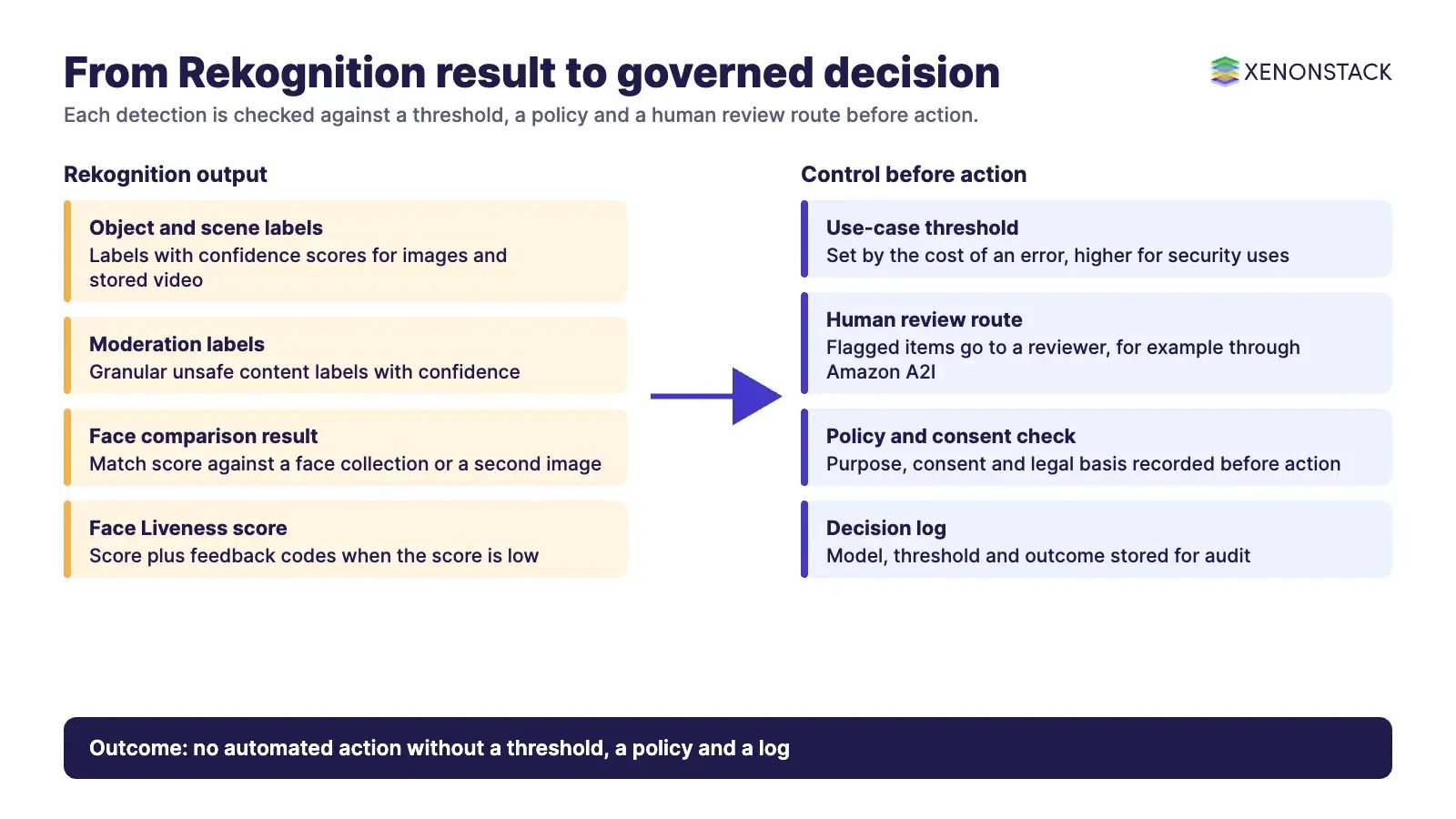
Step 1: Define the decision, not just the detection
Write down what action follows a result, who owns it and what happens when the model is wrong. "Detect helmets" is a detection. "Alert the shift supervisor when a worker is detected without a helmet and log the evidence" is a decision.
Step 2: Prepare and store the images
Store images and video in Amazon S3. According to the AWS quotas page, Rekognition supports PNG and JPEG images, up to 15 MB as an S3 object or 5 MB as raw bytes, and stored video must use the H.264 codec in MPEG-4 or MOV format, up to 10 GB and 6 hours. Check the page for current values before you size a pipeline.
Step 3: Call the right API and set confidence thresholds
Pick the operation that matches the question, for example DetectLabels for objects or DetectModerationLabels for unsafe content. AWS advises that the confidence threshold should reflect the use case: it gives 80% as an example that may suit identifying family members in photos, and recommends a higher threshold such as 99% where the cost of an error is higher, for example in security applications (AWS guidance).
Step 4: Orchestrate with events and review
A common pattern is S3 upload, then an AWS Lambda function that calls Rekognition and stores the result. For moderation, AWS notes that human moderators can review a much smaller set of content, "typically 1-5% of the total volume", already flagged by machine learning, using Amazon Augmented AI, which is integrated with Rekognition (AWS moderation guide).
Step 5: Add custom models only where the base model falls short
Rekognition Custom Labels lets you train on a small set of your own images, "typically a few hundred images or less" according to its developer guide. It is not designed for faces, text or unsafe content, which the standard APIs cover. For moderation, a Custom Moderation adapter can be trained on your own annotated images.
Step 6: Monitor accuracy and cost
Sample results regularly against human review, log the model and threshold used for each decision, and track spend. Plan scaling around the documented quotas, such as 20 concurrent stored-video jobs per account by default, and request increases through AWS Service Quotas where needed.
Which use cases fit Amazon Rekognition, and which do not?
| Use case | Fit | Notes |
|---|---|---|
| Retail catalogue tagging and visual search | Good | Labels and Custom Labels for products and logos |
| User-generated content moderation | Good | Moderation labels plus human review of flagged items |
| Identity verification at onboarding | Good, with consent | Face comparison with Face Liveness; set high thresholds and keep a fallback path |
| Workplace safety from still images | Good | PPE detection, within the documented image limits |
| Live video surveillance | Check first | Streaming features are in maintenance for new customers; privacy and legal review needed |
| Emotion inference about employees or students | Avoid | The EU AI Act prohibits emotion recognition in workplaces and education (European Commission) |
| Medical diagnosis from scans | Not supported | Use regulated medical imaging products |
If you are weighing cloud APIs against on-site inference, our cloud versus edge vision guide sets out the trade-offs, and agentic video analytics shows how an alert becomes a governed action.
What should governance, security and cost look like?
Governance. Treat every face feature as a high-risk decision. Record consent and purpose, keep a named owner, set thresholds by use case and keep a manual review route. A decision layer such as ElixirData Context OS keeps governed context, versioned policy and decision traces in one decision layer above AI agents, which helps when a vision result triggers an automated action. AgentGRC keeps autonomous agent actions inside policy, with the audit trail risk teams need.
Security. AWS states that third-party auditors assess Rekognition as part of multiple AWS compliance programmes, including SOC, PCI, FedRAMP and HIPAA, and that you can download audit reports through AWS Artifact (compliance page). Your own obligations still depend on your data and applicable law. AWS requires TLS 1.2 or later for connections and recommends least-privilege IAM access and CloudTrail logging (data protection page). It also advises against putting confidential information in tags or free-form name fields.
Cost. According to the AWS pricing page, Rekognition is pay as you go, with no upfront commitment or minimum fee. Image analysis is billed per image, stored video per minute, Custom Labels per training and inference hour, and Face Liveness per check. The page describes a free tier that includes 1,000 images per month for each of two API groups, for 12 months from account creation. Read the page for current prices, because we quote none here.
When should you choose something other than Rekognition?
| If you need | Consider | Why |
|---|---|---|
| Standard labels, text, moderation or faces from images | Rekognition APIs | Managed service, no model training |
| A business-specific object class | Rekognition Custom Labels | Trains on a small image set |
| Open-ended questions about an image or video, or reasoning over content | A multimodal model on Amazon Bedrock, such as Amazon Nova Lite, Pro or Premier | AWS lists these models as accepting text, image and video input (Nova guide) |
| Inference at the camera with low latency or limited connectivity | Edge deployment | See AWS edge vision options |
A sensible adoption sequence is a pilot on one decision, a measured comparison against human review, a governance sign-off, then rollout. Physical AI programmes that span cameras, sites and cloud can also look at NexaStack, an agentic operating platform for physical AI that runs across on-premises, cloud and hybrid environments.
What will change in Amazon Rekognition and computer vision over the next 3 to 5 years?
The outlook below is our reading of published AWS and EU sources, not a forecast with numbers. Dates are as stated on each page.
| Trend | Evidence | What it may mean for you |
|---|---|---|
| Regulation of biometric use tightens in practice | The European Commission page lists prohibitions effective from February 2025, including emotion recognition in workplaces and education, and says high-risk obligations for Annex III systems were extended to 2 December 2027 | Plan for documented risk management, human oversight and logging around any face feature before the high-risk dates |
| Vendors retire or restrict older vision features | Panorama support ended on 31 May 2026; streaming events and batch moderation moved to maintenance for new customers from 30 April 2026 | Design with replaceable components and review vendor status pages every quarter |
| Multimodal models sit beside task APIs | Amazon Nova Lite, Pro and Premier accept image and video input through Amazon Bedrock | Use task APIs for fixed, high-volume checks and multimodal models for open-ended review, and compare cost and accuracy on your own data |
| Identity checks add richer feedback | Face Liveness feedback codes were announced in September 2026 | Expect liveness flows to aim at fewer failed retries, and test them with your real user base |
The practical conclusion is to keep detection, policy and action separate. Vision services will keep changing, and the policy and audit layer should not.
To map one vision decision your agents should make, and the context and policy it depends on, book a Context Workshop. See what happens in the workshop.
What should you plan for in 2027?
If your Rekognition use touches faces or other biometric checks, one dated rule matters most for planning.
- 2 December 2027: the European Commission states that EU AI Act obligations for high risk uses listed in Annex III apply from this date, after an extension. Biometric uses sit in that group.
- 2 August 2028: the same page gives this date for AI built into regulated products.
- What to do: record consent and purpose, keep human review and log each decision for every face feature well before these dates.
Frequently asked questions
What is Amazon Rekognition used for?
It analyses images and video to detect objects, scenes, text, faces and unsafe content, and to support identity checks, using an API instead of a model you train yourself.
Does Amazon Rekognition need machine learning expertise?
No. AWS states the service requires no machine learning expertise. You still need engineering skill to build the pipeline and governance to decide how results are used.
Can new customers still use Rekognition streaming video?
AWS lists streaming events among features moving to maintenance, no longer accessible to new customers from 30 April 2026, while existing customers keep access. Confirm the current position on the AWS documentation for your account.
How should confidence thresholds be set?
Set them by the cost of an error. AWS gives 80% as an example for low-risk photo use and recommends a higher level, such as 99%, for security applications.
Is Amazon Rekognition priced per image or per hour?
Both, depending on the feature. Images are billed per image, stored video per minute, Custom Labels per training and inference hour, and Face Liveness per check.
What will change in computer vision on AWS over the next 3 to 5 years?
Expect more multimodal models alongside task APIs, continued retirement of older features, and stricter biometric rules, with EU high-risk obligations for Annex III systems now set for 2 December 2027. Plan for replaceable components and a stable policy layer.
Follow XenonStack on LinkedIn: XenonStack on LinkedIn for new guides on agentic AI, data and platform engineering.
Ready to put AI agents to work? Explore ElixirClaw, the agentic OS platform to build, orchestrate and govern AI agents.
Explore the XenonStack platform family: ElixirData · ElixirClaw · ElixirHub · NexaStack · MetaSecure · Neural AI · AgentGRC · AgentSRE · AgentAnalyst · AgentInstruct · AgentRAI · AgentScrum · AgentSearch · AgentForce · AI Aviator · SAIF Aviator · CohortIQ · XenonStack AI · XenonStack UAE