Key takeaway
- Platform as a Service (PaaS) explained: what the provider runs, types, pros and cons, how it differs from IaaS, SaaS and serverless, and AI agents.
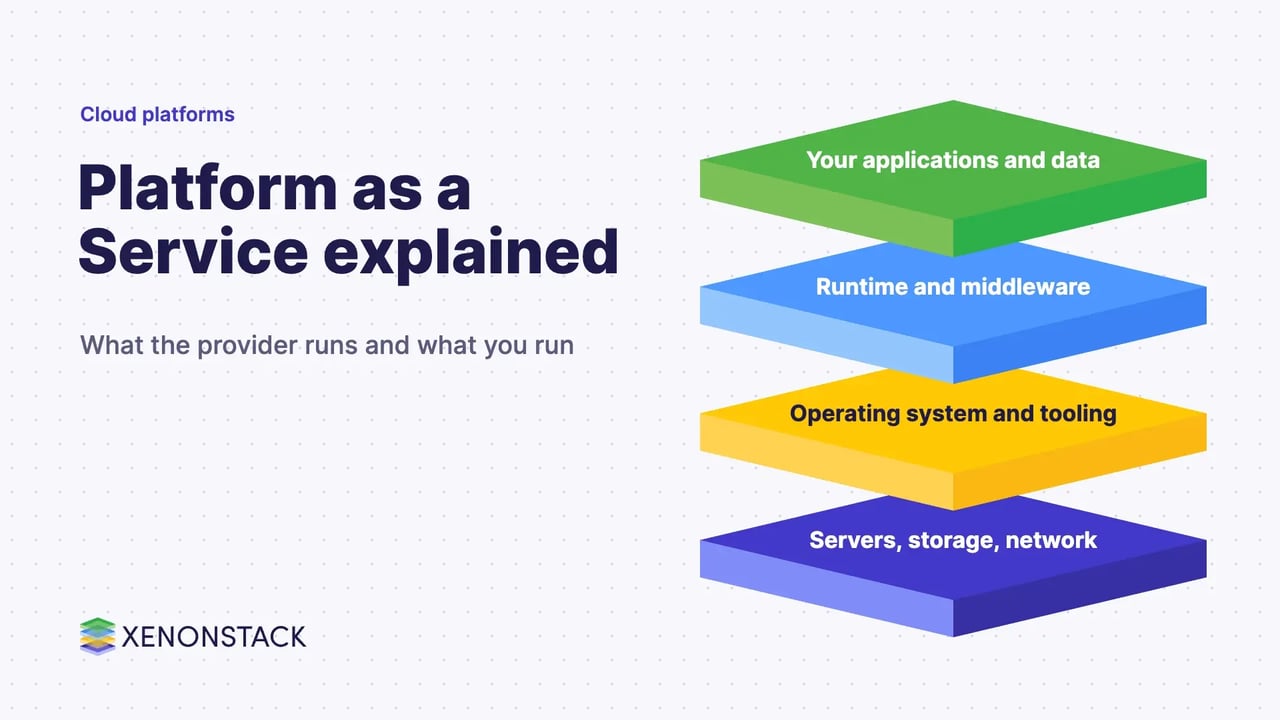
Platform as a Service (PaaS) is a cloud service model in which the provider runs the infrastructure and application platform, and you deploy and manage only your own applications and data. It covers the runtime, middleware, databases and tooling that developers would otherwise have to build and maintain themselves.
This guide is for engineering leaders, platform teams and architects choosing between infrastructure, platform and software services, or between PaaS and serverless. It covers the definition, the types, the trade-offs, how PaaS compares with its neighbours, and how AI agents change the picture. Related reading: IoT analytics platform, internal developer platform, digital platform engineering services and DevOps on Google Cloud Platform.
What is Platform as a Service?
NIST SP 800-145 defines PaaS as the capability to deploy consumer-created or acquired applications onto cloud infrastructure, built with programming languages, libraries, services and tools that the provider supports. The consumer does not manage or control the underlying network, servers, operating systems or storage, but controls the deployed applications and possibly the configuration of the hosting environment. That definition dates from September 2011 and still anchors most vendor wording.
The Microsoft Azure explainer on PaaS lists what a platform typically includes: operating systems, runtime environments, databases, development tools, middleware, and hosting and scaling capabilities. The Google Cloud guide to PaaS adds that the provider supplies the infrastructure, the middleware and a user interface, which may be a graphical console, a command line, an API, or all three.
What are the layers of a PaaS platform?
Different providers package the platform differently, but the pieces named in the sources above fall into three layers.
| Layer | What it holds | Who runs it |
|---|---|---|
| Infrastructure | Data centres, storage, network equipment and servers | Provider |
| Platform and middleware | Operating systems, runtimes, frameworks, SDKs, libraries, databases, build and CI/CD tooling | Provider |
| Application and data | Your code, configuration of the hosting environment, and your data | You |
Because these layers are bundled, developers can build, test and deploy in one environment. The Microsoft Azure explainer on PaaS describes this as supporting building, testing, deploying, managing and updating within the same integrated environment. Testing in that environment pairs naturally with a clear approach to API testing.
What are the types of PaaS?
NIST names four cloud deployment models: private, community, public and hybrid. A public cloud is provisioned for open use by the general public, a private cloud for exclusive use by a single organisation, and a hybrid cloud is a composition of two or more distinct cloud infrastructures bound together by technology that enables data and application portability. A platform service can sit on any of these, so the practical choice is where the platform runs and who operates it.
- Public PaaS: the provider operates the platform in its own cloud, and you consume it on demand.
- Private PaaS: the platform runs for one organisation, on or off its own premises, which gives more control over resources and data placement.
- Hybrid PaaS: workloads span private and public environments, so teams can choose which parts stay under their direct control.
What are the advantages and disadvantages of PaaS?
The Google Cloud guide to PaaS lists faster time to market, low maintenance because the provider keeps everything up to date, pay-for-what-you-use pricing, easy scaling and shared security, where the provider secures the infrastructure. The drawbacks follow from the same design.
| Advantages | Disadvantages |
|---|---|
| Developers get a ready platform they do not build or manage | You do not control the underlying servers, operating systems or storage (NIST definition) |
| Integrated CI/CD, version control, testing and monitoring tools (Azure explainer) | Platform-specific tooling can tie applications to one provider; the Azure explainer names multicloud PaaS as a way to avoid vendor lock-in |
| On-demand scaling and usage-based pricing | Your team still owns application code, data and its security, so shared responsibility needs a clear owner |
| Teams can collaborate from any location over the internet | PaaS suits application development; people who only need finished software are better served by SaaS |
How does PaaS differ from IaaS, SaaS and serverless?
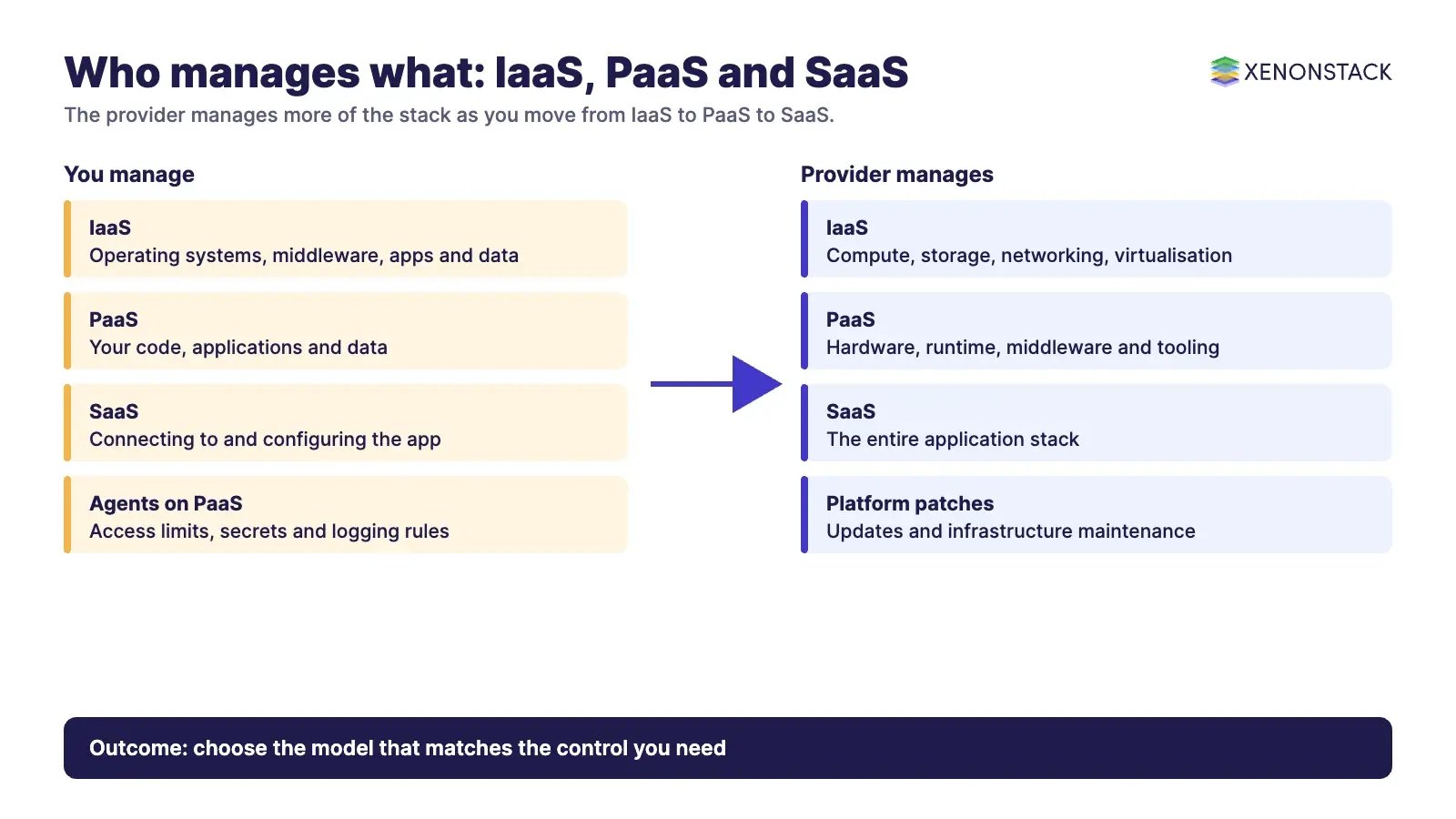
The difference is how much of the stack the provider manages. NIST describes IaaS as provisioning processing, storage and networks where you run arbitrary software including operating systems, and SaaS as using the provider's applications. PaaS sits between them.
| Model | Provider manages | You manage |
|---|---|---|
| IaaS | Compute, storage, networking, virtualisation | Virtual machines, operating systems, middleware, applications, data |
| PaaS | Hardware and the software resources needed for application development | Your code, applications and data |
| SaaS | The entire application stack | Connecting to and configuring the app |
Serverless is best read as a point on the same spectrum rather than a rival. The Google Cloud guide describes Cloud Run as a serverless, fully managed PaaS for container-based development that scales up and down from zero with traffic and charges for the exact resources used. Teams choosing between a classic platform and a serverless one should compare control over the runtime, start-up behaviour and pricing for their own workload. See also our notes on serverless data and building serverless applications on AWS.
How do AI agents change the PaaS decision?
AI agents add long-running, tool-calling workloads that call APIs, read data and take actions, so a platform has to host them, limit what they can reach and record what they did. A platform team should ask whether the PaaS exposes enough control over networking, secrets and logging for those workloads, and who approves an agent's access. Agents also raise the cost of lock-in, because the tools and data they depend on are harder to move once embedded. For teams building and running agents, ElixirClaw is XenonStack's AI agents computing platform.
What should you do first?
- List the applications you run and mark which need runtime control and which do not.
- Match each one to IaaS, PaaS, serverless or SaaS using the table above.
- Check the exit path: how portable are code, data and configuration if you change provider?
- Write down which security tasks the provider owns and which remain with your team.
- Pilot one application on the chosen platform and compare effort, cost and control before moving more.
To map one decision your agents make on your platform, and the data and policy it depends on, book a Context Workshop. See what happens in the workshop.
Frequently asked questions
What is PaaS in simple terms?
PaaS is a cloud service where the provider runs the servers, operating systems and middleware, and you deploy and manage your own applications and data.
What are examples of PaaS?
Google Cloud describes Cloud Run as a serverless, fully managed PaaS for container-based development. Other providers publish their own application platforms, so compare their documentation against your needs.
What is the difference between PaaS and IaaS?
With IaaS you provision compute, storage and networks and manage the operating system and software yourself. With PaaS the provider also manages the platform layer, so you manage your applications and data.
Is serverless the same as PaaS?
Not exactly. Google Cloud presents its serverless Cloud Run service as a fully managed PaaS, so serverless can be viewed as one style of PaaS that scales with traffic and bills for exact usage.
What are the main disadvantages of PaaS?
You give up control of the underlying infrastructure, platform-specific tooling can make switching providers harder, and your team remains responsible for application security and data.
Ready to put AI agents to work? See an ElixirClaw demo: the agentic OS to build, orchestrate and govern AI agents across your enterprise systems.
Explore the XenonStack platform family: ElixirData · ElixirClaw · ElixirHub · NexaStack · MetaSecure · Neural AI · AgentGRC · AgentSRE · AgentAnalyst · AgentInstruct · AgentRAI · AgentScrum · AgentSearch · AgentForce · AI Aviator · SAIF Aviator · CohortIQ · XenonStack AI · XenonStack UAE