Key takeaway
- What is ONNX? The open model format, how IR versions and opsets work, which ONNX Runtime execution provider fits your hardware, and when to skip it.
ONNX (Open Neural Network Exchange) is an open format for representing machine learning models. It gives every model the same building blocks: a computation graph, a shared set of operators and standard data types. That lets a team train in one framework, such as PyTorch, and run the same model in a different runtime, compiler or hardware accelerator without rewriting it.
For enterprise leaders, ONNX is a portability and deployment decision rather than a modelling one. It separates the choice of training framework from the choice of inference hardware, which matters when the same model has to run in a cloud GPU cluster, on a factory edge device and inside a browser. This guide covers what ONNX is in 2026, how versions and opsets work, which ONNX Runtime execution provider fits which hardware, and when ONNX is the wrong choice.
What is ONNX and what problem does it solve?
According to onnx.ai, ONNX is "an open format built to represent machine learning models". It defines a common set of operators and a common file format so models can move between frameworks, tools, runtimes and compilers. The LF AI and Data Foundation describes it as a community project created by Facebook and Microsoft, and onnx.ai lists it as an LF AI graduate project. The onnx package is released under the Apache-2.0 licence.
The problem it solves is lock-in between training and serving. Without a shared format, every pairing of framework and runtime needs its own converter, and every new accelerator needs support for every framework. ONNX puts one exchange format in the middle. If you are new to the underlying models, our guide to artificial neural network applications and algorithms explains the networks that ONNX graphs describe.
| Part of ONNX | What it is | Why it matters to you |
|---|---|---|
| Computation graph | Nodes (operators) connected by tensors, with declared inputs and outputs | Any compliant tool can read and execute the same model |
| Operator set (opset) | A versioned library of operators such as Conv, MatMul and Attention | Decides which models a runtime can load |
| IR version | The rules for how the graph, inputs, outputs and metadata are stored | Changes only when the file format changes |
| Data types | Standard tensor types, now including low-precision float and integer types | Enables quantised models for cheaper inference |
What has changed in the ONNX ecosystem since it launched?
Much of the early ONNX tooling has moved on. If your team is following an older tutorial, check it against this table before starting.
| Item | Older guidance | Status in 2026 (source) |
|---|---|---|
| Apache MXNet as a source framework | Install ONNX support through onnx-mxnet | MXNet retired in September 2023 and moved to the Apache Attic (Apache Attic) |
| ONNX Model Zoo | Download pre-trained models from the onnx/models repository | Deprecated and kept for historical purposes; models moved to Hugging Face, LFS downloads ended 1 July 2025 (onnx/models) |
| PyTorch export | TorchScript based torch.onnx.export | Since PyTorch 2.9 the dynamo option is True by default, using the torch.export based exporter (PyTorch docs) |
| Transformer and LLM operators | Composed from many primitive operators | ONNX 1.18 added Attention, RMSNormalization and RotaryEmbedding; 1.23 added SwiGLU (ONNX releases) |
| Latest release | Opset numbers in the low teens | ONNX 1.23.2 (6 October 2026); ONNX 1.23 uses IR version 14 and opset 28 |
| Generative AI on ONNX Runtime | Not available | onnxruntime-genai provides the generation loop and KV cache management; the API is marked preview (ONNX Runtime docs) |
The supported tools list on onnx.ai now includes PyTorch, TensorFlow (through tensorflow-onnx), Keras, scikit-learn (through onnxmltools), XGBoost, CatBoost, MATLAB, PaddlePaddle and Hugging Face Optimum on the build side, and runtimes and compilers including ONNX Runtime, NVIDIA TensorRT, OpenVINO, TVM, onnx-mlir and Windows ML on the deploy side.
How do ONNX versions, IR versions and opsets fit together?
The ONNX versioning documentation separates two numbers. The IR version describes the file format, and it changes only when the format changes in a way existing readers cannot handle. The opset version describes the operator library, and it changes when operators are added, removed or have their behaviour altered. Each model declares the opset it relies on, and a runtime must support that opset to load the model.
| ONNX release | IR version | Default ai.onnx opset | Notable additions (from release notes) |
|---|---|---|---|
| 1.18.0 | 11 | 23 | Attention, RMSNormalization and RotaryEmbedding operators |
| 1.19.0 | 12 | 24 | FLOAT8E8M0 type, Swish operator, Attention updates for in-place KV cache |
| 1.20.0 | 13 | 25 | Python 3.14 stable ABI support, 2-bit data type |
| 1.21.0 | 13 | 26 | BitCast operator, Attention specification changes |
| 1.22.0 | 13 | 27 | LinearAttention and CausalConvWithState operators |
| 1.23.0 | 14 | 28 | SwiGLU operator, FLOAT6E2M3 and FLOAT6E3M2 types |
A practical point for architects: the format and the runtime move at different speeds. The ONNX Runtime 1.31.0 release notes state that its ONNX dependency stays at 1.22.0 after the ONNX 1.23 integration was reverted. Export to the opset your production runtime supports, not the newest opset your exporter can write.
What does ONNX Runtime add, and which execution provider fits your hardware?
ONNX Runtime is a cross-platform engine for running ONNX models. Its site says it runs on Linux, Windows, Mac, iOS, Android and in web browsers, with APIs for Python, C#, C++, Java, JavaScript and Rust, and that it powers AI in Windows, Office, Azure Cognitive Services and Bing. The latest release at the time of writing is 1.31.1 (26 October 2026), which requires Python 3.11 or later.
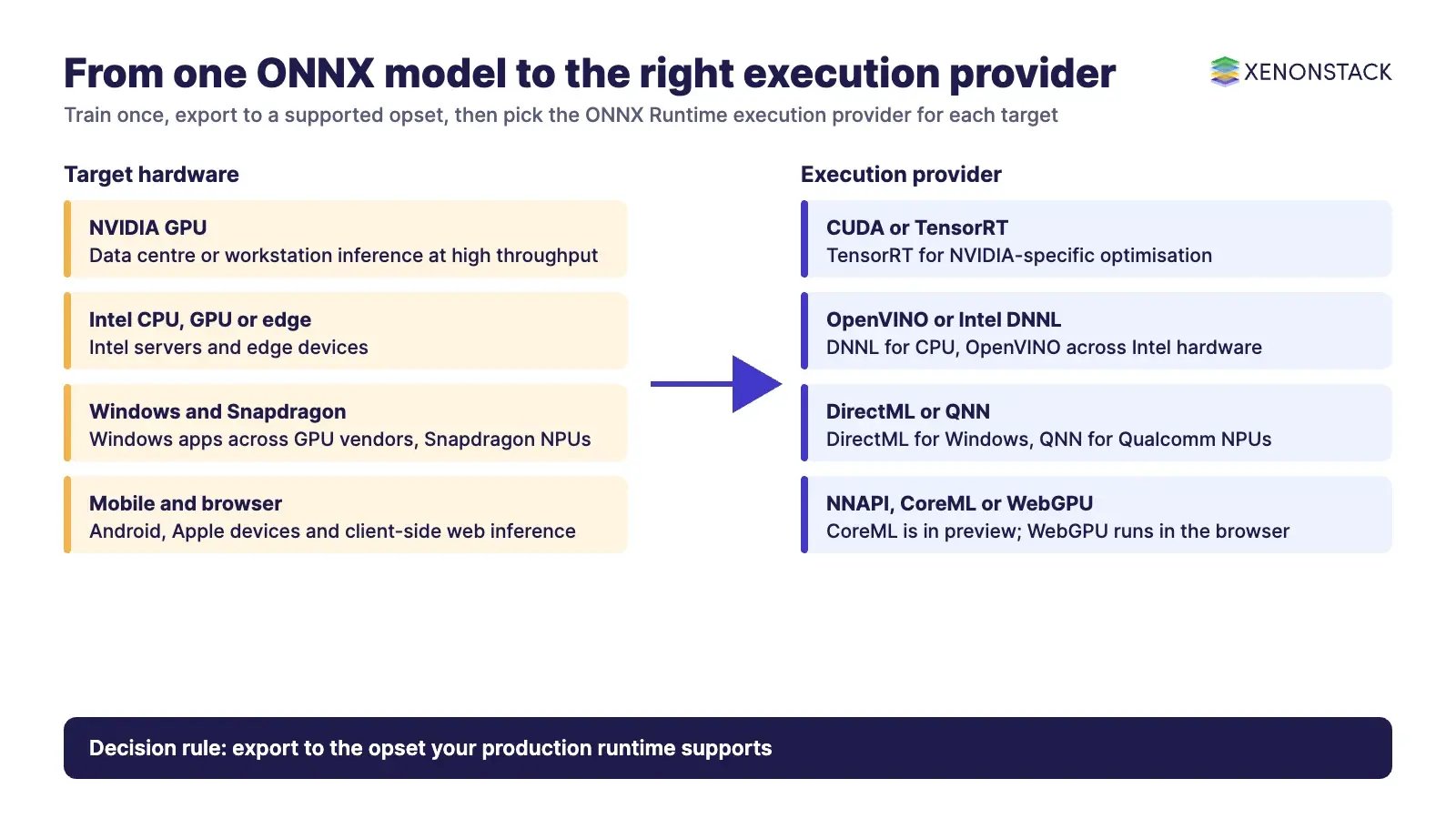
Hardware acceleration comes through execution providers (EPs). ONNX Runtime hands the nodes or sub-graphs a provider supports to that provider, so one API can target CPUs, GPUs, FPGAs and NPUs.
| Target hardware | Execution provider | When it fits | Status on onnxruntime.ai |
|---|---|---|---|
| NVIDIA GPU (data centre or workstation) | CUDA, TensorRT | High-throughput inference; TensorRT for maximum NVIDIA-specific optimisation | Listed |
| Intel CPU, GPU or edge device | OpenVINO, Intel DNNL (CPU) | Intel servers and edge devices | Listed |
| AMD GPU | MIGraphX | AMD GPU deployments | Listed; ROCm EP deprecated |
| Windows devices | DirectML | Windows applications across GPU vendors | Listed |
| Qualcomm Snapdragon | QNN | On-device inference on Snapdragon NPUs | Listed |
| Mobile and embedded | NNAPI (Android), CoreML (Apple), XNNPACK | Phones, tablets and low-power Arm devices | CoreML in preview |
| Browser | WebGPU | Client-side inference without a server round trip | Listed |
| Arm Linux | Arm Compute Library, Arm NN | Arm edge devices | Preview; ACL EP deprecated in 1.31.0 |
Where does ONNX fit in an enterprise AI stack?
In our own architecture work, ONNX usually sits between training and serving. A common pattern is to train priority or risk prediction models in PyTorch, export them to ONNX and serve them as a lightweight model service. For edge and computer vision deployments, our solution designs compare ONNX Runtime, TensorRT, OpenVINO and native PyTorch as the model runtime, and pick quantised ONNX or TFLite models when inference has to stay on the device. Our guide to computer vision on edge covers that deployment pattern in more detail.
The value is that the serving layer no longer depends on the training framework. A data science team can change frameworks, and an operations team can change hardware, without both having to move at once. Where those models run across plants, vehicles and data centres, NexaStack is an agentic operating platform for physical AI that runs across on-premises, cloud and hybrid environments.
What are the governance, security and cost questions?
Governance. An ONNX file is a deployable artefact, so treat it like one: version it, record the source model, the exporter version, the opset and the validation results, and approve it before promotion. When ONNX models feed decisions made by AI agents, ElixirData Context OS keeps governed context, versioned policy and decision traces in one decision layer above AI agents, and AgentGRC keeps autonomous agent actions inside policy, with the audit trail risk teams need.
Security. A runtime parses model files, so a model from an untrusted source is an input to secure. Recent ONNX Runtime patch releases (1.28.3 and 1.30.1) list memory-safety and model-validation fixes in their release notes. Load models only from controlled registries and keep the runtime patched.
Cost. Quantisation is the main cost lever. The ONNX Runtime quantisation guide supports 8-bit static and dynamic quantisation and 4-bit block-wise weight-only quantisation for MatMul and Gather. It suggests dynamic quantisation for RNNs and transformers and static quantisation for CNNs, and it warns that quantisation is not a loss-less transformation and that older hardware may see no gain. Our overview of energy-efficient computer vision models explains how compression and quantisation trade accuracy for efficiency.
How should an enterprise adopt ONNX?
- Pick one model and one target. Choose a model already in production and the hardware you most want to serve it on.
- Fix the opset. Check which opset your production runtime supports and export to that, not the newest available.
- Export and validate. Export with the current exporter (for PyTorch, torch.onnx.export with the default dynamo option) and compare outputs against the original model on a held-out data set.
- Choose the execution provider. Benchmark the default CPU provider against the hardware-specific EP on real traffic shapes, including batch size and input length.
- Quantise only with evidence. Apply static or dynamic quantisation, then measure accuracy and latency again before accepting the change.
- Register and govern. Store the ONNX file with its lineage, opset, validation report and approval, and patch the runtime on a schedule.
When should you not use ONNX?
| Situation | Why ONNX may not fit | What to do instead |
|---|---|---|
| Model relies on custom operators or heavy dynamic control flow | Export may fail or need custom operator work in every runtime | Serve in the native framework until the operators are covered |
| Serving only on one vendor's stack | A vendor-native path may already give the best optimisation | Use the vendor runtime directly, and keep ONNX as an exchange option |
| Large language model serving at scale | onnxruntime-genai is marked preview and subject to change | Compare it with dedicated LLM serving engines before committing |
| Frequent architecture experiments | Every change needs re-export and re-validation | Adopt ONNX once the model is stable enough to deploy |
To map one model deployment decision your agents depend on, and the context and policy around it, book a Context Workshop. See what happens in the workshop.
Frequently asked questions about ONNX
What is ONNX in simple terms?
ONNX (Open Neural Network Exchange) is an open file format for machine learning models. It defines a computation graph, a shared set of operators and standard data types, so a model trained in one framework can be run by another tool, runtime or compiler.
Is ONNX the same as ONNX Runtime?
No. ONNX is the model format and specification, maintained as an LF AI and Data graduate project. ONNX Runtime is a separate open source engine that loads ONNX models and runs them for inference and training on Linux, Windows, Mac, iOS, Android and in web browsers.
What is the difference between an ONNX IR version and an opset?
The IR version describes the file format itself, such as how the graph and metadata are serialised. The opset version describes the library of operators a model can use. ONNX 1.23 uses IR version 14 and opset 28.
How do I convert a PyTorch model to ONNX?
Use torch.onnx.export. Since PyTorch 2.9 the dynamo option is True by default, so export goes through the torch.export based exporter rather than TorchScript. Validate the exported model against the original outputs before deployment.
Does quantising an ONNX model always make it faster?
No. ONNX Runtime documentation states that quantisation is not a loss-less transformation, and gains depend on hardware. Older hardware may see no benefit, and int8 GPU speed-ups need Tensor Core int8 support.
Follow XenonStack on LinkedIn: XenonStack on LinkedIn for new guides on agentic AI, data and platform engineering.
Ready to put AI agents to work? Explore ElixirClaw, the agentic OS platform to build, orchestrate and govern AI agents.
Explore the XenonStack platform family: ElixirData · ElixirClaw · ElixirHub · NexaStack · MetaSecure · Neural AI · AgentGRC · AgentSRE · AgentAnalyst · AgentInstruct · AgentRAI · AgentScrum · AgentSearch · AgentForce · AI Aviator · SAIF Aviator · CohortIQ · XenonStack AI · XenonStack UAE