Key takeaway
- Micro frontends let teams build and release parts of one web app on their own. See integration options, web components and rules for mixing JS frameworks.
A micro frontend is an independently deliverable frontend application that is composed with others into one larger web application, so that separate teams can build, test and release their own part of the interface. Martin Fowler's micro frontends article defines the style as independently deliverable frontend applications composed into a greater whole, and notes that the Thoughtworks Technology Radar first listed it in November 2016.
This guide is for frontend leads and architects who run several teams on one product and want to know how to combine JavaScript frameworks such as Angular, React and Vue on one page. It covers the integration options, how web components fit, the rules that keep fragments apart, and when not to use the approach. For the architecture view, read our guide to micro frontend architecture.
What is a micro frontend and what problem does it solve?
Many companies split their backend into microservices and leave the frontend as one large application. Over time that frontend, often built by several teams, becomes hard to change: a small edit means a full build and a coordinated release. The article presents micro frontends as the answer, with smaller and more cohesive codebases, incremental upgrades and rewrites, and independent deployment, each micro frontend having its own delivery pipeline.
The key design choice is how to slice. The article recommends teams formed around vertical slices of business functionality, with each micro frontend owned end to end by one team, rather than teams split by technical layer. That mirrors the thinking in microservices testing strategies, where each service is owned and verified on its own.
How do you integrate micro frontends on one page?
Something has to assemble the fragments. Fowler's article describes five approaches.
| Approach | How it works | Point to note |
|---|---|---|
| Server-side template composition | Fragments are assembled on the server, for example with server-side includes | Works with plain HTML; composition happens before the browser |
| Build-time integration | Each micro frontend is published as a package and bundled by a container | The article warns it creates a lockstep release process |
| Run-time via iframes | Each fragment sits in its own frame | Easy isolation, but routing, deep linking and responsiveness get harder |
| Run-time via JavaScript | Each bundle exposes a global function as its entry point that the container calls to mount and unmount it | The article's default choice |
| Run-time via web components | Each micro frontend defines a custom element that the container creates | Suits teams that want to rely on browser standards |
This is where mixed frameworks come in. With run-time integration, the container does not care whether a fragment is built with Angular, React, Vue or plain JavaScript, as long as it honours the mount and unmount contract or the custom element contract. Agree that contract first, because it is the public interface between teams.
How do web components help micro frontends?
The MDN web components guide names three main technologies, and each maps to a micro frontend need.
| Technology | What MDN says it does | Why it helps |
|---|---|---|
| Custom elements | JavaScript APIs to define custom elements and their behaviour for use in your interface | A named tag becomes the contract between teams |
| Shadow DOM | Attaches an encapsulated tree to an element so its styles and IDs do not collide with the rest of the document | Keeps one team's styles from leaking into another's |
| HTML templates | The template and slot elements define reusable markup that is not displayed until used | Reusable structure inside a custom element |
The article notes that the web components route suits teams that want to rely on browser standards, which keeps the contract independent of any one framework.
What rules keep micro frontends from colliding?
Teams ship on their own schedule, so shared assumptions are the main risk. The article gives clear guidance.
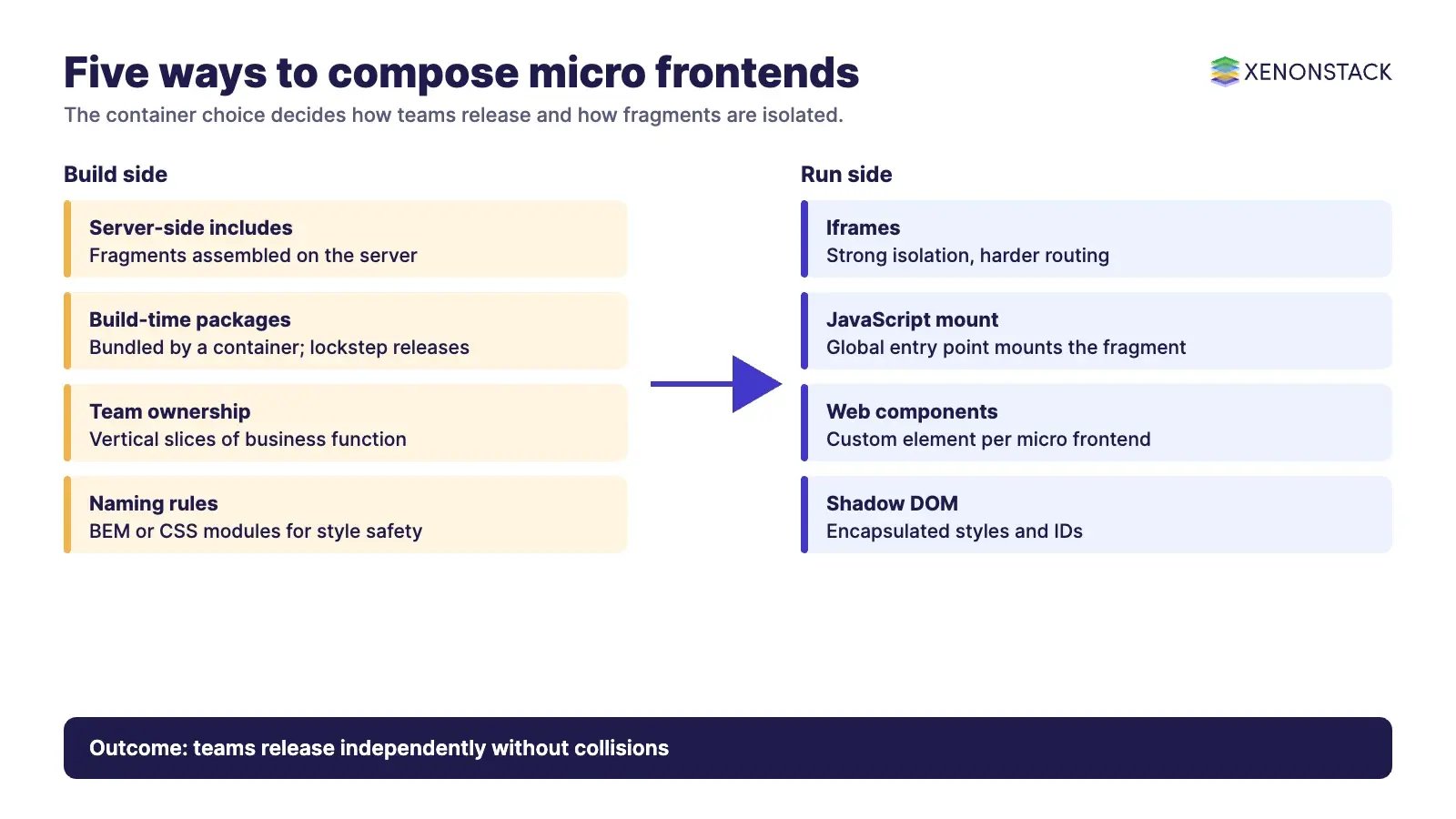
- Keep communication between fragments minimal, using custom events, data passed from parent to child, or URL routing, and avoid having any shared state.
- Treat CSS as global by default. Use a strict naming convention such as BEM, preprocessor nesting, CSS modules or CSS-in-JS, or Shadow DOM for style isolation.
- Prefix or namespace anything global, such as events, storage keys and cookies, so ownership is obvious.
Each of these rules reduces the chance that one release breaks another. For the deployment side of independent pipelines, see our guide to deploying Java microservices on Kubernetes.
When should you not use micro frontends?
Micro frontends add moving parts: a container, a contract for each fragment, and several build pipelines. If one small team owns a modest application, a single well-structured codebase is usually simpler. The approach pays back when several teams, organised by business domain, need to release independently. That is a judgement call for your organisation, so start with one boundary and measure how much release friction it removes. Visual components such as charts can stay inside one fragment; our guide to the D3.js library and its use cases shows one example, and capsule networks is a separate topic if you are exploring other kinds of component design.
How do AI agents change micro frontend work?
Agents can take over repetitive checks across many small codebases: reviewing a fragment against its mount contract, flagging global CSS or shared state, drafting boundary tests and summarising pipeline failures. People should still own the slicing decisions and the contract between teams. For agent, testing and automation work of this kind, see ElixirClaw, the AI agents computing platform.
What should you do first?
- Map your pages to business domains and mark where two teams change the same code.
- Choose one boundary, such as checkout or search, as the first fragment.
- Pick an integration approach from the table and write the contract: entry point or element name, events and URL rules.
- Agree naming and styling rules before the second fragment exists.
- Give each fragment its own pipeline and tests, and track release lead time.
Is there a video on micro frontends?
A short video is embedded below.
To map one decision your agents make across frontend and backend services, and the data and policy it depends on, book a Context Workshop. See what happens in the workshop.
Frequently asked questions
What are micro frontends?
Micro frontends are an architectural style where independently deliverable frontend applications are composed into a greater whole. Each is owned by one team and can be built, tested and deployed on its own.
Can I mix Angular, React and Vue in one application?
Yes, with run-time integration the container mounts each fragment through an agreed entry point or custom element, so the fragments can use different frameworks. Agree the contract and the rules for shared state and styles first.
How do web components relate to micro frontends?
Web components are one way to integrate them. A micro frontend defines a custom element, and Shadow DOM keeps its styles and IDs from colliding with the rest of the page.
Is build-time integration a good idea?
Fowler's article warns against it, because publishing each micro frontend as a package for a container to bundle creates a lockstep release process.
When is a micro frontend not worth it?
When one small team owns a modest application, a single codebase is usually simpler. The approach pays back when several teams organised by business domain need to release independently.
Follow XenonStack on LinkedIn: XenonStack on LinkedIn for new guides on agentic AI, data and platform engineering.
Ready to put AI agents to work? Explore ElixirClaw, the agentic OS platform to build, orchestrate and govern AI agents.
Explore the XenonStack platform family: ElixirData · ElixirClaw · ElixirHub · NexaStack · MetaSecure · Neural AI · AgentGRC · AgentSRE · AgentAnalyst · AgentInstruct · AgentRAI · AgentScrum · AgentSearch · AgentForce · AI Aviator · SAIF Aviator · CohortIQ · XenonStack AI · XenonStack UAE