Key takeaway
- How agentic AI changes customer service: what AI agents do, how they differ from chatbots, use cases, a build roadmap and the governance they need.
Agentic AI in customer service means AI agents that understand a customer's request, use connected tools to act on it, and escalate to a person when needed, instead of only answering from a script. The IBM guide to AI agents in customer service describes an AI agent as "capable of autonomously performing tasks on behalf of a user or another system".
This guide is for customer service, contact centre and CX leaders and the technology teams who support them. It explains how agents differ from chatbots, the main types and use cases, how to build one, and the governance and limits to plan for. For a list of contact centre scenarios, see our guide to use cases for the contact centre with agentic AI.
What are AI agents for customer service?
IBM says customer service agents are primarily built on large language models and combine machine learning, natural language processing and automation to manage customer interactions across channels. They can understand intent and context, ask follow-up questions, use connected tools to resolve tickets, message customers and escalate complex issues, and work with CRM software and communication tools.
How are AI agents different from chatbots?
IBM contrasts agents with non-agentic assistants such as chatbots, which answer questions one at a time, and notes that agents can keep memory across days, reason and act on their own. Rule-based bots follow a decision tree. Agents choose steps towards a goal, within limits you set.
| Question | Rule-based chatbot | AI agent |
|---|---|---|
| How does it decide? | Follows scripted paths and keywords | Plans steps towards a goal using context |
| What can it do? | Answer FAQs and hand off | Look up orders, update records, create tickets, send messages through connected tools |
| Memory | Usually limited to the current session | Can use stored preferences and past interactions |
| Failure mode | Dead ends and loops | Wrong action or unsupported answer if not constrained |
| Governance need | Review the scripts | Define permissions, approvals, logging and escalation rules |
How do AI agents work in customer service?
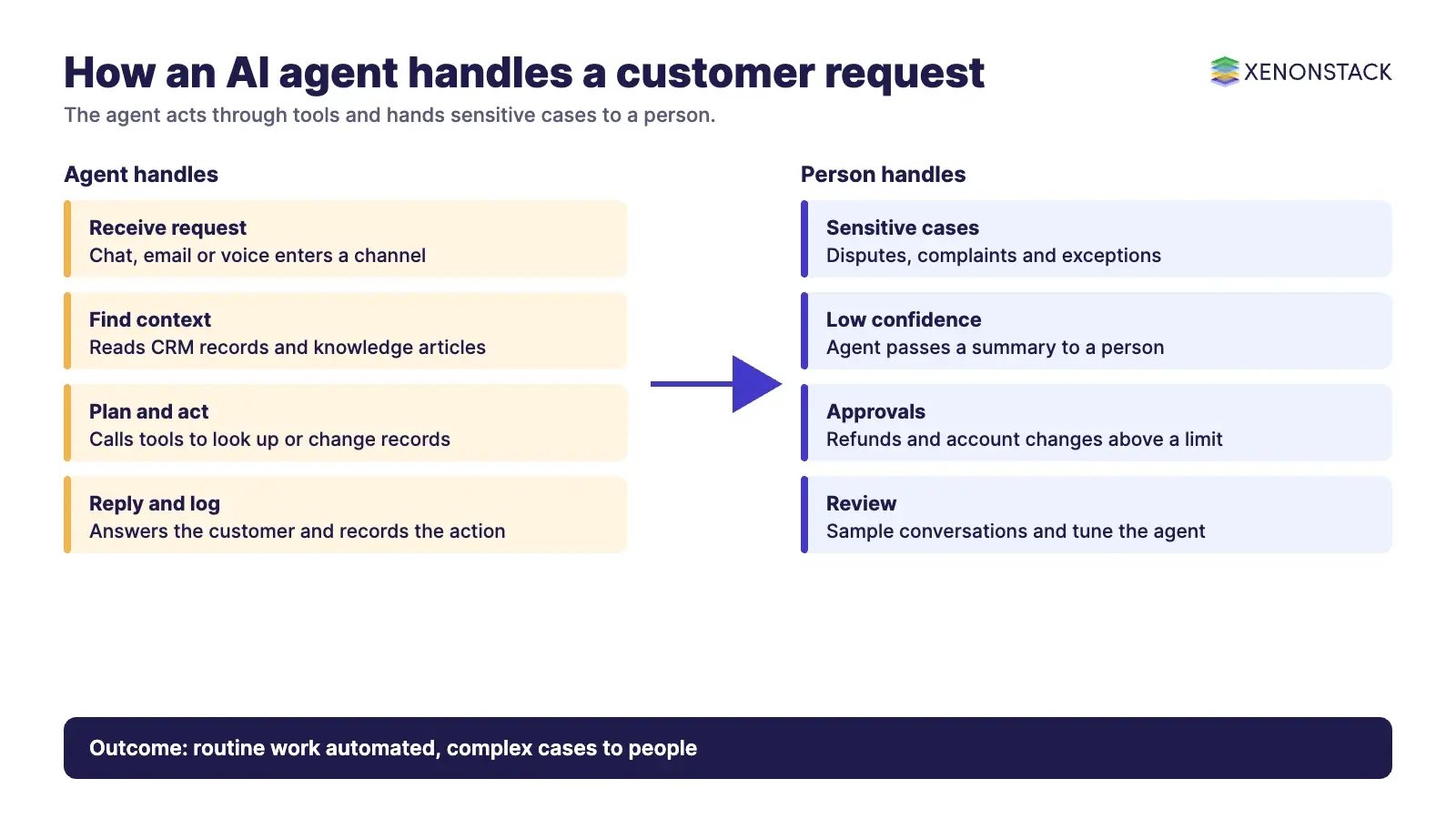
A typical flow has five steps. The agent receives a request in a channel such as chat, email or voice. It identifies the intent and pulls relevant context from the CRM and knowledge base. It decides on a plan, calls tools to look up or change records, and replies. If the case is sensitive or the agent is unsure, it escalates to a person with a summary. The ServiceNow Customer Service Management page describes agents that "handle routine tasks and complete processes autonomously", can be designed to operate 24/7, and can produce case summaries and recommended actions for human agents.
What types of agents and use cases are there?
Common types are conversational agents for customers, assistant agents that support human representatives, and back-office agents that process requests. IBM lists customer queries, order status and tracking, knowledge management, troubleshooting, process automation and sentiment monitoring as use cases. For the ServiceNow route, see the Customer Service Management page. For a sector example, see our guide to customer support in telecommunications with AI chatbots.
| Use case | What the agent does | Human role |
|---|---|---|
| Order and account queries | Looks up status and explains it in context | Handles disputes and exceptions |
| Troubleshooting | Guides the customer step by step | Takes over when steps fail |
| Agent assist | Drafts summaries and next actions for a representative | Reviews and sends |
| Process automation | Creates tickets, starts onboarding steps | Approves sensitive actions |
| Sentiment monitoring | Flags frustrated customers early | Decides how to respond |
What do you gain, and what are the challenges?
The benefits are practical: round-the-clock coverage, faster routine handling, consistent answers and more time for representatives on complex cases. We do not quote percentages here because published figures vary by company and method, so measure results in your own contact centre. IBM points to the challenges: agents need clean data and current knowledge bases, work best when connected to CRM and ERP systems, change how representatives work, and need "clear policies for elevating critical customer issues to human support teams".
How do you build an AI agent for customer service?
- Define one use case with a measurable goal, such as resolution time or customer satisfaction.
- Choose the platform or framework, and check it connects to your CRM and knowledge base.
- Design the conversation and escalation flows.
- Ground the agent in your own policies, products and knowledge articles.
- Integrate with backend systems through narrow, permissioned tools.
- Deploy on one channel first, then extend to others.
- Monitor conversations, review failures and tune the agent.
- Set governance: permissions, approvals, logging, privacy and a human route.
How should governance work?
An agent that can refund an order or change an account needs rules that an auditor could read. Decide which actions are automatic, which need approval, which data the agent may see and how every action is logged with its reason. Check privacy and consumer protection duties with your own legal team. XenonStack's ElixirClaw is the AI agents computing platform for building and running agents across systems.
What should you do first?
- List the ten most common request types and what each needs from backend systems.
- Pick one with clear rules and low risk.
- Define what the agent may do alone and when it hands off.
- Pilot with a small share of traffic and review every escalation.
- Use the findings to widen scope.
To discuss a customer service agent for your team, contact us or talk to a specialist.
To map one decision your agents make, and the data and policy it depends on, book a Context Workshop. See what happens in the workshop.
Frequently asked questions
What is agentic AI in customer service?
It means AI agents that understand a request, use connected tools to act on it and escalate to a person when needed, rather than only answering from a script.
How is an AI agent different from a chatbot?
A chatbot answers questions one at a time from scripts or fixed flows. An agent can keep context, plan steps and use tools to complete a task within the limits you set.
What are the main use cases?
Customer queries, order status, troubleshooting, knowledge retrieval, support for human representatives, process automation and sentiment monitoring.
What are the main risks?
Poor data, weak integrations, wrong actions and unclear escalation. Limit what the agent can do, log its actions and give customers a route to a person.
How should a team start?
Pick one low-risk request type, define what the agent may do alone, pilot on one channel and review every escalation before widening scope.
Follow XenonStack on LinkedIn: XenonStack on LinkedIn for new guides on agentic AI, data and platform engineering.
Ready to put AI agents to work? Explore ElixirClaw, the agentic OS platform to build, orchestrate and govern AI agents.
Explore the XenonStack platform family: ElixirData · ElixirClaw · ElixirHub · NexaStack · MetaSecure · Neural AI · AgentGRC · AgentSRE · AgentAnalyst · AgentInstruct · AgentRAI · AgentScrum · AgentSearch · AgentForce · AI Aviator · SAIF Aviator · CohortIQ · XenonStack AI · XenonStack UAE