Key takeaway
- IT operations management with Amazon Q in 2027: what Q Business and Q Developer do, what has changed, ITOM basics, and how AI agents fit with governance.
Amazon Q for IT operations means using AWS's generative AI assistants to answer operational questions, summarise enterprise data and carry out tasks in the tools your operations team already uses, while the core IT operations management (ITOM) practice of discovery, monitoring, event handling and change control stays in place. The Amazon Q product line has changed, so the details below reflect what AWS documents today.
This guide is for IT operations, platform and service management leads who are evaluating Amazon Q or who already run it. It covers what ITOM involves, which Amazon Q products exist and their current status, where they help, how AI agents change the picture, and what to do first. Facts about Amazon Q come from AWS documentation read on 14 November 2026.
What is IT operations management?
IT operations management is the discipline of keeping services running: knowing what you have, watching how it performs, and responding when something breaks or changes. ServiceNow describes ITOM in terms of discovering and mapping service dependencies, building service maps from system signals, correlating and de-duplicating alerts from different monitoring tools, tracking service health, running orchestrated workflows to remediate repeat incidents, and showing the downstream impact of a planned change.
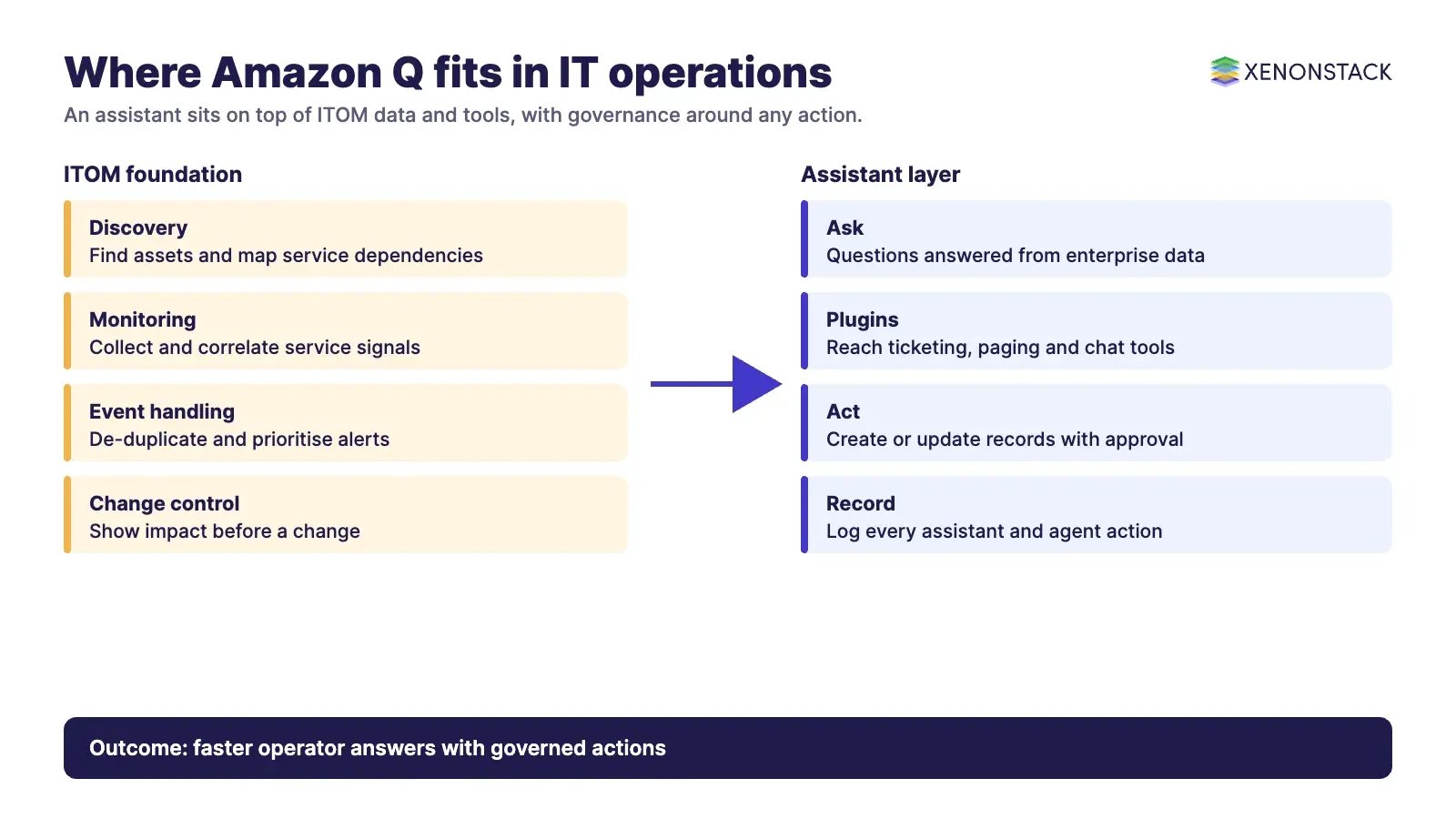
Manual updates, reactive responses and fragmented monitoring remain the usual pain points. Real-time performance monitoring and AI-driven automation aim to address them, and an assistant such as Amazon Q is one way to put that automation in front of operators.
| ITOM capability | What it does | Where an assistant can help |
|---|---|---|
| Discovery and service mapping | Finds assets and maps how services depend on each other | Answering "what depends on this service?" from mapped data |
| Event and alert management | Correlates and de-duplicates alerts across monitoring tools | Summarising an alert group and its likely context |
| Service health | Aggregates signals into a view of service condition | Explaining a health change in plain language |
| Remediation workflows | Runs orchestrated steps for repeat incidents | Raising a ticket or starting an approved action |
What is Amazon Q, and what has changed?
Amazon Q is two separate products, each with its own user guide. The table shows their documented status when we read the pages.
| Product | What AWS says it is | Status in the docs |
|---|---|---|
| Amazon Q Business | A fully managed, generative-AI powered assistant that answers questions, provides summaries, generates content and completes tasks based on your enterprise data, with permissions-aware responses and citations, for uses such as IT, HR and benefits help desks | No longer open to new customers. AWS says it will continue bug fixes and security updates for existing customers, but new feature requests will no longer be considered, and recommends migrating to Amazon Quick |
| Amazon Q Developer | A generative AI powered conversational assistant that helps you understand, build, extend and operate AWS applications, including questions about your AWS resources and best practices | AWS will discontinue support for Amazon Q Developer IDE plugins on 30 April 2027 and points to Kiro for similar capabilities |
Some published material describes Amazon Q as a single assistant that integrates with over 40 enterprise systems and automates patching, configuration and predictive maintenance. We could not confirm those figures or capabilities in the AWS pages we read, so this guide leaves them out. If a vendor claims them, ask for the documentation.
What can Amazon Q do for IT operations today?
For Q Business customers, the main route into operations is plugins. AWS lists built-in plugins for Asana, Confluence, Google Calendar, Jira Cloud, Microsoft Exchange, Microsoft Teams, PagerDuty, Salesforce, ServiceNow, Smartsheet and Zendesk Suite, with legacy versions for Jira, Salesforce, ServiceNow and Zendesk. A December 2024 AWS announcement describes plugins as a way to connect to third-party apps and perform specific tasks, such as creating a record, directly in the chat. In an operations setting that points to uses such as querying incident knowledge and raising or updating tickets.
For teams that run on AWS, Q Developer answers questions about AWS architecture, your resources and best practices, and is available in the AWS Management Console and documentation site. Because IDE plugin support ends in April 2027, plan any developer-side use around that date. For related reading, see our articles on IT service management with Amazon Q, cyber security with generative AI and Amazon Q and securing data integrity with Amazon Q, and our page on Amazon Web Services and Amazon QuickSight for the analytics side.
How should you choose an approach?
| Situation | Option | Check first |
|---|---|---|
| You already run Q Business | Keep it for existing use cases and plan a move | AWS recommends Amazon Quick and a Bring Your Own Index path for migration |
| You are starting now and need an operations assistant | Evaluate Amazon Quick or other assistants against your ITOM tools | Whether plugins cover your ticketing, paging and monitoring tools |
| You build and operate on AWS | Use Q Developer in the console, and plan for the IDE plugin end date | Where developers use it today |
| You need discovery, event correlation and service maps | Use an ITOM platform, with an assistant on top | Data quality of your configuration records |
How do AI agents change IT operations?
An assistant answers a question; an agent can plan several steps, call tools and act, for example gathering alert context, checking a runbook and proposing a fix for approval. That makes governance the central question. Each action needs a defined scope, human approval where the risk justifies it, and a record of what the agent saw and why it acted. XenonStack describes ElixirClaw as the AI agents computing platform for building and running agents of this kind across operations tools.
What should you do first?
List the operations tasks that are repetitive and well documented: ticket triage, alert summaries, knowledge lookups.
Check the current AWS documentation for the product you plan to use and confirm its status before you commit.
Confirm that every tool the assistant must reach has a supported plugin or API.
Start read-only, then allow narrow actions with human approval.
Log every assistant and agent action so incidents can be reviewed afterwards.
To map one operations decision your agents make, and the data and policy it depends on, book a Context Workshop. See what happens in the workshop.
What should you plan for in 2027?
Two dated items in AWS documentation affect Amazon Q plans.
- 30 April 2027: AWS states it will discontinue support for Amazon Q Developer IDE plugins and points to Kiro for similar capabilities. Move any developer workflows before that date.
- Amazon Q Business: the availability notice says it is closed to new customers and recommends migrating to Amazon Quick. The page gives no shutdown date, so treat migration as a planned project rather than an emergency.
- Operations assistants: before you commit, confirm that plugins cover your ticketing, paging and monitoring tools.
Frequently asked questions
What is IT operations management?
It is the practice of discovering IT assets, monitoring services, handling events and incidents, and managing change so that services keep running. ITOM platforms add service mapping, alert correlation and remediation workflows.
Is Amazon Q Business still available?
AWS documentation says Amazon Q Business is no longer open to new customers. Existing customers continue to receive bug fixes and security updates, and AWS recommends Amazon Quick for similar capabilities.
What is the difference between Amazon Q Business and Amazon Q Developer?
Q Business answers questions and completes tasks based on your enterprise data. Q Developer helps you understand, build, extend and operate AWS applications. Each has its own user guide.
Which tools does Amazon Q Business connect to?
AWS lists built-in plugins for Asana, Confluence, Google Calendar, Jira Cloud, Microsoft Exchange, Microsoft Teams, PagerDuty, Salesforce, ServiceNow, Smartsheet and Zendesk Suite.
Can AI agents replace an ITOM platform?
Not on their own. Agents act on top of discovery, monitoring and change records, so they depend on the quality of that data. Use them with defined scope, approvals and an audit trail.
Follow XenonStack on LinkedIn: XenonStack on LinkedIn for new guides on agentic AI, data and platform engineering.
Ready to put AI agents to work? Explore ElixirClaw, the agentic OS platform to build, orchestrate and govern AI agents.
Explore the XenonStack platform family: ElixirData · ElixirClaw · ElixirHub · NexaStack · MetaSecure · Neural AI · AgentGRC · AgentSRE · AgentAnalyst · AgentInstruct · AgentRAI · AgentScrum · AgentSearch · AgentForce · AI Aviator · SAIF Aviator · CohortIQ · XenonStack AI · XenonStack UAE