Key takeaway
- AWS Glue Data Quality explained: DQDL rules, Catalog vs ETL checks, anomaly detection, documented cost and limits, and when another tool fits better.
AWS Glue Data Quality is a managed, serverless way to measure and enforce data quality on data you already hold in AWS. You write rules in Data Quality Definition Language (DQDL), run them against Data Catalog tables or inside Glue ETL jobs, and get a data quality score, per-rule results and, in ETL, the failing rows. It suits teams that want quality checks on S3, Redshift and lakehouse tables without running their own validation servers.
For a CDO or platform lead, the decision is where the checks run and who owns the rules. This guide covers the two entry points, the rule and anomaly features, what AWS documents about cost and limits, and when a different tool fits better. For the wider discipline, see our guides to data quality management and common data quality issues and how to fix them.
What is AWS Glue Data Quality and how does it work?
AWS describes the service as built on the open-source DeeQu framework, with no installation, patching or maintenance and pay-as-you-go pricing (AWS Glue Data Quality documentation). Its core terms are worth knowing before any design discussion:
| Term | What it means in AWS's documentation |
| DQDL | A domain-specific language for data quality rules, kept in an open format because the service is built on DeeQu |
| Rule | A DQDL expression that checks one characteristic of the data and returns true or false |
| Ruleset | A set of rules, associated with a table in the Glue Data Catalog |
| Data quality score | The percentage of rules that pass when a ruleset is evaluated |
| Analyzer | A DQDL expression that gathers statistics without asserting pass or fail |
| Observation | An unconfirmed insight Glue generates from statistics gathered over time |
Glue itself is the wider data integration service, with crawlers, the Data Catalog, ETL jobs and schedulers. Our overview of AWS Glue covers that platform; this post covers only the quality layer.
Where should the checks run: the Data Catalog or ETL jobs?
AWS documents two entry points. Catalog evaluation is aimed at data stewards and analysts and governs data at rest. ETL evaluation is proactive: it filters out bad data before it reaches the lake. The feature differences below come from AWS's own comparison table.
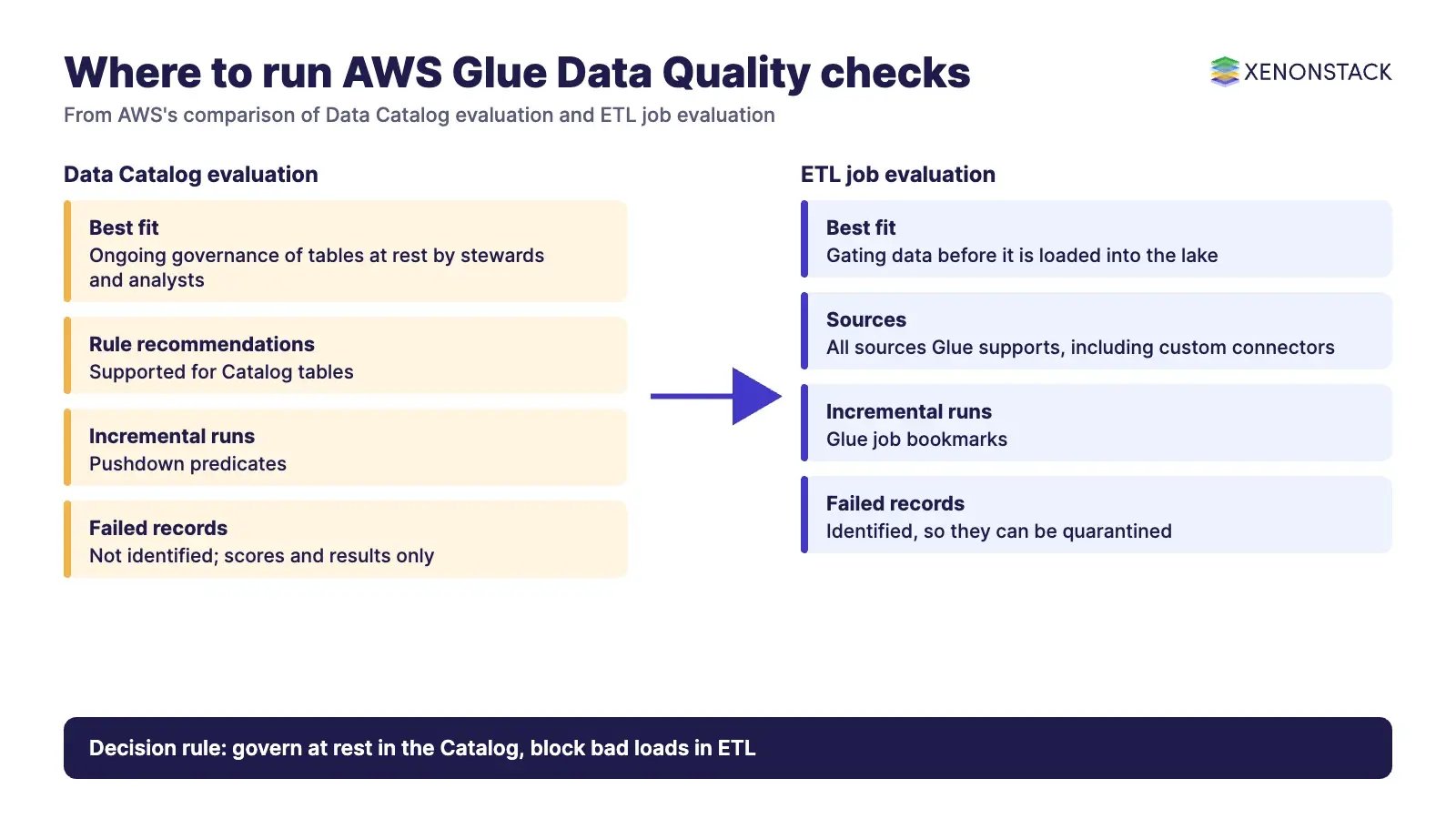
| Capability | Data Catalog | ETL jobs |
| Best fit | Ongoing governance of tables at rest, by stewards and analysts | Gating data before it is loaded |
| Data sources | S3, Redshift, Catalog-compatible JDBC, Iceberg, Hudi, Delta Lake, Athena views | All sources Glue supports, including custom and third-party connectors |
| Rule recommendations | Supported | Not supported |
| Identify failed records | Not supported | Supported |
| Incremental evaluation | Pushdown predicates | Glue job bookmarks |
| Auto scaling and Glue Flex | Not supported | Supported |
A common sequence is to start with Catalog evaluation on the tables that matter most, then move the rules that must block bad loads into ETL jobs, where failing rows can be identified and handled.
How do rules, recommendations and dynamic checks work?
A ruleset is a Rules list in DQDL, for example IsComplete "order-id", IsUnique "order-id" and RowCount > 0. Rules can be combined with and and or, filtered with a where clause (Glue 4.0 only) and labelled for reporting in ETL. The DQDL reference lists rule types including Completeness, Uniqueness, ColumnValues, DataFreshness, ReferentialIntegrity, DatasetMatch, CustomSql and DetectAnomalies (DQDL reference).
Rule recommendations
For a Catalog table, Glue can analyse the data and propose a starting ruleset in two clicks. AWS's release notes dated 18 September 2026 add an ADVANCED mode that uses Amazon Bedrock, table metadata and sampled rows to generate rules; BASIC remains the default. Treat recommended rules as a draft: a data owner should review each one.
Dynamic rules
Dynamic rules compare today's metric with history, for example RowCount > avg(last(3)). The DQDL reference states that dynamic rules are supported in Glue ETL and not in the Data Catalog, although the overview page lists them for both, so confirm the current behaviour in your Region before relying on them.
What does anomaly detection add?
Fixed rules go stale when the business changes. Anomaly detection learns from stored statistics and raises an observation when a value falls outside the predicted range (anomaly detection documentation). Points that matter for governance:
- It needs at least three data points before it can detect anything.
- Each observation shows the actual value, a trend, upper and lower bounds and recommended rules to catch the issue in future.
- Observations do not change the data quality score.
- A detected anomaly is treated as normal in later runs unless it is excluded, so someone must acknowledge or reject each one.
- Two modes exist:
LINEAR(the default, for trends and seasonality) andFIXED(for flat or irregular data). - For Catalog tables, evaluation runs need
ObservationScopeset toALL.
What does it cost and what are the limits?
Pricing and limits decide whether a design scales. AWS documents the following (AWS Glue pricing, read 12 November 2026; check your Region before budgeting):
| Item | What AWS states |
| Catalog data quality tasks | At least 2 DPUs and a 1-minute minimum billing duration; the pricing examples use $0.44 per DPU-hour |
| Data quality in ETL jobs | Rules run inside the job, so they add to its runtime and DPU use; Flex execution is cheaper |
| Anomaly detection, Catalog | 1 DPU per statistic for the detection time |
| Anomaly detection, ETL | No additional charge |
| Statistics storage | No charge; up to 100,000 statistics per account, kept for a maximum of two years |
| Ruleset size | Up to 2,000 rules and 65 KB per ruleset |
| Nested data | Rules cannot evaluate nested or list-type sources; flatten structs first |
S3 storage, requests, data transfer and Data Catalog charges are billed separately at standard rates.
How should a team adopt it, step by step?
- Catalog the data. Run crawlers, then check that discovered schemas, descriptions and partitions are right, because a ruleset must attach to a Catalog table.
- Grant least-privilege access. Create an IAM role that lets Glue read the source and write results to S3 and CloudWatch.
- Start from recommendations, then edit. Generate a draft ruleset, drop what the business does not need and add rules for its own definitions of valid, such as referential integrity to a master table.
- Schedule evaluations to follow data arrival, and write results to S3 for audit and trend reporting.
- Move blocking rules into ETL. Where bad data must not load, run the rules in the job and route failing rows to a quarantine location.
- Alert on results. Glue integrates with Amazon EventBridge and Amazon CloudWatch, so a failed ruleset can trigger a notification or workflow.
- Review quarterly. Retire stale rules, acknowledge or reject anomaly observations and re-check thresholds with the data owner.
Who should own data quality rules, and what about governance?
The tooling is the easy part. Each ruleset needs a named business owner, a review date and a record of why each threshold was chosen, because a data quality score is only as meaningful as the rules behind it. Keep rulesets in version control through CloudFormation or code, so a change to a threshold is reviewed like any other change. Our guide to augmented data quality covers how automation fits with human ownership.
Quality rules also matter once AI agents consume the data. An agent that acts on a failed or stale table needs to know which policy applied and who approved it. ElixirData Context OS keeps governed context, versioned policy and decision traces in one decision layer above AI agents, and AgentGRC keeps autonomous agent actions inside policy, with the audit trail risk teams need. Our post on data quality agents shows the pattern.
When is AWS Glue Data Quality not the right choice?
| Situation | Why Glue Data Quality may not fit |
| Data mostly outside AWS | Rulesets attach to Glue Data Catalog tables, so non-AWS data needs a connector or a different tool |
| Deeply nested JSON or list columns | Rules cannot evaluate nested or list-type sources until you flatten them |
| Rules needed in one portable format across clouds | DQDL is open and DeeQu-based, but the managed service runs only in AWS |
| Very large or very many rulesets | The 2,000-rule and 65 KB ruleset limits mean splitting rulesets |
| Failing rows needed on Catalog tables | Identifying failed records is documented for ETL only |
Our guide to Apache Spark architecture helps when the choice is between managed checks and your own Spark jobs.
To map one data quality decision your agents should make, and the context and policy it depends on, book a Context Workshop. See what happens in the workshop.
Frequently asked questions
What is AWS Glue Data Quality built on?
AWS states it is built on the open-source DeeQu framework, and rules are written in DQDL.
Can I run it on Data Catalog tables and in ETL jobs?
Yes. Catalog evaluation suits governance of data at rest, and ETL evaluation filters bad data before it loads and can identify failed records.
Does anomaly detection change the data quality score?
No. AWS states that anomalies do not affect the score. It needs at least three data points and treats a detected anomaly as normal in later runs unless excluded.
How is AWS Glue Data Quality priced?
Catalog tasks need at least 2 DPUs with a 1-minute minimum, and ETL checks add to the job's DPU use. Anomaly detection costs 1 DPU per statistic on the Catalog and nothing extra in ETL. Check AWS's pricing page for your Region.
What are the main limits?
Up to 2,000 rules and 65 KB per ruleset, 100,000 statistics per account kept for two years, and no evaluation of nested or list-type data.
Ready to put AI agents to work? Explore ElixirClaw, the agentic OS platform to build, orchestrate and govern AI agents.
Explore the XenonStack platform family: ElixirData · ElixirClaw · ElixirHub · NexaStack · MetaSecure · Neural AI · AgentGRC · AgentSRE · AgentAnalyst · AgentInstruct · AgentRAI · AgentScrum · AgentSearch · AgentForce · AI Aviator · SAIF Aviator · CohortIQ · XenonStack AI · XenonStack UAE